Forum Discussion
DJBrennan
9 years agoFrequent Visitor
Multiply Count by Value in Related Table Column
Hi, I have a table that contains a supply number and month of invoice. So one supply number may have 12 entries (12 monthly invoices) and another perhaps 3. I have another table that contains a stand...
v-qiuyu-msft
Community Support
9 years agoHi DJBrennan,
You can create a table use DAX below:
Table = SUMMARIZE('Table1','Table1'[Elec_MPANID],"CountOfMonth",DISTINCTCOUNT(Table1[Month]))
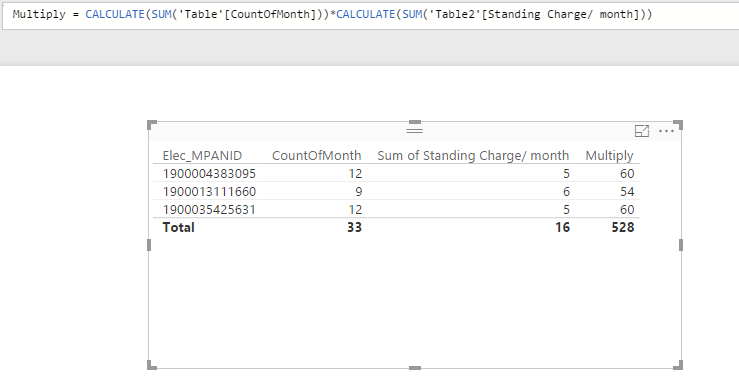
Then create a measure below to calculate multiply:
Multiply = CALCULATE(SUM('Table'[CountOfMonth]))*CALCULATE(SUM('Table2'[Standing Charge/ month]))
Best Regards,
Qiuyun Yu
DJBrennan
9 years agoFrequent Visitor
Thank you for your help. However, I'm getting these results rather than the correct ones you show in your table. Each MPANID is duplicated and the duplicate has the wrong standing charge and the Multiply value is extended by an apparently random factor. Any thoughts?
| Elec_MPANID | CountOfMonth | Standing Charge/ month | Multiply |
| 1900004383095 | 12 | £5.00 | 300 |
| 1900004383095 | 12 | £6.00 | 648 |
| 1900013111660 | 9 | £5.00 | 225 |
| 1900013111660 | 9 | £6.00 | 486 |
| 1900016111380 | 9 | £5.00 | 225 |
| 1900016111380 | 9 | £6.00 | 486 |
| 1900021426305 | 3 | £5.00 | 75 |