Join us at FabCon Atlanta from March 16 - 20, 2026, for the ultimate Fabric, Power BI, AI and SQL community-led event. Save $200 with code FABCOMM.
Register now!Get Fabric Certified for FREE during Fabric Data Days. Don't miss your chance! Request now
On my dashboard I have several measures in a Card mode but I want this measure to appear like they are un a Table visualization.
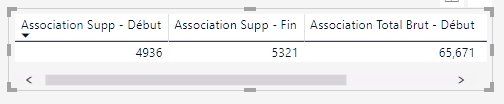
When I try this I have all my values on the same line. I want them presented with one measure per row.
I got it like that
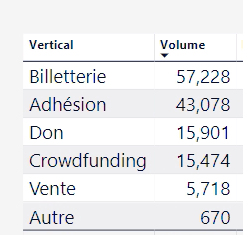
But I want the representation more like this :
Solved! Go to Solution.
Hi @Anonymous ,
You can create a new table with all type of measure, then write a measure with switch function to check current type and return correspond measure result.
Table =
DATATABLE ( "Type", STRING, { { "A" }, { "B" }, { "C" }, { "D" }, { "E" } } )
Measure =
SWITCH (
SELECTEDVALUE ( 'Table'[Type] ),
"A", "Measure1",
"B", "Measure2",
"C", "Measure3",
"D", "Measure4",
"E", "Measure5",
"None"
)
Regards,
Xiaoxin Sheng
Hi @Anonymous ,
You can create a new table with all type of measure, then write a measure with switch function to check current type and return correspond measure result.
Table =
DATATABLE ( "Type", STRING, { { "A" }, { "B" }, { "C" }, { "D" }, { "E" } } )
Measure =
SWITCH (
SELECTEDVALUE ( 'Table'[Type] ),
"A", "Measure1",
"B", "Measure2",
"C", "Measure3",
"D", "Measure4",
"E", "Measure5",
"None"
)
Regards,
Xiaoxin Sheng
Check out the November 2025 Power BI update to learn about new features.
Advance your Data & AI career with 50 days of live learning, contests, hands-on challenges, study groups & certifications and more!