FabCon is coming to Atlanta
Join us at FabCon Atlanta from March 16 - 20, 2026, for the ultimate Fabric, Power BI, AI and SQL community-led event. Save $200 with code FABCOMM.
Register now!- Power BI forums
- Get Help with Power BI
- Desktop
- Service
- Report Server
- Power Query
- Mobile Apps
- Developer
- DAX Commands and Tips
- Custom Visuals Development Discussion
- Health and Life Sciences
- Power BI Spanish forums
- Translated Spanish Desktop
- Training and Consulting
- Instructor Led Training
- Dashboard in a Day for Women, by Women
- Galleries
- Data Stories Gallery
- Themes Gallery
- Contests Gallery
- QuickViz Gallery
- Quick Measures Gallery
- Visual Calculations Gallery
- Notebook Gallery
- Translytical Task Flow Gallery
- TMDL Gallery
- R Script Showcase
- Webinars and Video Gallery
- Ideas
- Custom Visuals Ideas (read-only)
- Issues
- Issues
- Events
- Upcoming Events
View all the Fabric Data Days sessions on demand. View schedule
- Power BI forums
- Forums
- Get Help with Power BI
- Desktop
- Re: Multiple Slicers from Multiple Columns
- Subscribe to RSS Feed
- Mark Topic as New
- Mark Topic as Read
- Float this Topic for Current User
- Bookmark
- Subscribe
- Printer Friendly Page


- Mark as New
- Bookmark
- Subscribe
- Mute
- Subscribe to RSS Feed
- Permalink
- Report Inappropriate Content
Multiple Slicers from Multiple Columns
Hi,
I have a table built as following in Power BI.
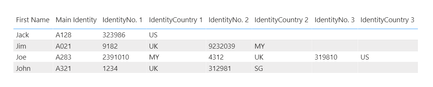
How to create 2 slicers to filter the table as follows:
IdentityNo. Slicer: A slicer with values from IdentityNo. 1, IdentityNo. 2 and IdentityNo. 3.
E.g. selecting 9232039 from the slicer will filter the table and output the entire 2nd row.
IdentityCountry Slicer: A slicer with values from IdentityCountry 1, IdentityCountry 2, IdentityCountry 3?
E.g. selecting MY from the slicer will filter the table and output the entire 2nd and 3rd rows.
How to create a card to do a distinct count of values from IdentityCountry 1, IdentityCountry 2, IdentityCountry 3?
E.g. Card of UK will show a total of 3 since UK appears 3 times in the 2nd, 3rd, 4th rows.
Thanks. 🙂
Solved! Go to Solution.


- Mark as New
- Bookmark
- Subscribe
- Mute
- Subscribe to RSS Feed
- Permalink
- Report Inappropriate Content
Hi, @gab2020
Based on your description, I created data to reproduce your scenario. The pbix file is attached in the end.
Table:

Slicer No(a calculated table):
Slicer No =
FILTER(
    DISTINCT(
        UNION(
            DISTINCT('Table'[IdentityNo.1]),
            DISTINCT('Table'[IdentityNo.2]),
            DISTINCT('Table'[IdentityNo.3])
        )
    ),
    [IdentityNo.1]<>BLANK()
)
Slicer Country:
Slicer Country =
FILTER(
    DISTINCT(
        UNION(
            DISTINCT('Table'[IdentityCountry 1]),
            DISTINCT('Table'[IdentityCountry 2]),
            DISTINCT('Table'[IdentityCountry 3])
        )
    ),
    [IdentityCountry 1]<>BLANK()
)
You may create two measures as below.
Visual Control =
IF(
    AND(
        SELECTEDVALUE('Table'[IdentityNo.1]) in DISTINCT('Slicer No'[IdentityNo])||
        SELECTEDVALUE('Table'[IdentityNo.2]) in DISTINCT('Slicer No'[IdentityNo])||
        SELECTEDVALUE('Table'[IdentityNo.3]) in DISTINCT('Slicer No'[IdentityNo]),
        SELECTEDVALUE('Table'[IdentityCountry 1]) in DISTINCT('Slicer Country'[IdentityCountry])||
        SELECTEDVALUE('Table'[IdentityCountry 2]) in DISTINCT('Slicer Country'[IdentityCountry])||
        SELECTEDVALUE('Table'[IdentityCountry 3]) in DISTINCT('Slicer Country'[IdentityCountry])
    ),
    1,0
)

Count UK =
var tab =
ADDCOLUMNS(
    'Table',
    "flag",
    IF(
        AND(
            'Table'[IdentityNo.1] in DISTINCT('Slicer No'[IdentityNo])||
            'Table'[IdentityNo.2] in DISTINCT('Slicer No'[IdentityNo])||
            'Table'[IdentityNo.3] in DISTINCT('Slicer No'[IdentityNo]),
            'Table'[IdentityCountry 1] in DISTINCT('Slicer Country'[IdentityCountry])||
            'Table'[IdentityCountry 2] in DISTINCT('Slicer Country'[IdentityCountry])||
            'Table'[IdentityCountry 3] in DISTINCT('Slicer Country'[IdentityCountry])
        ),
        1,0
    )
)
return
COUNTROWS(
    FILTER(
        tab,
        [flag]=1&&
        [IdentityCountry 1]="UK"
    )
)+
COUNTROWS(
    FILTER(
        tab,
        [flag]=1&&
        [IdentityCountry 2]="UK"
    )
)+
COUNTROWS(
    FILTER(
        tab,
        [flag]=1&&
        [IdentityCountry 3]="UK"
    )
)
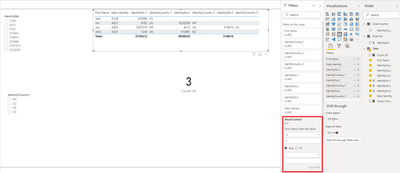
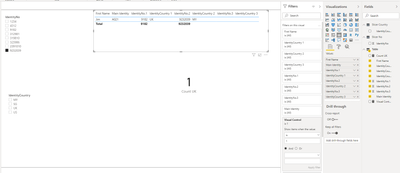
Finally you may put 'Visual Control' measure in the visual level filter and use 'IdentityNo', 'IdentityCountry' from 'Slicer No', 'Slicer Country' to filter the result.

Best Regards
Allan
If this post helps, then please consider Accept it as the solution to help the other members find it more quickly.
- Mark as New
- Bookmark
- Subscribe
- Mute
- Subscribe to RSS Feed
- Permalink
- Report Inappropriate Content
Hi, @gab2020
Based on your description, I created data to reproduce your scenario. The pbix file is attached in the end.
Table:
Slicer No(a calculated table):
Slicer No =
FILTER(
    DISTINCT(
        UNION(
            DISTINCT('Table'[IdentityNo.1]),
            DISTINCT('Table'[IdentityNo.2]),
            DISTINCT('Table'[IdentityNo.3])
        )
    ),
    [IdentityNo.1]<>BLANK()
)
Slicer Country:
Slicer Country =
FILTER(
    DISTINCT(
        UNION(
            DISTINCT('Table'[IdentityCountry 1]),
            DISTINCT('Table'[IdentityCountry 2]),
            DISTINCT('Table'[IdentityCountry 3])
        )
    ),
    [IdentityCountry 1]<>BLANK()
)
You may create two measures as below.
Visual Control =
IF(
    AND(
        SELECTEDVALUE('Table'[IdentityNo.1]) in DISTINCT('Slicer No'[IdentityNo])||
        SELECTEDVALUE('Table'[IdentityNo.2]) in DISTINCT('Slicer No'[IdentityNo])||
        SELECTEDVALUE('Table'[IdentityNo.3]) in DISTINCT('Slicer No'[IdentityNo]),
        SELECTEDVALUE('Table'[IdentityCountry 1]) in DISTINCT('Slicer Country'[IdentityCountry])||
        SELECTEDVALUE('Table'[IdentityCountry 2]) in DISTINCT('Slicer Country'[IdentityCountry])||
        SELECTEDVALUE('Table'[IdentityCountry 3]) in DISTINCT('Slicer Country'[IdentityCountry])
    ),
    1,0
)

Count UK =
var tab =
ADDCOLUMNS(
    'Table',
    "flag",
    IF(
        AND(
            'Table'[IdentityNo.1] in DISTINCT('Slicer No'[IdentityNo])||
            'Table'[IdentityNo.2] in DISTINCT('Slicer No'[IdentityNo])||
            'Table'[IdentityNo.3] in DISTINCT('Slicer No'[IdentityNo]),
            'Table'[IdentityCountry 1] in DISTINCT('Slicer Country'[IdentityCountry])||
            'Table'[IdentityCountry 2] in DISTINCT('Slicer Country'[IdentityCountry])||
            'Table'[IdentityCountry 3] in DISTINCT('Slicer Country'[IdentityCountry])
        ),
        1,0
    )
)
return
COUNTROWS(
    FILTER(
        tab,
        [flag]=1&&
        [IdentityCountry 1]="UK"
    )
)+
COUNTROWS(
    FILTER(
        tab,
        [flag]=1&&
        [IdentityCountry 2]="UK"
    )
)+
COUNTROWS(
    FILTER(
        tab,
        [flag]=1&&
        [IdentityCountry 3]="UK"
    )
)
Finally you may put 'Visual Control' measure in the visual level filter and use 'IdentityNo', 'IdentityCountry' from 'Slicer No', 'Slicer Country' to filter the result.
Best Regards
Allan
If this post helps, then please consider Accept it as the solution to help the other members find it more quickly.
- Mark as New
- Bookmark
- Subscribe
- Mute
- Subscribe to RSS Feed
- Permalink
- Report Inappropriate Content


- Mark as New
- Bookmark
- Subscribe
- Mute
- Subscribe to RSS Feed
- Permalink
- Report Inappropriate Content
@gab2020 , create independent slicer , do not join with any of the countries. Or use cross join to remove join
Then try like
measure =
var _max = selectedvalue(Country[country])
return
calculate(count(Table[identity No]) , filter(Table , Table[IdentityCountry 1] = _max && Table[IdentityCountry 2] = _max && Table[IdentityCountry 3] = _max ))
measure =
var _max = allselected(Country[country]) // or use // values(Country[country])
return
calculate(count(Table[identity No]) , filter(Table , Table[IdentityCountry 1] in _max && Table[IdentityCountry 2] in _max && Table[IdentityCountry 3] in _max ))
You can do same for another slicer too
there is an example of cross filter here
- Mark as New
- Bookmark
- Subscribe
- Mute
- Subscribe to RSS Feed
- Permalink
- Report Inappropriate Content
Hi @amitchandak , not sure if i understand the independent slicer correctly.
Do you mean to add slicer individually per column?
I'm looking to have 2 separate slicers to output the table based on selection of similar columns in IdentityNo. and IdentityCountry.
- Mark as New
- Bookmark
- Subscribe
- Mute
- Subscribe to RSS Feed
- Permalink
- Report Inappropriate Content
@gab2020 , have one table with all identity and one all IdentityCountry. Do not join them with your table. Use only in the slicer.
how to create a table from exiting the column
https://www.dropbox.com/s/op9lb78w9utdonz/Distinct%20from%20two%20Tables.pbix?dl=0
check how the new column has been created.
- Mark as New
- Bookmark
- Subscribe
- Mute
- Subscribe to RSS Feed
- Permalink
- Report Inappropriate Content
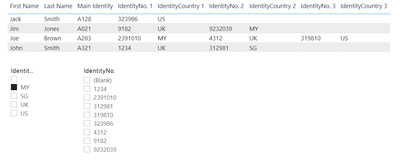
Hi @amitchandak , I have created the slicers as per your sharing.
Not able to slice the data though. Kindly refer to the details in below link.
https://www.dropbox.com/s/my4d2pz2pne3gom/test.pbix?dl=0
e.g. selected MY in the IdentityCountry Slicer and expecting rows 2 and 3 from table to be output but its not working as expected.
Thanks.
- Mark as New
- Bookmark
- Subscribe
- Mute
- Subscribe to RSS Feed
- Permalink
- Report Inappropriate Content
- Mark as New
- Bookmark
- Subscribe
- Mute
- Subscribe to RSS Feed
- Permalink
- Report Inappropriate Content
Hi @amitchandak , it's fine. Manage to get it working already. Thanks for your advise too. Much appreciated. 😀

Helpful resources

Power BI Monthly Update - November 2025
Check out the November 2025 Power BI update to learn about new features.

Fabric Data Days
Advance your Data & AI career with 50 days of live learning, contests, hands-on challenges, study groups & certifications and more!

FabCon Atlanta 2026
Join us at FabCon Atlanta, March 16-20, for the ultimate Fabric, Power BI, AI and SQL community-led event. Save $200 with code FABCOMM.


