Join us at FabCon Atlanta from March 16 - 20, 2026, for the ultimate Fabric, Power BI, AI and SQL community-led event. Save $200 with code FABCOMM.
Register now!The Power BI Data Visualization World Championships is back! Get ahead of the game and start preparing now! Learn more
I have a column containing report dates. I want to create another column that reflects a reporting period, so for instance if the date of the report is after 2/5, it returns "Feb YY" and if any report date is after 1/7 it returns "Jan YY." I understand that I would need to have it parse the latest date first, then nest another "if" statement after it for the earlier reporting period.
I have tried
Reporting Period = IF ( [Report Date] > 2/5/YY, "Feb YY", IF ( [Report Date] > 1/5/YY, "Jan "YY", "NA"))
and
Reporting Period = SWITCH(TRUE(), [Report Date] > 2/5/YY, "Feb YY", [Report Date] > 1/5/YY, "Jan YY")
Both scenarios return a column with Feb YY in every row, unless I switch the dates; whichever date comes first is what ends up being evaluated, and its result returned throughout.
Any ideas?
Solved! Go to Solution.
Hi @ripstaur ,
You should use Date function when referencing dates.
Reporting Period v2 =
IF (
[Report Date] > DATE ( 2021, 2, 5 ),
"Feb 21",
IF ( [Report Date] > DATE ( 2021, 1, 5 ), "Jan 21", "NA" )
)
Attached demo file. You can make it more dynamic if needed to always compare to 5th day of month. Idea started, you can customize if needed.
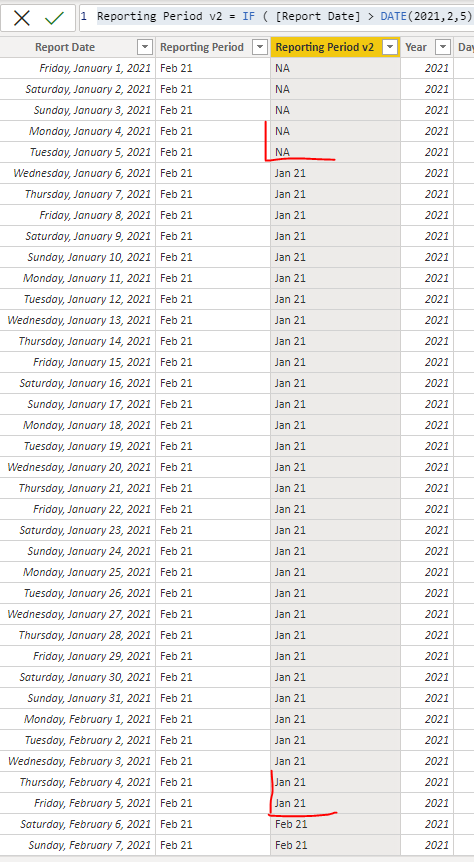
This is the result:
Best regards,
Nemanja Andic
Hi @ripstaur ,
You should use Date function when referencing dates.
Reporting Period v2 =
IF (
[Report Date] > DATE ( 2021, 2, 5 ),
"Feb 21",
IF ( [Report Date] > DATE ( 2021, 1, 5 ), "Jan 21", "NA" )
)
Attached demo file. You can make it more dynamic if needed to always compare to 5th day of month. Idea started, you can customize if needed.
This is the result:
Best regards,
Nemanja Andic
This is exactly what I needed to know! Thank you so much!
The Power BI Data Visualization World Championships is back! Get ahead of the game and start preparing now!
Check out the November 2025 Power BI update to learn about new features.
| User | Count |
|---|---|
| 66 | |
| 47 | |
| 43 | |
| 26 | |
| 19 |
| User | Count |
|---|---|
| 198 | |
| 126 | |
| 102 | |
| 68 | |
| 51 |