Join us at FabCon Atlanta from March 16 - 20, 2026, for the ultimate Fabric, Power BI, AI and SQL community-led event. Save $200 with code FABCOMM.
Register now!View all the Fabric Data Days sessions on demand. View schedule
Hi,
I have 2 tables, Table A has various information about all my teams - teams are unique in this table. Table B holds a list of events where 2 of the teams are involved in each time - every row has 2 teams, one each in columns "Team 1" and "Team 2".
I can create a one to many relationship from Table A to column "Team 1", but I can't create a second relationship to the "Team 2" column.
How should I be doing this?
Hi @xarius ,
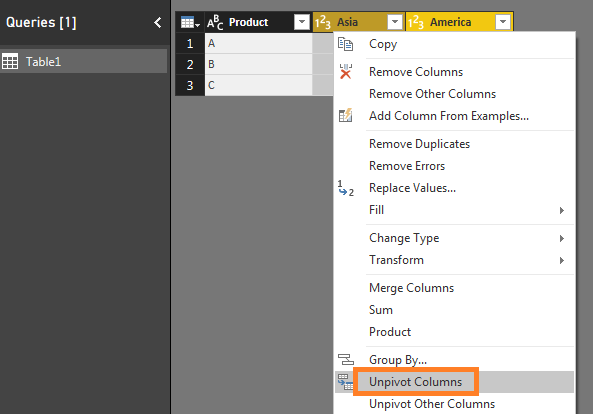
Enter into Query Editor, click on column Team 1 and Team 2 at the same time, right click to choose "Unpivot Columns", rename this result columns . Don't forget to click the "Close & Apply" button. After that, you can begin to create relationship.
Best Regards,
Amy
If this post helps, then please consider Accept it as the solution to help the other members find it more quickly.
Hi Amy (@v-xicai),
This then breaks the fact that my events table is unique to each event (I have 1 to many relationship of that used elsewhere). Is there any other way around it or do I have to make a new table for my events and link to this table?
Regards,
Xarius
Check out the November 2025 Power BI update to learn about new features.
Advance your Data & AI career with 50 days of live learning, contests, hands-on challenges, study groups & certifications and more!