Forum Discussion

 Community Champion
Month Columns in PBI Desktop
 11 years ago
We're currently working on this for the desktop .... and it will be a unified experience in both the desktop and service. There are several date time features that will show up. This kind of automatic behavior is among the first that will arrive.

 Power Participant
Sean You can create a calculted column for your date field as follows:
~MonthNumber=Month([Created Date])
Where MonthNumber is used to extract month number. Then later
~Month=SWITCH([MonthNumber],
1,"January",
2,"Feburary",
3,"March",
4,"April",
5,"May",
6,"June",
7,"July",
8,"August",
9,"September",
10,"October",
11,"November",
12,"December",
"Invalid Month Number"
)
To represents Month in Words
~MonthNo=SWITCH([MonthNumber],
1,"01",
2,"02",
3,"03",
4,"04",
5,"05",
6,"06",
7,"07",
8,"08",
9,"09",
10,"10",
11,"11",
12,"12"
)
~Year=YEAR([Created Date])
~YearMonth=[Year]&[MonthNo]
For custom sorting the month column.
Later to sort, you can follow the following step as shown in image below and also the sorted filed
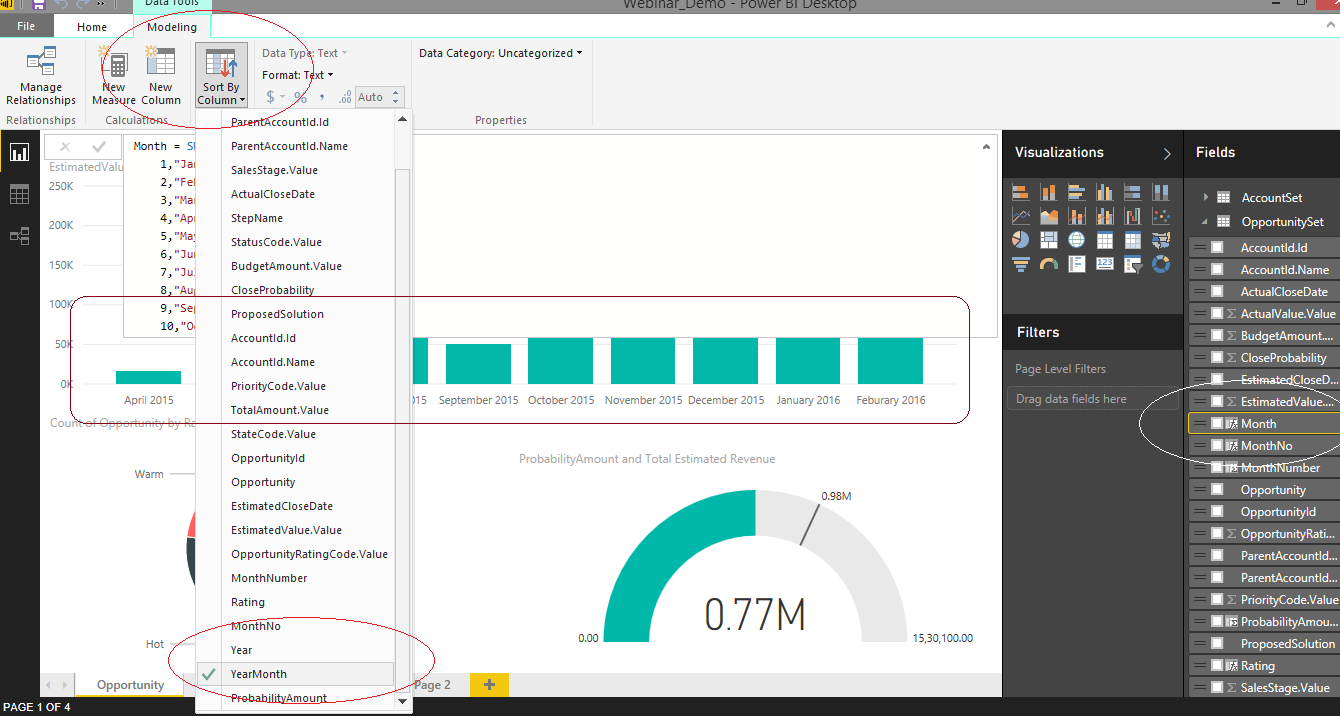
You can see the output marked in rectangle. Hope this works!
 raprgz10 years ago
Microsoft Employee
How can you setup this sort for just month? Without the Month & Year?
- RJ10 years ago
Resolver II
raprgz
Unsure if this helps or not
http://community.powerbi.com/t5/Desktop/Sorting-by-Month-as-Text-Jan-Feb-Mar-etc/m-p/9244#M1730
This is the way I sorted Jan Feb Mar etc by the month number
I was confused at first so have given a fairly detailed step by step explanation
 ALeef10 years ago
Yup, RJ's explanation is exactly like I did it - use a helper column with a numerical value and use that as the "Sort As" column.
- RJ10 years ago
ALeef
Have you had a look at my explantion to join two or more dates to one calendar
I was confused at first so wrote it down in detail