Join us in Barcelona for FabCon and SQLCon, September 28 - October 1, 2026.
This is best Fabric, Power BI, SQL and AI community event. How do we know? The last event sold out! Save €200 with code FABCMTY200.
Register now- Power BI forums
- Get Help with Power BI
- Desktop
- Service
- Report Server
- Power Query
- Mobile Apps
- Developer
- DAX Commands and Tips
- Custom Visuals Development Discussion
- Health and Life Sciences
- Power BI Spanish forums
- Translated Spanish Desktop
- Training and Consulting
- Instructor Led Training
- Dashboard in a Day for Women, by Women
- Galleries
- Data Stories Gallery
- Themes Gallery
- Contests Gallery
- QuickViz Gallery
- Quick Measures Gallery
- Visual Calculations Gallery
- Fabric Apps Gallery
- Notebook Gallery
- Translytical Task Flow Gallery
- TMDL Gallery
- R Script Showcase
- Webinars and Video Gallery
- Ideas
- Custom Visuals Ideas (read-only)
- Issues
- Issues
- Events
- Upcoming Events
The Fabric community is now in read-only for platform upgrade. Learn more
- Power BI forums
- Forums
- Get Help with Power BI
- Desktop
- Re: Mobile layout having wrong interactions
- Subscribe to RSS Feed
- Mark Topic as New
- Mark Topic as Read
- Float this Topic for Current User
- Bookmark
- Subscribe
- Printer Friendly Page


- Mark as New
- Bookmark
- Subscribe
- Mute
- Subscribe to RSS Feed
- Permalink
- Report Inappropriate Content
Mobile layout having wrong interactions
Hello,
After the latest update in Power BI, which was a milestone for formatting in mobile layout, my report have changed a lot. Before it everything was working well and I didn't had any problems apart of creating seperate visuals which was in good size.
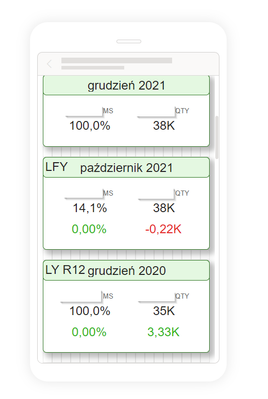
Unfortunately after the update I see that the visuals drifted apart and show very weird numbers or blanks.
F.ex. that is the current view of some cards:
And the visuals are also not comparable to those in the normal view:
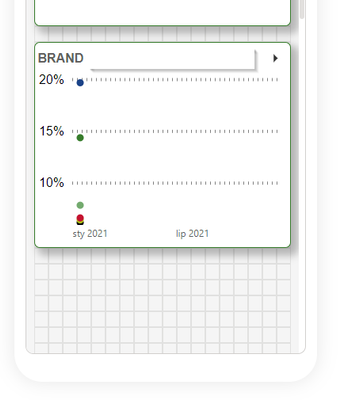
I see that on one page there is a date filter problem and for all of the visuals there is December 2020 date taken. I also see that might be related to one slicer which is filtering the dates in normal view but the interactions of it to the things I have shown above are blocked and set as NONE.
The slicer is also set to December 2020 and if I delete it from the whole report everything is back to normal.

I guess there is a new problem with interactions but I don't know if its a bug or I can somehow solve it.
Thank you for your help 🙂
Solved! Go to Solution.


- Mark as New
- Bookmark
- Subscribe
- Mute
- Subscribe to RSS Feed
- Permalink
- Report Inappropriate Content
Hi, @mzienowicz99
This issue has been confirmed as a known issue internally. Internal ICM ID: 291383010. Please be patient to wait for fixing. If there is any news, I will update it here.
Best Regards,
Community Support Team _Janey
If this post helps, then please consider Accept it as the solution to help the other members find it more quickly.
- Mark as New
- Bookmark
- Subscribe
- Mute
- Subscribe to RSS Feed
- Permalink
- Report Inappropriate Content
Hi, @boboroo @mzienowicz99 @jwilliams999999
1. For consumption (in the mobile app) - issue will be fixed by ~04/01
2. For the authoring experience (in desktop) the issue will be fixed in April update.
Best Regards,
Community Support Team _Janey

- Mark as New
- Bookmark
- Subscribe
- Mute
- Subscribe to RSS Feed
- Permalink
- Report Inappropriate Content
I am having a similar issue. I have edited the interactions of several gauges on my desk top. When I open the report on the Power BI app, they are not displayed correctly. They are displaying as if the interactions had not been edited. When I turn my phone in the horizontal position, the guages display correctly.
- Mark as New
- Bookmark
- Subscribe
- Mute
- Subscribe to RSS Feed
- Permalink
- Report Inappropriate Content
Hi, @mzienowicz99
This issue has been confirmed as a known issue internally. Internal ICM ID: 291383010. Please be patient to wait for fixing. If there is any news, I will update it here.
Best Regards,
Community Support Team _Janey
If this post helps, then please consider Accept it as the solution to help the other members find it more quickly.

- Mark as New
- Bookmark
- Subscribe
- Mute
- Subscribe to RSS Feed
- Permalink
- Report Inappropriate Content
@v-janeyg-msft Is there any news regarding this issue? We experience this issue still and also after updating to March 2022 version from last week.
- Mark as New
- Bookmark
- Subscribe
- Mute
- Subscribe to RSS Feed
- Permalink
- Report Inappropriate Content
Hi, @boboroo @mzienowicz99 @jwilliams999999
1. For consumption (in the mobile app) - issue will be fixed by ~04/01
2. For the authoring experience (in desktop) the issue will be fixed in April update.
Best Regards,
Community Support Team _Janey
- Mark as New
- Bookmark
- Subscribe
- Mute
- Subscribe to RSS Feed
- Permalink
- Report Inappropriate Content
Ok, I will wait then for any updates 🙂
Thank you for your support!


- Mark as New
- Bookmark
- Subscribe
- Mute
- Subscribe to RSS Feed
- Permalink
- Report Inappropriate Content
@mzienowicz99 , There are few changes in new release
https://app.powerbi.com/signupredirect?pbi_source=websignup&cmpid=pbi-glob-head-try-free
please check and log an issue - https://community.powerbi.com/t5/Issues/idb-p/Issues
- Mark as New
- Bookmark
- Subscribe
- Mute
- Subscribe to RSS Feed
- Permalink
- Report Inappropriate Content
Yes I know it, but is there a way to somehow deal with my problem?

Helpful resources

FabCon & SQLCon – Barcelona 2026
Join us in Barcelona for FabCon and SQLCon, the Fabric, Power BI, SQL, and AI community event. Save €200 with code FABCMTY200.

Power BI DataViz World Championships - June 2026
A new Power BI DataViz World Championship is coming this June! Don't miss out on submitting your entry.

| User | Count |
|---|---|
| 23 | |
| 22 | |
| 14 | |
| 14 | |
| 13 |


| User | Count |
|---|---|
| 47 | |
| 39 | |
| 24 | |
| 22 | |
| 20 |


