Get Fabric or SQL Certified for Free.
Get certified for free when you join Fabric Data Days 2026 and dive into Fabric, Power BI, SQL, AI, and other essential data skills.
Join now- Power BI forums
- Get Help with Power BI
- Desktop
- Service
- Report Server
- Power Query
- Mobile Apps
- Developer
- DAX Commands and Tips
- Custom Visuals Development Discussion
- Health and Life Sciences
- Power BI Spanish forums
- Translated Spanish Desktop
- Training and Consulting
- Instructor Led Training
- Dashboard in a Day for Women, by Women
- Galleries
- Data Stories Gallery
- Themes Gallery
- Contests Gallery
- QuickViz Gallery
- Quick Measures Gallery
- Visual Calculations Gallery
- Notebook Gallery
- Translytical Task Flow Gallery
- TMDL Gallery
- R Script Showcase
- Webinars and Video Gallery
- Ideas
- Custom Visuals Ideas (read-only)
- Issues
- Issues
- Events
- Upcoming Events
Try your skills in the Power BI Dataviz World Championship! Round one ends June 26. Join now
- Power BI forums
- Forums
- Get Help with Power BI
- Desktop
- Re: Mobile layout having wrong interactions
- Subscribe to RSS Feed
- Mark Topic as New
- Mark Topic as Read
- Float this Topic for Current User
- Bookmark
- Subscribe
- Printer Friendly Page


- Mark as New
- Bookmark
- Subscribe
- Mute
- Subscribe to RSS Feed
- Permalink
- Report Inappropriate Content
Mobile layout having wrong interactions
Hello,
After the latest update in Power BI, which was a milestone for formatting in mobile layout, my report have changed a lot. Before it everything was working well and I didn't had any problems apart of creating seperate visuals which was in good size.
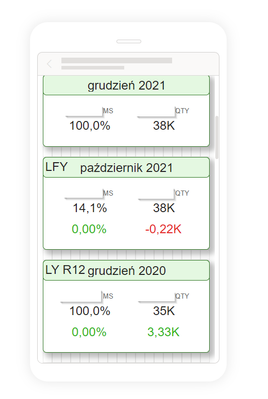
Unfortunately after the update I see that the visuals drifted apart and show very weird numbers or blanks.
F.ex. that is the current view of some cards:
And the visuals are also not comparable to those in the normal view:
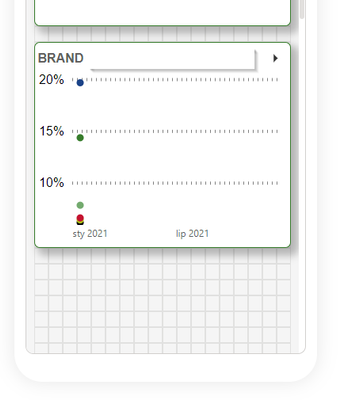
I see that on one page there is a date filter problem and for all of the visuals there is December 2020 date taken. I also see that might be related to one slicer which is filtering the dates in normal view but the interactions of it to the things I have shown above are blocked and set as NONE.
The slicer is also set to December 2020 and if I delete it from the whole report everything is back to normal.

I guess there is a new problem with interactions but I don't know if its a bug or I can somehow solve it.
Thank you for your help 🙂
Solved! Go to Solution.


- Mark as New
- Bookmark
- Subscribe
- Mute
- Subscribe to RSS Feed
- Permalink
- Report Inappropriate Content
Hi, @mzienowicz99
This issue has been confirmed as a known issue internally. Internal ICM ID: 291383010. Please be patient to wait for fixing. If there is any news, I will update it here.
Best Regards,
Community Support Team _Janey
If this post helps, then please consider Accept it as the solution to help the other members find it more quickly.
- Mark as New
- Bookmark
- Subscribe
- Mute
- Subscribe to RSS Feed
- Permalink
- Report Inappropriate Content
Hi, @boboroo @mzienowicz99 @jwilliams999999
1. For consumption (in the mobile app) - issue will be fixed by ~04/01
2. For the authoring experience (in desktop) the issue will be fixed in April update.
Best Regards,
Community Support Team _Janey

- Mark as New
- Bookmark
- Subscribe
- Mute
- Subscribe to RSS Feed
- Permalink
- Report Inappropriate Content
I am having a similar issue. I have edited the interactions of several gauges on my desk top. When I open the report on the Power BI app, they are not displayed correctly. They are displaying as if the interactions had not been edited. When I turn my phone in the horizontal position, the guages display correctly.
- Mark as New
- Bookmark
- Subscribe
- Mute
- Subscribe to RSS Feed
- Permalink
- Report Inappropriate Content
Hi, @mzienowicz99
This issue has been confirmed as a known issue internally. Internal ICM ID: 291383010. Please be patient to wait for fixing. If there is any news, I will update it here.
Best Regards,
Community Support Team _Janey
If this post helps, then please consider Accept it as the solution to help the other members find it more quickly.

- Mark as New
- Bookmark
- Subscribe
- Mute
- Subscribe to RSS Feed
- Permalink
- Report Inappropriate Content
@v-janeyg-msft Is there any news regarding this issue? We experience this issue still and also after updating to March 2022 version from last week.
- Mark as New
- Bookmark
- Subscribe
- Mute
- Subscribe to RSS Feed
- Permalink
- Report Inappropriate Content
Hi, @boboroo @mzienowicz99 @jwilliams999999
1. For consumption (in the mobile app) - issue will be fixed by ~04/01
2. For the authoring experience (in desktop) the issue will be fixed in April update.
Best Regards,
Community Support Team _Janey
- Mark as New
- Bookmark
- Subscribe
- Mute
- Subscribe to RSS Feed
- Permalink
- Report Inappropriate Content
Ok, I will wait then for any updates 🙂
Thank you for your support!


- Mark as New
- Bookmark
- Subscribe
- Mute
- Subscribe to RSS Feed
- Permalink
- Report Inappropriate Content
@mzienowicz99 , There are few changes in new release
https://app.powerbi.com/signupredirect?pbi_source=websignup&cmpid=pbi-glob-head-try-free
please check and log an issue - https://community.powerbi.com/t5/Issues/idb-p/Issues
- Mark as New
- Bookmark
- Subscribe
- Mute
- Subscribe to RSS Feed
- Permalink
- Report Inappropriate Content
Yes I know it, but is there a way to somehow deal with my problem?

Helpful resources

Data Days 2026
Don't miss out on Data Days, June 15 through August 7. Learn Fabric, Power BI, SQL, AI and more.

Power BI DataViz World Championships - June 2026
A new Power BI DataViz World Championship is coming this June! Don't miss out on submitting your entry.

| User | Count |
|---|---|
| 22 | |
| 21 | |
| 20 | |
| 20 | |
| 11 |


| User | Count |
|---|---|
| 62 | |
| 55 | |
| 46 | |
| 45 | |
| 34 |


