Forum Discussion
rjg2g11
Advocate I
8 years agoMinimum Value across multiple columns
Hello,
I am trying to create a column that picks out the minimum value from a number of columns.
I have posted a table below with my desired outcome
Can someone advise?
Many Thanks
| ID | A | B | C | D | E | F | G | Desired Column |
| 36185098 | 19.98 | 39 | 14.7 | 0 | 0 | 0 | 0 | C |
| 36855167 | 22 | 29.5 | 18 | 0 | 18 | 17.8 | 18.5 | F |
| 34938430 | 25.98 | 27.98 | 17.8 | 0 | 0 | 20.5 | 17 | G |
| 38001554 | 23.6 | 27.3 | 16.2 | 8 | 16.2 | 0 | 0 | D |
| 32315810 | 0 | 27.1 | 16.7 | 0 | 0 | 16.5 | 16.1 | G |
| 32125239 | 22.1 | 27 | 16.4 | 0 | 0 | 16.1 | 17.8 | F |
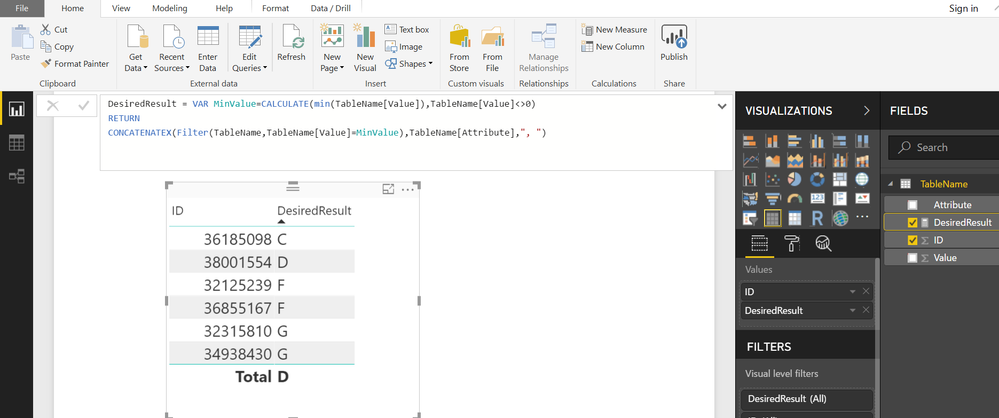
After unpivoting your Letter Columns, you can use following MEASURE to get the desired Output
DesiredResult = VAR MinValue = CALCULATE ( MIN ( TableName[Value] ), TableName[Value] <> 0 ) RETURN CONCATENATEX ( FILTER ( TableName, TableName[Value] = MinValue ), TableName[Attribute], ", " )
4 Replies
- Greg_Deckler
Community Champion
Easiest thing to do would be to unpivot your letter columns. At that point, the problem is trivial.
- wilson_smyth
Post Patron
make sure to specify that you dont care about zeros, as in your dataset, the lowest value is zero, even though its your outcome in the sample data specifies you want the lowest value that is greater than zero.
- Zubair_Muhammad
Community Champion
After unpivoting your Letter Columns, you can use following MEASURE to get the desired Output
DesiredResult = VAR MinValue = CALCULATE ( MIN ( TableName[Value] ), TableName[Value] <> 0 ) RETURN CONCATENATEX ( FILTER ( TableName, TableName[Value] = MinValue ), TableName[Attribute], ", " )