FabCon is coming to Atlanta
Join us at FabCon Atlanta from March 16 - 20, 2026, for the ultimate Fabric, Power BI, AI and SQL community-led event. Save $200 with code FABCOMM.
Register now!- Power BI forums
- Get Help with Power BI
- Desktop
- Service
- Report Server
- Power Query
- Mobile Apps
- Developer
- DAX Commands and Tips
- Custom Visuals Development Discussion
- Health and Life Sciences
- Power BI Spanish forums
- Translated Spanish Desktop
- Training and Consulting
- Instructor Led Training
- Dashboard in a Day for Women, by Women
- Galleries
- Data Stories Gallery
- Themes Gallery
- Contests Gallery
- QuickViz Gallery
- Quick Measures Gallery
- Visual Calculations Gallery
- Notebook Gallery
- Translytical Task Flow Gallery
- TMDL Gallery
- R Script Showcase
- Webinars and Video Gallery
- Ideas
- Custom Visuals Ideas (read-only)
- Issues
- Issues
- Events
- Upcoming Events
View all the Fabric Data Days sessions on demand. View schedule
- Power BI forums
- Forums
- Get Help with Power BI
- Desktop
- Re: Microsoft Power BI - DAX - develop a dataset u...
- Subscribe to RSS Feed
- Mark Topic as New
- Mark Topic as Read
- Float this Topic for Current User
- Bookmark
- Subscribe
- Printer Friendly Page


- Mark as New
- Bookmark
- Subscribe
- Mute
- Subscribe to RSS Feed
- Permalink
- Report Inappropriate Content
Microsoft Power BI - DAX - develop a dataset using variables - NATURALJOIN, GENERATE, GENERATEALL
I have a Power BI Desktop file. I am developing a Calculated Table (CT) in DAX language.
I am using a number of manipulations inside to develop this CT (similar to what I do in a T-SQL stored procedure).
I develop a number of variables within this DAX query. Ignore any relationships between the tables, since these are variables.
I have the below variable (a table) called VAR_SourceData. Please see the image file below:

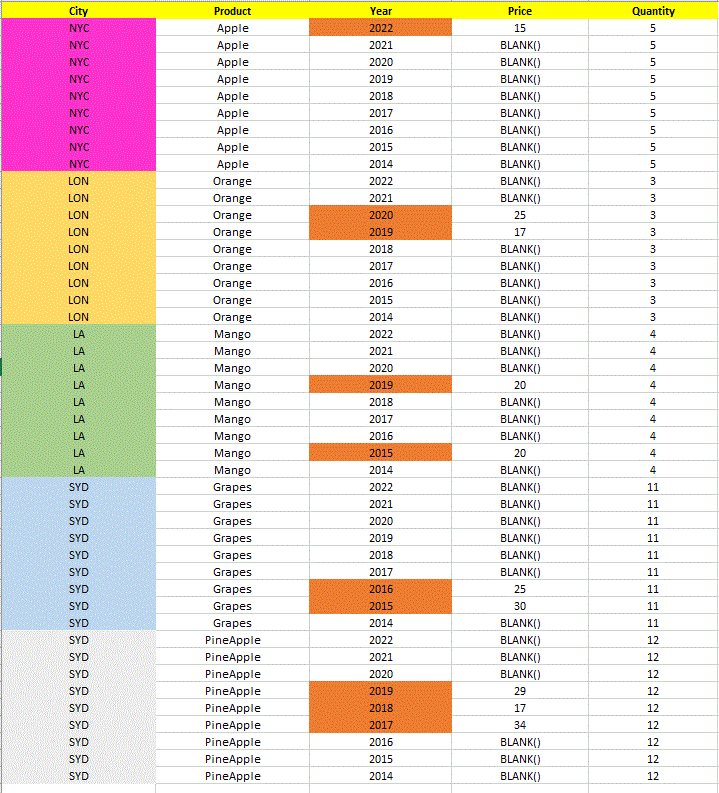
It has 4 cities - NYC, LON, LA, SYD. It has 5 different combinations of City-Product.
Each City may have one or more Products.
A combination of a City-Product will have only one unique Quantity (always), regardless of the year.
For example, SYD and PineApple has 12 as its Quantity always, on the other hand SYD and Grapes has a Quantity of 11 always. (This is regardless of the Year).
A combination of City-Product may or may not have Price for all the years. For example, LON-Orange has Price for 2020 and 2019 only, on the other hand LA-Mango has Price for 2019 and 2015 only.
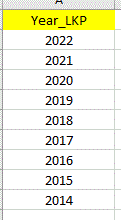
I have a master table (VAR_ReferenceYearLookup) with all the possible years. It has 9 years (2022-2014), in descending order.
I need the desired output of the table VAR_Desired_Output:
I explain the VAR_Desired_Output table as follows:
The table would have every possible combination of City-Product, with a fixed Quantity. The City, Product, Quantity are independent of the Year. However, the Price depends on the Year. If there is no data for Price in a year in the VAR_SourceData table, the VAR_Desired_Output table must show blank.
My desired output must have all the years (2022-2014 (in descending order, preferably)) for every possible combination of City-Product, with the fixed Quantity; the Quantity depends on the City-Product combination, but not on the Year. If the Price for a Year is not available in the VAR_SourceData table, the VAR_Desired_Output table must show blank.
Hence every City-Product combination must have exactly 9 years, with a fixed Quantity always.
I have 5 different combinations of City-Product, hence the VAR_Desired_Output table has 45 rows.
I tried with NATURALINNERJOIN, NATURALLEFTOUTERJOIN, GENERATE etc. But am not able to solve this.
Can anyone help me achieve my goal?
(I have the .pbix file with me, I can provide if needed; am not able to attach it here; I also have excel file with this data; I can provide if necessary)
Solved! Go to Solution.
- Mark as New
- Bookmark
- Subscribe
- Mute
- Subscribe to RSS Feed
- Permalink
- Report Inappropriate Content
Hello Ben,
I referred to your solution, and zeroed-in on the logic.
I assume that the 2 variables (VAR_SourceData, VAR_ReferenceYearLookup) are tables, and have this code below for a Calculated Table:
DesiredOutput_CT =

VAR src=DISTINCT(

                    SELECTCOLUMNS(

                                   VAR_SourceData,

                                   "City", [City],
                                   "Product", [Product],
                                   "Quantity", [Quantity]

                                  )

                   )

VAR cj = CROSSJOIN(src, VAR_ReferenceYearLookup)

VAR t1 = SELECTCOLUMNS(

                        cj,

                        "Concat", [City] & "-" & [Product] & "-" & [Year_LKP],
                        "City", [City],
                        "Product", [Product],
                        "Quantity", [Quantity],
                        "Year", [Year_LKP]

                      )

VAR t2 = SELECTCOLUMNS(

                        VAR_SourceData,

                        "Concat", [City] & "-" & [Product] & "-" & [Year],
                        "Price", [Price]

                      )

VAR t3 = SELECTCOLUMNS(

                        t1,

                        "Concat", [Concat] & "Z",
                        "City", [City],
                        "Product", [Product],
                        "Quantity", [Quantity],
                        "Year", [Year]

                      )

VAR t4 = SELECTCOLUMNS(

                        t2,

                        "Concat", [Concat] & "Z",
                        "Price", [Price]

                      )

VAR t5 = NATURALLEFTOUTERJOIN(t3,t4)

VAR t6 = SELECTCOLUMNS(

                        t5,

                        "City", [City],
                        "Product", [Product],
                        "Quantity", [Quantity],
                        "Price", [Price],
                        "Year", [Year]

                      )

RETURN t6
This gives me the correct output. But thanks very much for your codes. Really appreciate it.


- Mark as New
- Bookmark
- Subscribe
- Mute
- Subscribe to RSS Feed
- Permalink
- Report Inappropriate Content
Sorry slightly misunderstood your requirement.
How about this:
EVALUATE
VAR CityProductList =
    SUMMARIZE ( VAR_SourceData, VAR_SourceData[City], VAR_SourceData[Product] )
VAR YearList =
    VALUES ( VAR_ReferenceYearLookup[Year_LKP] )
VAR CombinationTable =
    CROSSJOIN ( CityProductList, YearList )
VAR Result =
    ADDCOLUMNS (
        CombinationTable,
        "Price",
            VAR CurrentCity = VAR_SourceData[City]
            VAR CurrentProduct = VAR_SourceData[Product]
            VAR CurrentYear = VAR_ReferenceYearLookup[Year_LKP]
            RETURN
                LOOKUPVALUE (
                    VAR_SourceData[Price],
                    VAR_SourceData[Product], CurrentProduct,
                    VAR_SourceData[City], CurrentCity,
                    VAR_SourceData[Year], CurrentYear
                ),
        "Quantity",
            VAR CurrentProduct = VAR_SourceData[Product]
            RETURN
                LOOKUPVALUE (
                    VAR_SourceData[Quantity],
                    VAR_SourceData[Product], CurrentProduct
                )
    )
RETURN
    Result
- Mark as New
- Bookmark
- Subscribe
- Mute
- Subscribe to RSS Feed
- Permalink
- Report Inappropriate Content
Hello Ben,
I referred to your solution, and zeroed-in on the logic.
I assume that the 2 variables (VAR_SourceData, VAR_ReferenceYearLookup) are tables, and have this code below for a Calculated Table:
DesiredOutput_CT =

VAR src=DISTINCT(

                    SELECTCOLUMNS(

                                   VAR_SourceData,

                                   "City", [City],
                                   "Product", [Product],
                                   "Quantity", [Quantity]

                                  )

                   )

VAR cj = CROSSJOIN(src, VAR_ReferenceYearLookup)

VAR t1 = SELECTCOLUMNS(

                        cj,

                        "Concat", [City] & "-" & [Product] & "-" & [Year_LKP],
                        "City", [City],
                        "Product", [Product],
                        "Quantity", [Quantity],
                        "Year", [Year_LKP]

                      )

VAR t2 = SELECTCOLUMNS(

                        VAR_SourceData,

                        "Concat", [City] & "-" & [Product] & "-" & [Year],
                        "Price", [Price]

                      )

VAR t3 = SELECTCOLUMNS(

                        t1,

                        "Concat", [Concat] & "Z",
                        "City", [City],
                        "Product", [Product],
                        "Quantity", [Quantity],
                        "Year", [Year]

                      )

VAR t4 = SELECTCOLUMNS(

                        t2,

                        "Concat", [Concat] & "Z",
                        "Price", [Price]

                      )

VAR t5 = NATURALLEFTOUTERJOIN(t3,t4)

VAR t6 = SELECTCOLUMNS(

                        t5,

                        "City", [City],
                        "Product", [Product],
                        "Quantity", [Quantity],
                        "Price", [Price],
                        "Year", [Year]

                      )

RETURN t6
This gives me the correct output. But thanks very much for your codes. Really appreciate it.
- Mark as New
- Bookmark
- Subscribe
- Mute
- Subscribe to RSS Feed
- Permalink
- Report Inappropriate Content
Glad you have some code that works. Slightly confused by your message. The tables referenced in my code came from the pbix you sent. Main thing is you have a solution though.
- Mark as New
- Bookmark
- Subscribe
- Mute
- Subscribe to RSS Feed
- Permalink
- Report Inappropriate Content
I used the idea of the CROSS JOIN, and developed the code. I referred to your logic.
- Mark as New
- Bookmark
- Subscribe
- Mute
- Subscribe to RSS Feed
- Permalink
- Report Inappropriate Content
I personally like the following version better but both give the same results:
VAR CityProductList =
    SUMMARIZE (
        VAR_SourceData,
        VAR_SourceData[City],
        VAR_SourceData[Product]
    )
VAR YearList =
    VALUES ( VAR_ReferenceYearLookup[Year_LKP] )
VAR CombinationTable =
    CROSSJOIN (
        CityProductList,
        YearList
    )
VAR Result =
    ADDCOLUMNS (
        CombinationTable,
        "Price",
            VAR RowYear = VAR_ReferenceYearLookup[Year_LKP]
            RETURN
                CALCULATE (
                    MAX ( VAR_SourceData[Price] ),
                    VAR_SourceData[Year] = RowYear
                ),
        "Quantity",
            CALCULATE (
                MAX ( VAR_SourceData[Quantity] )
            )
    )
RETURN
Result- Mark as New
- Bookmark
- Subscribe
- Mute
- Subscribe to RSS Feed
- Permalink
- Report Inappropriate Content
Hi,
If you upload and share a link from OneDrive /Drop Box/Google Drive etc I can have a go at this.
A few initial thoughts:
This looks like it would be straight forward in Power Query using Merge Tables and then a little work to lookup the static quantity.
I did wonder what your aim was with it though? You'd normally want to aim at a star schema. Can help with that but wasn't sure on the city interaction to product have same quantity /price regardless of city?
- Mark as New
- Bookmark
- Subscribe
- Mute
- Subscribe to RSS Feed
- Permalink
- Report Inappropriate Content
Hello Ben,
Thanks for your reply.
https://drive.google.com/file/d/1INvkegkQFSD2VqTOR9huZulbaC5UiF4h/view?usp=sharing
I have the links above:
I need this as a DAX solution, not in Power Query. The model is has a lot of Calculated Columns, so obviously I cannot use Power Query.
I put the situtaion as below:
1) Assume that the there is a source table in Power BI Desktop: VAR_SourceData
2) There is a lookup table (not related to the source table): VAR_ReferenceYearLookup
3) I need to develop a Calculated Table in DAX called VAR_Desired_Output
- Mark as New
- Bookmark
- Subscribe
- Mute
- Subscribe to RSS Feed
- Permalink
- Report Inappropriate Content
Try the code below.
It's gets distinct lists of Products, Years and Cities and does a cross join on them.
As part of the production of the year list I use TREATAS to tell it to treat the year column as the year from your SourceData table.
Once crossjoined we can add new columsn with ADDCOLUMNS and just rely on data lineage (Understanding data lineage in DAX - SQLBI) and CALCULATE to force a context transition moving from row context to filter context in order to pass the row context to the original table. I use MAX simply to ensure I get a single value returned, SELECTEDVALUE would do the same.
CalculatedOutput =

VAR ProductList =
    VALUES ( VAR_SourceData[Product] )

VAR YearList =
    TREATAS (
        VALUES ( VAR_ReferenceYearLookup[Year_LKP] ),
        VAR_SourceData[Year]
    )

VAR CityList =
    VALUES ( VAR_SourceData[City] )

VAR CombinationTable =
    CROSSJOIN ( ProductList, YearList, CityList )

VAR Result =
    ADDCOLUMNS (
        CombinationTable,
        "Price", CALCULATE ( MAX ( VAR_SourceData[Price] ) ),
        "Quantity",
            CALCULATE (
                MAX ( VAR_SourceData[Quantity] ),
                REMOVEFILTERS ( VAR_SourceData[Year], VAR_SourceData[City] )
            )
    )

RETURN
    Result
- Mark as New
- Bookmark
- Subscribe
- Mute
- Subscribe to RSS Feed
- Permalink
- Report Inappropriate Content
Thanks Ben; appreciate your response; will get back.
Can we use LOOKUPVALUE with variables to achieve this ?
Also, can Quantity not be combined with the City-Product combination for the CROSSJOIN, since Quantity will be dependent on this pair only ?

Helpful resources

Power BI Monthly Update - November 2025
Check out the November 2025 Power BI update to learn about new features.

Fabric Data Days
Advance your Data & AI career with 50 days of live learning, contests, hands-on challenges, study groups & certifications and more!

FabCon Atlanta 2026
Join us at FabCon Atlanta, March 16-20, for the ultimate Fabric, Power BI, AI and SQL community-led event. Save $200 with code FABCOMM.


