Huge last-minute discounts for FabCon Vienna from September 15-18, 2025
Supplies are limited. Contact info@espc.tech right away to save your spot before the conference sells out.
Get your discount- Power BI forums
- Get Help with Power BI
- Desktop
- Service
- Report Server
- Power Query
- Mobile Apps
- Developer
- DAX Commands and Tips
- Custom Visuals Development Discussion
- Health and Life Sciences
- Power BI Spanish forums
- Translated Spanish Desktop
- Training and Consulting
- Instructor Led Training
- Dashboard in a Day for Women, by Women
- Galleries
- Data Stories Gallery
- Themes Gallery
- Contests Gallery
- Quick Measures Gallery
- Notebook Gallery
- Translytical Task Flow Gallery
- TMDL Gallery
- R Script Showcase
- Webinars and Video Gallery
- Ideas
- Custom Visuals Ideas (read-only)
- Issues
- Issues
- Events
- Upcoming Events
Score big with last-minute savings on the final tickets to FabCon Vienna. Secure your discount
- Power BI forums
- Forums
- Get Help with Power BI
- Desktop
- Re: Merging two unrelated tables
- Subscribe to RSS Feed
- Mark Topic as New
- Mark Topic as Read
- Float this Topic for Current User
- Bookmark
- Subscribe
- Printer Friendly Page

- Mark as New
- Bookmark
- Subscribe
- Mute
- Subscribe to RSS Feed
- Permalink
- Report Inappropriate Content
Merging two unrelated tables
Is it possible to merge two unrelated tables together
Say for instance I have a Date table, with one column and three rows
Date
1-Jan-15
1-Feb-15
1-Mar-15
The I also have a Names table, with one column and three rows
Name
Rod
Jane
Freddie
Is it possible to create a DateName table, , with two columns and nine rows?
Date.........Name
1-Jan-15...Rod
1-Feb-15...Rod
1-Mar-15...Rod
1-Jan-15...Jane
1-Feb-15...Jane
1-Mar-15...Jane
1-Jan-15...Freddie
1-Feb-15...Freddie
1-Mar-15...Freddie
Thanks in advance
Lee
Solved! Go to Solution.

- Mark as New
- Bookmark
- Subscribe
- Mute
- Subscribe to RSS Feed
- Permalink
- Report Inappropriate Content
Hello @Lee_Mather
Yes you can do this in the Query Modeler, but you'll have to modifiy the structure of the tables in order to create a surrogate key" to mege the table.
In the table, you add a new column (SK for example) with the value "1" for all the record.
You do the same with the other table, and now you can merge the two queries, based on this fake relationship. Don't forget to check the relationship type with "full external" and it should be ok.
Sébasttien
- Mark as New
- Bookmark
- Subscribe
- Mute
- Subscribe to RSS Feed
- Permalink
- Report Inappropriate Content
Great solution @Anonymous!
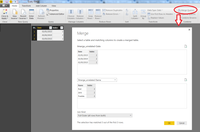
p.s. For other users that may need help on this purpose here is the solution explained:
1) Add to the two tables the same "index column" with a fixed index

2) Merge the two tables
- Mark as New
- Bookmark
- Subscribe
- Mute
- Subscribe to RSS Feed
- Permalink
- Report Inappropriate Content
Hello @Lee_Mather
Yes you can do this in the Query Modeler, but you'll have to modifiy the structure of the tables in order to create a surrogate key" to mege the table.
In the table, you add a new column (SK for example) with the value "1" for all the record.
You do the same with the other table, and now you can merge the two queries, based on this fake relationship. Don't forget to check the relationship type with "full external" and it should be ok.
Sébasttien
- Mark as New
- Bookmark
- Subscribe
- Mute
- Subscribe to RSS Feed
- Permalink
- Report Inappropriate Content
thanks loads, makes perfect sense
ta
Lee
- Mark as New
- Bookmark
- Subscribe
- Mute
- Subscribe to RSS Feed
- Permalink
- Report Inappropriate Content
5) And you have the result:
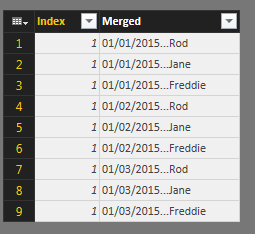
..if you want you can delete the "index colum".
#Good Coding To Everyone#

- Mark as New
- Bookmark
- Subscribe
- Mute
- Subscribe to RSS Feed
- Permalink
- Report Inappropriate Content
I have a similar issue when I created index columns for two of my tables to which I want to create a relationship, but in my case since I used DirectQuery, It says that the resulted query is not supported with Direct Query.
What would be the best workaround for this?
- Mark as New
- Bookmark
- Subscribe
- Mute
- Subscribe to RSS Feed
- Permalink
- Report Inappropriate Content
3) Select the columns to display
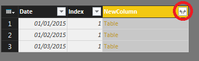
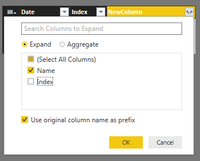
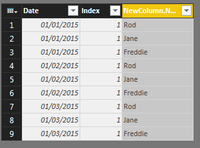
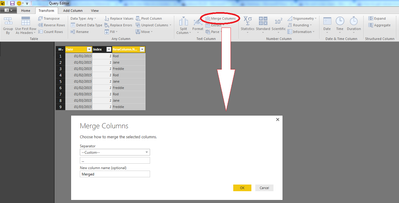
4) Select and merge the columns
Helpful resources

Power BI Monthly Update - August 2025
Check out the August 2025 Power BI update to learn about new features.

Fabric Community Update - August 2025
Find out what's new and trending in the Fabric community.


| User | Count |
|---|---|
| 84 | |
| 74 | |
| 48 | |
| 41 | |
| 40 |


