Join us at FabCon Vienna from September 15-18, 2025
The ultimate Fabric, Power BI, SQL, and AI community-led learning event. Save €200 with code FABCOMM.
Get registered- Power BI forums
- Get Help with Power BI
- Desktop
- Service
- Report Server
- Power Query
- Mobile Apps
- Developer
- DAX Commands and Tips
- Custom Visuals Development Discussion
- Health and Life Sciences
- Power BI Spanish forums
- Translated Spanish Desktop
- Training and Consulting
- Instructor Led Training
- Dashboard in a Day for Women, by Women
- Galleries
- Data Stories Gallery
- Themes Gallery
- Contests Gallery
- Quick Measures Gallery
- Notebook Gallery
- Translytical Task Flow Gallery
- TMDL Gallery
- R Script Showcase
- Webinars and Video Gallery
- Ideas
- Custom Visuals Ideas (read-only)
- Issues
- Issues
- Events
- Upcoming Events
Enhance your career with this limited time 50% discount on Fabric and Power BI exams. Ends September 15. Request your voucher.
- Power BI forums
- Forums
- Get Help with Power BI
- Desktop
- Re: Merging two columns from two tabels into one c...
- Subscribe to RSS Feed
- Mark Topic as New
- Mark Topic as Read
- Float this Topic for Current User
- Bookmark
- Subscribe
- Printer Friendly Page

- Mark as New
- Bookmark
- Subscribe
- Mute
- Subscribe to RSS Feed
- Permalink
- Report Inappropriate Content
Merging two columns from two tabels into one column
I've got 2 columns in 2 different tabels but my data in the table are complementary.
As i show you on this screenshot.
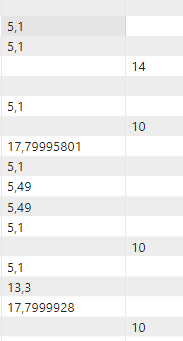
And i want to merge them to one column, but i doesn't exacly know how to do it.
Solved! Go to Solution.


- Mark as New
- Bookmark
- Subscribe
- Mute
- Subscribe to RSS Feed
- Permalink
- Report Inappropriate Content
Hi @pbzmz ,
If your two tables have the same number of columns, consider using the UNION() function.
My test table1:
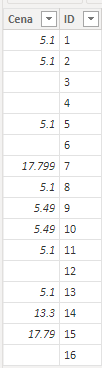
My test table2:
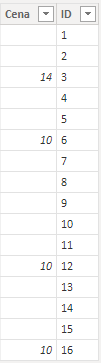
Please try following DAX:
Table = UNION('Table1','Table2')
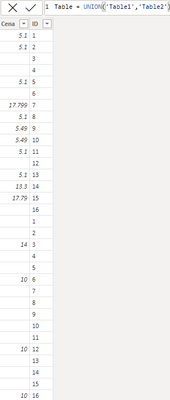
Best regards,
Yadong Fang
If this post helps, then please consider Accept it as the solution to help the other members find it more quickly.
- Mark as New
- Bookmark
- Subscribe
- Mute
- Subscribe to RSS Feed
- Permalink
- Report Inappropriate Content
Hi @pbzmz ,
If your two tables have the same number of columns, consider using the UNION() function.
My test table1:
My test table2:
Please try following DAX:
Table = UNION('Table1','Table2')
Best regards,
Yadong Fang
If this post helps, then please consider Accept it as the solution to help the other members find it more quickly.


- Mark as New
- Bookmark
- Subscribe
- Mute
- Subscribe to RSS Feed
- Permalink
- Report Inappropriate Content
Do you load them in PowerQuery? Tell us a little more about the structure 🙂
- Mark as New
- Bookmark
- Subscribe
- Mute
- Subscribe to RSS Feed
- Permalink
- Report Inappropriate Content
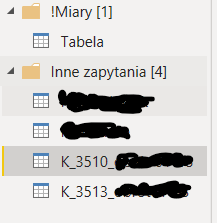
In K3513 i have one column called "cena" and in the K3510 i have other column called "cena".
And in !Miary, "Tabela", i want to create new column that will merge those two column that i just mention
- Mark as New
- Bookmark
- Subscribe
- Mute
- Subscribe to RSS Feed
- Permalink
- Report Inappropriate Content
- Mark as New
- Bookmark
- Subscribe
- Mute
- Subscribe to RSS Feed
- Permalink
- Report Inappropriate Content
After doing same thing from this video it's showing me column full of zeros.
- Mark as New
- Bookmark
- Subscribe
- Mute
- Subscribe to RSS Feed
- Permalink
- Report Inappropriate Content
Is "Tabela" empty or are there already values in it? Where does Tabela come from?
- Mark as New
- Bookmark
- Subscribe
- Mute
- Subscribe to RSS Feed
- Permalink
- Report Inappropriate Content
I've managed to merge both files in excel so I have everything in one table now.
But i have one additional question. My column named "cena", has numbers in it, and when i throw them to matrix, it shows me column "cena" as sum. And I don't want it
- Mark as New
- Bookmark
- Subscribe
- Mute
- Subscribe to RSS Feed
- Permalink
- Report Inappropriate Content
That's normal (implicit measure).
See Explicit Vs Implicit DAX Measures in Power BI - RADACAD
If you want to just have the value in your Matrix you have to format it as Text or create a Measure which you then place on the matrix. The Measure can be something like MIN(Cena) or TEXT(cena, "0000")
- Mark as New
- Bookmark
- Subscribe
- Mute
- Subscribe to RSS Feed
- Permalink
- Report Inappropriate Content
Hi,
-In DAX: Create a new Calculated column:
MergedColumn := IF([Col1]<>BLANK(), [Col1], [Col2])-In PowerQuery: Add a custom column:
Table.AddColumn(tbl, "MergedColumn", each if [Col1] <> null then [Col1] else [Col2])
- Mark as New
- Bookmark
- Subscribe
- Mute
- Subscribe to RSS Feed
- Permalink
- Report Inappropriate Content
It's good if i have two columns in one table. But i've got two columns. Two different files. And i need to merge one column from one file, and one column from second file.

Helpful resources

Power BI Monthly Update - August 2025
Check out the August 2025 Power BI update to learn about new features.

Fabric Community Update - August 2025
Find out what's new and trending in the Fabric community.

| User | Count |
|---|---|
| 69 | |
| 69 | |
| 66 | |
| 54 | |
| 28 |


| User | Count |
|---|---|
| 112 | |
| 82 | |
| 66 | |
| 48 | |
| 43 |


