FabCon is coming to Atlanta
Join us at FabCon Atlanta from March 16 - 20, 2026, for the ultimate Fabric, Power BI, AI and SQL community-led event. Save $200 with code FABCOMM.
Register now!- Power BI forums
- Get Help with Power BI
- Desktop
- Service
- Report Server
- Power Query
- Mobile Apps
- Developer
- DAX Commands and Tips
- Custom Visuals Development Discussion
- Health and Life Sciences
- Power BI Spanish forums
- Translated Spanish Desktop
- Training and Consulting
- Instructor Led Training
- Dashboard in a Day for Women, by Women
- Galleries
- Data Stories Gallery
- Themes Gallery
- Contests Gallery
- QuickViz Gallery
- Quick Measures Gallery
- Visual Calculations Gallery
- Notebook Gallery
- Translytical Task Flow Gallery
- TMDL Gallery
- R Script Showcase
- Webinars and Video Gallery
- Ideas
- Custom Visuals Ideas (read-only)
- Issues
- Issues
- Events
- Upcoming Events
Get Fabric Certified for FREE during Fabric Data Days. Don't miss your chance! Request now
- Power BI forums
- Forums
- Get Help with Power BI
- Desktop
- Re: Merge Tables into aligned row
- Subscribe to RSS Feed
- Mark Topic as New
- Mark Topic as Read
- Float this Topic for Current User
- Bookmark
- Subscribe
- Printer Friendly Page

- Mark as New
- Bookmark
- Subscribe
- Mute
- Subscribe to RSS Feed
- Permalink
- Report Inappropriate Content
Merge Tables into aligned row
Hi all,
I've managed to get the following code to collate all my information into the same table (three different tables picked up), however when outputting the data it creates a new row, for each table (i.e. 3 rows for the one line).
How can I ensure these are combined with the following code? Or Updating the following code:
let GetResults=(URL_List) =>
let
Source0 = Web.Page(Web.Contents(URL_List)),
Data0 = Source0{0}[Data],
#"Changed Type" = Table.TransformColumnTypes(Data0,{{"Column1", type text}, {"Column2", type text}}),
#"Transposed Table" = Table.Transpose(#"Changed Type"),
#"Promoted Headers" = Table.PromoteHeaders(#"Transposed Table", [PromoteAllScalars=true]),
#"Changed Type1" = Table.TransformColumnTypes(#"Promoted Headers",{{"Trainer", type text}, {"Home Track", type text}, {"Colour", type text}, {"Age/Sex", type text}, {"Prize Money", Currency.Type}}),
Source1 = Web.Page(Web.Contents(URL_List)),
Data1 = Source1{1}[Data],
#"Changed Type2" = Table.TransformColumnTypes(Data1,{{"Column1", type text}, {"Column2", type text}}),
#"Transposed Table1" = Table.Transpose(#"Changed Type2"),
#"Promoted Headers1" = Table.PromoteHeaders(#"Transposed Table1", [PromoteAllScalars=true]),
#"Changed Type3" = Table.TransformColumnTypes(#"Promoted Headers1",{{"Foal Date", type text}, {"Sire", type text}, {"Dam", type text}, {"Sire of Dam", type text}}),
Source2 = Web.Page(Web.Contents(URL_List)),
Data2 = Source2{2}[Data],
#"Changed Type4" = Table.TransformColumnTypes(Data2,{{"Career", type text}, {"Last 10 Results", type text}, {"Season", type text}, {"Rating", Int64.Type}, {"ROI", Percentage.Type}}),
#"TableCombined" = Table.Combine({#"Changed Type1", #"Changed Type3",#"Changed Type4"})
in
#"TableCombined"
in GetResults
Data currently comes out like following:
Col 1 Data 1 Data 2 Data 3
Link 1 This
Link 1 Should
Link 1 Combine
Link 2 But
Link 2 It
Link 2 Doesn't


- Mark as New
- Bookmark
- Subscribe
- Mute
- Subscribe to RSS Feed
- Permalink
- Report Inappropriate Content
Hi,
Paste your input data here.
Regards,
Ashish Mathur
http://www.ashishmathur.com
https://www.linkedin.com/in/excelenthusiasts/
- Mark as New
- Bookmark
- Subscribe
- Mute
- Subscribe to RSS Feed
- Permalink
- Report Inappropriate Content
Hi Ashish,
This is a link I'm using, but I'll end up with a larger URL list as per the code to extract them all.
https://www.racenet.com.au/horse/lankan-rupee
Basically pulling in the 3 tables it identifies:
Table1
Table2
Table3
| Trainer |
| Home Track |
| Colour |
| Age/Sex |
| Prize Money |
| Foal Date |
| Sire |
| Dam |
| Sire of Dam |
| Career |
| Last 10 Results |
| Season |
| Rating |
| ROI |
- Mark as New
- Bookmark
- Subscribe
- Mute
- Subscribe to RSS Feed
- Permalink
- Report Inappropriate Content
Hi,
Does this help? You may download my file from here.
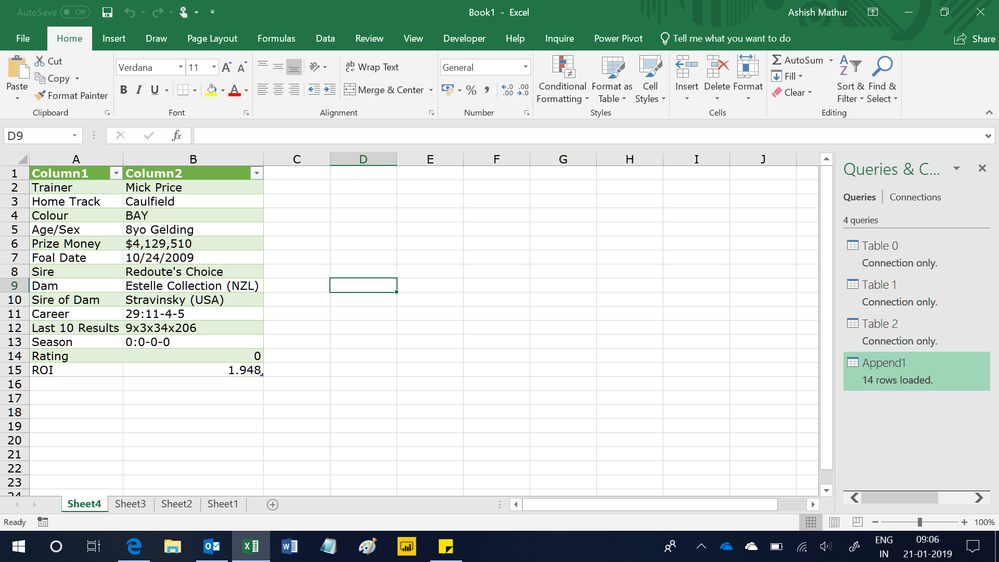
Regards,
Ashish Mathur
http://www.ashishmathur.com
https://www.linkedin.com/in/excelenthusiasts/
- Mark as New
- Bookmark
- Subscribe
- Mute
- Subscribe to RSS Feed
- Permalink
- Report Inappropriate Content
Hi Ashish,
Can you Transpose the data to have the Headers across the top, and the data underneath it (i.e. row 1 = Headers, row 2 = data).
I downloaded your sheet then and did that but had the same issue with the tables not lining up by row, as there are null values in the column headers where the other tables dont have data for it.
Link to file I've completed here
Ive included 3 example linkes in Sheet 3 that eventually I'd turn into a table, and then have the powerquery go through every link and return the data we have listed.
- Mark as New
- Bookmark
- Subscribe
- Mute
- Subscribe to RSS Feed
- Permalink
- Report Inappropriate Content
Hi,
I do not understand your requirement. Show me the exact result you want. Also, that link requires signing in.
Regards,
Ashish Mathur
http://www.ashishmathur.com
https://www.linkedin.com/in/excelenthusiasts/
- Mark as New
- Bookmark
- Subscribe
- Mute
- Subscribe to RSS Feed
- Permalink
- Report Inappropriate Content
I basically want your result but transposed so headers are across the columns, and data in the row beneath.
My problem is the data comes out with a row for each table result and not all three tables in the one row.
- Mark as New
- Bookmark
- Subscribe
- Mute
- Subscribe to RSS Feed
- Permalink
- Report Inappropriate Content
Hi,
Right click on the Append Query > Edit. Select both columns and go to Transform > Transpose. Then Promote the Headers.
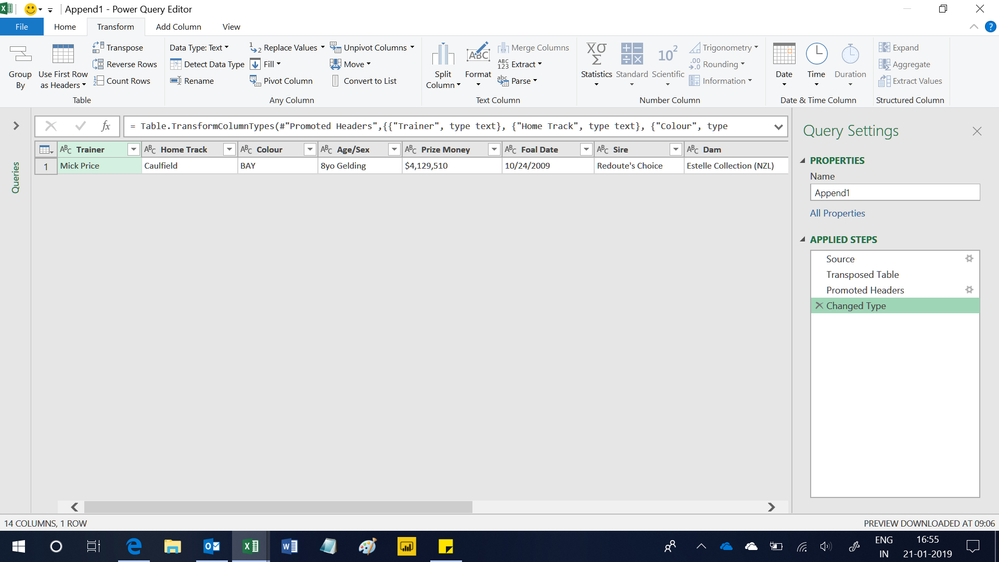
Regards,
Ashish Mathur
http://www.ashishmathur.com
https://www.linkedin.com/in/excelenthusiasts/
- Mark as New
- Bookmark
- Subscribe
- Mute
- Subscribe to RSS Feed
- Permalink
- Report Inappropriate Content
Hi,
Ok thats the format I want it in, but now I want to be able to paste a list of URL's that the query will run through and add the data from those 3 tables into the one combined table below each other.
Hopefully this link works, as this is what I had done previously with this file being your with the latest transposing, and this file being the original one I did with the row errors.
Let me know if those links don't work I'm uploading into Dropbox.


- Mark as New
- Bookmark
- Subscribe
- Mute
- Subscribe to RSS Feed
- Permalink
- Report Inappropriate Content
Hi @brad58
First i need to confirm requirements with you
your expected output should be:

Right?
Best Regards
Maggie

Helpful resources

Power BI Monthly Update - November 2025
Check out the November 2025 Power BI update to learn about new features.

Fabric Data Days
Advance your Data & AI career with 50 days of live learning, contests, hands-on challenges, study groups & certifications and more!

FabCon Atlanta 2026
Join us at FabCon Atlanta, March 16-20, for the ultimate Fabric, Power BI, AI and SQL community-led event. Save $200 with code FABCOMM.


