Join us at FabCon Atlanta from March 16 - 20, 2026, for the ultimate Fabric, Power BI, AI and SQL community-led event. Save $200 with code FABCOMM.
Register now!View all the Fabric Data Days sessions on demand. View schedule
Hi,
Update: Initial question is solved, but didn't fully reflect the case. Additional info provided further down.
I am trying to build a calculated table that merge/expand two calculated tables in the same DAX code. But there might be another way to do it - query editor (M script) is not an option here.
Here's what I am trying to do illustrated in Excel. I need to create a calculated table with the unique combinations of AccTree and ParrentKey.
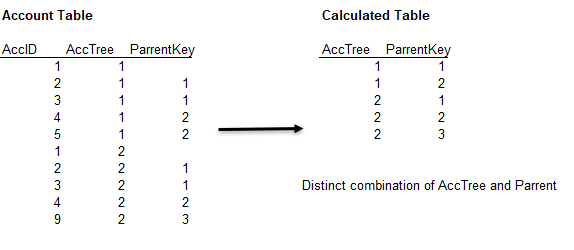
So basically I get can my distinct AccTrees and the distinct ParrentKeys that go with the trees in two separate calculated tables. But I just can't figure out how to merge the two into one table - without having to actually calculate two separate tables and then add them up in a third calculated table.
Distinct AccTree = SELECTCOLUMNS(SUMMARIZE(Acc,Acc[AccTree]),"AccTree",Acc[AccTree])
Distinct ParrentKey = CALCULATETABLE(DISTINCT(Acc[ParrentKey]),FILTER(ALL(Acc),Acc[AccTree]= [AccTree]))
I hope someone out there is up for the challenge.
Thank you,
Example data
| AccID | AccTree | ParrentKey |
| 1 | 1 | |
| 2 | 1 | 1 |
| 3 | 1 | 1 |
| 4 | 1 | 2 |
| 5 | 1 | 2 |
| 1 | 2 | |
| 2 | 2 | 1 |
| 3 | 2 | 1 |
| 4 | 2 | 2 |
| 9 | 2 | 3 |
Solved! Go to Solution.
@Matti , Try a new table like
summarize(filter(Table, not(isblank(Table[ParrentKey]))), Table[AccTree],Table[ParrentKey])
I managed to solve my problem. Have a look at my solution below.
Turns out GenerateAll was the function I was looking for.
GENERATEALL (
@amitchandak you solved my initial question, thanks!
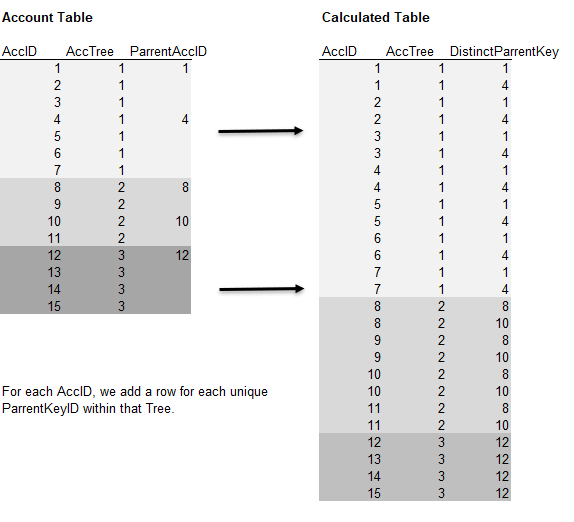
However, I did not word it quite right or provide a proper example. So let me try again.
So for each AccID, I need to add a row for each unique ParrentActKey within that account tree.
Example data provided below.
| AccID | AccTree | ParrentAccID |
| 1 | 1 | 1 |
| 2 | 1 | |
| 3 | 1 | |
| 4 | 1 | 4 |
| 5 | 1 | |
| 6 | 1 | |
| 7 | 1 | |
| 8 | 2 | 8 |
| 9 | 2 | |
| 10 | 2 | 10 |
| 11 | 2 | |
| 12 | 3 | 12 |
| 13 | 3 | |
| 14 | 3 | |
| 15 | 3 |
Thank you!
I managed to solve my problem. Have a look at my solution below.
Turns out GenerateAll was the function I was looking for.
GENERATEALL (
Check out the November 2025 Power BI update to learn about new features.
Advance your Data & AI career with 50 days of live learning, contests, hands-on challenges, study groups & certifications and more!