FabCon is coming to Atlanta
Join us at FabCon Atlanta from March 16 - 20, 2026, for the ultimate Fabric, Power BI, AI and SQL community-led event. Save $200 with code FABCOMM.
Register now!- Power BI forums
- Get Help with Power BI
- Desktop
- Service
- Report Server
- Power Query
- Mobile Apps
- Developer
- DAX Commands and Tips
- Custom Visuals Development Discussion
- Health and Life Sciences
- Power BI Spanish forums
- Translated Spanish Desktop
- Training and Consulting
- Instructor Led Training
- Dashboard in a Day for Women, by Women
- Galleries
- Data Stories Gallery
- Themes Gallery
- Contests Gallery
- QuickViz Gallery
- Quick Measures Gallery
- Visual Calculations Gallery
- Notebook Gallery
- Translytical Task Flow Gallery
- TMDL Gallery
- R Script Showcase
- Webinars and Video Gallery
- Ideas
- Custom Visuals Ideas (read-only)
- Issues
- Issues
- Events
- Upcoming Events
Get Fabric Certified for FREE during Fabric Data Days. Don't miss your chance! Request now
- Power BI forums
- Forums
- Get Help with Power BI
- Desktop
- Re: Measure total is not correct
- Subscribe to RSS Feed
- Mark Topic as New
- Mark Topic as Read
- Float this Topic for Current User
- Bookmark
- Subscribe
- Printer Friendly Page


- Mark as New
- Bookmark
- Subscribe
- Mute
- Subscribe to RSS Feed
- Permalink
- Report Inappropriate Content
Measure total is not correct
Hi,
Need some help and yes I know there are a dozen of threads for this same exact issue, but whatever I am doing in relation to those answers isn't working for me.
My measure is the following:
Lost Sales = sum('ns vwInventorySnapshot'[OutofStock])*AVERAGE('ns SalesRegister'[Sales/Unit])*AVERAGE('ns SalesRegister'[SalePerDay])
I have items that can be in two different locations that are in the visual. Here is the visual.
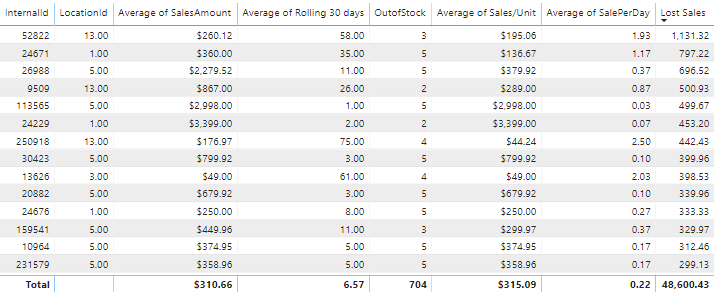
Hopefully you all can help me figure out what formula is needed to get a correct Lost Sales total.
Thank you,
Noel

- Mark as New
- Bookmark
- Subscribe
- Mute
- Subscribe to RSS Feed
- Permalink
- Report Inappropriate Content
Assuming 'ns vwInventorySnapshot' and 'ns SalesRegister' are two tables joined by InternalID, try this
avgSalesPerUnit = AVERAGEX('ns SalesRegister', 'ns SalesRegister'[Sales/Unit])
Lost Sales = CALCULATE(SUM('ns vwInventorySnapshot'[OutofStock]) * [avgSalesPerUnit])
If that doesn't work try
avgSalesPerUnit = AVERAGEX('ns SalesRegister', 'ns SalesRegister'[Sales/Unit])
Lost Sales = CALCULATE(SUM('ns vwInventorySnapshot'[OutofStock]) * [avgSalesPerUnit], ALL('ns SalesRegister'))
ALL might need to be ALLSELECTED or KEEPFILTERS - I'm not great with those.
- Mark as New
- Bookmark
- Subscribe
- Mute
- Subscribe to RSS Feed
- Permalink
- Report Inappropriate Content
This doesn't get me the numbers we need. Actually using the Lost Sales mesaure it doesn't even multiple the OutofStock correctly, it just looks like the OutOfStock is just assuming 1 it looks like. The output of avgSalesPerUnit equals Lost Sales measure.
Thanks,
Noel
- Mark as New
- Bookmark
- Subscribe
- Mute
- Subscribe to RSS Feed
- Permalink
- Report Inappropriate Content
Is the pricing averaging out correctly across the units in mult locations? Is there a relationship defined between those tables?
- Mark as New
- Bookmark
- Subscribe
- Mute
- Subscribe to RSS Feed
- Permalink
- Report Inappropriate Content
The avgSalesPerUnit matches my Average of Sales/unit columns.
SalesRegister and InventorySnapshot is linked via internal ID of NetsuiteItem table.
- Mark as New
- Bookmark
- Subscribe
- Mute
- Subscribe to RSS Feed
- Permalink
- Report Inappropriate Content
Without having the data, hard to play with. Maybe this will work?
lostSales = SUMX(SUMMARIZE('ns SalesRegister', 'ns SalesRegister'[InternalId], "myAvg", AVERAGE('ns SalesRegister'[Sales/Unit])), [myAvg] * 'ns vwInventorySnapshot'[OutofStock])
- Mark as New
- Bookmark
- Subscribe
- Mute
- Subscribe to RSS Feed
- Permalink
- Report Inappropriate Content
I'm getting an error with the ns vwInventorySnapshot'[OutofStock] piece. Looks like it is not an available option for the SUMX formula.
- Mark as New
- Bookmark
- Subscribe
- Mute
- Subscribe to RSS Feed
- Permalink
- Report Inappropriate Content
Alright, i got it with some dummy data.
invID itemID OOS Price
| a | a12 | 2 | 5 |
| b | a12 | 4 | 6 |
| c | a13 | 6 | 7 |
| d | a13 | 1 | 8 |
| e | a14 | 0 | 9 |
| f | a14 | 4 | 10 |
| g | a15 | 2 | 11 |
| h | a16 | 4 | 12 |
avgPrice=AVERAGEX(data, data[Price])
blendedPrice=CALCULATE([avgPrice], ALLEXCEPT(data, data[itemID]))
totalOOS=SUMX(data, data[OOS])
lostSales=[totalOOS]*[blendedPrice]
- Mark as New
- Bookmark
- Subscribe
- Mute
- Subscribe to RSS Feed
- Permalink
- Report Inappropriate Content
So all these equations work out, but again I think I am in the same boat as before. The total lines for the Lost Sales does not sum correctly. From my understanding I have to use a filter equation to sum the rows that are on my visual.
Thank you for you help so far.
- Mark as New
- Bookmark
- Subscribe
- Mute
- Subscribe to RSS Feed
- Permalink
- Report Inappropriate Content
- Mark as New
- Bookmark
- Subscribe
- Mute
- Subscribe to RSS Feed
- Permalink
- Report Inappropriate Content
Here is the visualization when filtered down to just 1 item in 2 different locations.

As you can see the "Lost SalesTest" column does not sum correctly. Here are my forumulas.
Lost SalesTest = [totalOOS]*[blendedPrice]*[avgSalesPerDay]totaloos = sumx('ns vwInventorySnapshot', 'ns vwInventorySnapshot'[OutofStock])blendedprice = CALCULATE([avgSalesPerUniTest],ALLEXCEPT('ns NetsuiteItem','ns NetsuiteItem'[InternalId]))avgSalesPerDay = AVERAGEX('ns SalesRegister', 'ns SalesRegister'[SalePerDay])- Mark as New
- Bookmark
- Subscribe
- Mute
- Subscribe to RSS Feed
- Permalink
- Report Inappropriate Content
So I am at a lost of what Forumula I need on the measure to get the total line to SUM the measure instead of performing the Measure on the total line. I feel like I have tried countless other suggestions found throughout the forum, but still end up not getting the correct sum on the total line.
- Mark as New
- Bookmark
- Subscribe
- Mute
- Subscribe to RSS Feed
- Permalink
- Report Inappropriate Content
I created a powerBI report with a few example measures that seem to work and add things up correctly.
I think the simplest is:
blendedPrice = CALCULATE([avgPrice], ALLEXCEPT(data, data[itemID]))
lostSales = sumx(data, [totalOOS]*[blendedPrice])
But I have an example that uses summarize, addcolumns & allselected. Maybe it's a bit more robust.
blendedPrice3 = AVERAGEX(ADDCOLUMNS(SUMMARIZE(data, data[itemID]), "bp3", CALCULATE(AVERAGEX(ALLSELECTED(data), data[Price]))), [bp3])
- Mark as New
- Bookmark
- Subscribe
- Mute
- Subscribe to RSS Feed
- Permalink
- Report Inappropriate Content
Thank you for your help! It now sums correctly, but only if one of my locations are selected.
Here are the formulas I am using:
lostSalesExample = sumx('ns NetsuiteItem',[totaloos]*[blendedAvgSale]*[avgSalesPerDay])avgSalesPerDay = AVERAGEX('ns SalesRegister', 'ns SalesRegister'[SalePerDay])blendedAvgSale = CALCULATE([AvgSale],ALLEXCEPT('ns NetsuiteItem','ns NetsuiteItem'[InternalId]))totaloos = sumx('ns vwInventorySnapshot', 'ns vwInventorySnapshot'[OutofStock])
The NetSuiteItem table does not have the locations, it is another table called Locations.
Thank you again.
- Mark as New
- Bookmark
- Subscribe
- Mute
- Subscribe to RSS Feed
- Permalink
- Report Inappropriate Content
The Lost Sales sum to a little of 16k when exporting the data to Excel, but it is showing about 51k on the total line in Power BI.
- Mark as New
- Bookmark
- Subscribe
- Mute
- Subscribe to RSS Feed
- Permalink
- Report Inappropriate Content
- Mark as New
- Bookmark
- Subscribe
- Mute
- Subscribe to RSS Feed
- Permalink
- Report Inappropriate Content

You'll need to adjust to your tables & columns, but I think it's working

Helpful resources

Power BI Monthly Update - November 2025
Check out the November 2025 Power BI update to learn about new features.

Fabric Data Days
Advance your Data & AI career with 50 days of live learning, contests, hands-on challenges, study groups & certifications and more!

FabCon Atlanta 2026
Join us at FabCon Atlanta, March 16-20, for the ultimate Fabric, Power BI, AI and SQL community-led event. Save $200 with code FABCOMM.


