cancel
Showing results for 
Search instead for 
Did you mean: 

Next up in the FabCon + SQLCon recap series: The roadmap for Microsoft SQL and Maximizing Developer experiences in Fabric. All sessions are available on-demand after the live show. Register now

Reply
govi
Helper II
Helper II

Measure to calculate BMI complicated by multiple height values

Hi all,

I have to calculate the BMI (weight/height ^ 2)


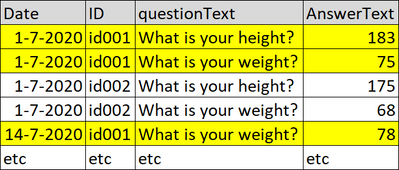
This is in the table/query:

govi_0-1594714516509.png

The BMI has to be calculated based on the last time an ID has answered the "What is your weight?" question.

In this example the weight to use for id001 is "78"


Tried a lot but I can't wrap my brain around it.


Can anyone help?


Thank you!


govi

1 ACCEPTED SOLUTION
Fowmy
Super User
Super User

@govi

One more approach if want to drop the measure against IDs level: 


BMI-BY-IDS = 

VAR _Height = CALCULATE(
    MAX(BMI[Answer Text]),BMI[Question Text] = "What is your height?")
VAR _Weight = CALCULATE(
    LASTNONBLANKVALUE(BMI[Date],MAX(BMI[Answer Text])),BMI[Question Text] = "What is your weight?")    
RETURN
POWER(
    DIVIDE(
        _Weight,
        _Height
    ),
    2
)


This Measure will work at almost any level, you add this to the table you showed:

BMI Calculation = 
VAR Q_H = "What is your height?"
VAR H = 
        CALCULATE(
            MAX(BMI[Answer Text]),
            FILTER(
                ALLEXCEPT(BMI,BMI[ID]),
                BMI[Date]=CALCULATE(MAX(BMI[Date]),ALLEXCEPT(BMI,BMI[ID]), BMI[Question Text]=Q_H)
            ),
            BMI[Question Text]=Q_H
        )
VAR Q_W = "What is your weight?"
VAR W = 
        CALCULATE(
            MAX(BMI[Answer Text]),
            FILTER(
                ALLEXCEPT(BMI,BMI[ID]),
                BMI[Date]=CALCULATE(MAX(BMI[Date]),ALLEXCEPT(BMI,BMI[ID]), BMI[Question Text]=Q_W)
            ),
            BMI[Question Text]=Q_W
        )
RETURN

// CONCATENATE(W1,H1)
POWER(
    DIVIDE(
        W,
        H
    ),
    2
)


If you are satisfied with my answer, please mark it as a solution so others can easily find it.

Don't forget to give KUDOS 👍 to replies that help answer your questions


Subscribe to ExcelFort: Learn Power BI, Power Query, and Excel

Did I answer your question? Mark my post as a solution! and hit thumbs up


Subscribe and learn Power BI from these videos

Website LinkedIn PBI User Group

View solution in original post

4 REPLIES 4
v-xicai
Community Support
Community Support

Hi @govi ,


You may create measure like DAX below.


BMI =
VAR _MaxWeightDate =
    CALCULATE (
        MAX ( Table1[Date] ),
        FILTER (
            ALLEXCEPT ( Table1, Table1[ID] ),
            Table1[AnswerText] = "What is your weight"
        )
    )
VAR _MaxHeightDate =
    CALCULATE (
        MAX ( Table1[Date] ),
        FILTER (
            ALLEXCEPT ( Table1, Table1[ID] ),
            Table1[AnswerText] = "What is your height"
        )
    )
VAR _Weight =
    CALCULATE (
        MAX ( Table1[Date] ),
        FILTER (
            ALLEXCEPT ( Table1, Table1[ID] ),
            Table1[AnswerText] = "What is your weight"
                && Table1[Date] = _MaxWeightDate
        )
    )
VAR _Height =
    CALCULATE (
        MAX ( Table1[Date] ),
        FILTER (
            ALLEXCEPT ( Table1, Table1[ID] ),
            Table1[AnswerText] = "What is your height"
                && Table1[Date] = _MaxHeightDate
        )
    )
RETURN
    POWER ( DIVIDE ( _Weight, _Height ), 2 )


Best Regards,

Amy 


Community Support Team _ Amy

If this post helps, then please consider Accept it as the solution to help the other members find it more quickly.

Fowmy
Super User
Super User

@govi

One more approach if want to drop the measure against IDs level: 


BMI-BY-IDS = 

VAR _Height = CALCULATE(
    MAX(BMI[Answer Text]),BMI[Question Text] = "What is your height?")
VAR _Weight = CALCULATE(
    LASTNONBLANKVALUE(BMI[Date],MAX(BMI[Answer Text])),BMI[Question Text] = "What is your weight?")    
RETURN
POWER(
    DIVIDE(
        _Weight,
        _Height
    ),
    2
)


This Measure will work at almost any level, you add this to the table you showed:

BMI Calculation = 
VAR Q_H = "What is your height?"
VAR H = 
        CALCULATE(
            MAX(BMI[Answer Text]),
            FILTER(
                ALLEXCEPT(BMI,BMI[ID]),
                BMI[Date]=CALCULATE(MAX(BMI[Date]),ALLEXCEPT(BMI,BMI[ID]), BMI[Question Text]=Q_H)
            ),
            BMI[Question Text]=Q_H
        )
VAR Q_W = "What is your weight?"
VAR W = 
        CALCULATE(
            MAX(BMI[Answer Text]),
            FILTER(
                ALLEXCEPT(BMI,BMI[ID]),
                BMI[Date]=CALCULATE(MAX(BMI[Date]),ALLEXCEPT(BMI,BMI[ID]), BMI[Question Text]=Q_W)
            ),
            BMI[Question Text]=Q_W
        )
RETURN

// CONCATENATE(W1,H1)
POWER(
    DIVIDE(
        W,
        H
    ),
    2
)


If you are satisfied with my answer, please mark it as a solution so others can easily find it.

Don't forget to give KUDOS 👍 to replies that help answer your questions


Subscribe to ExcelFort: Learn Power BI, Power Query, and Excel

Did I answer your question? Mark my post as a solution! and hit thumbs up


Subscribe and learn Power BI from these videos

Website LinkedIn PBI User Group

Hi @Fowmy @v-xicai @amitchandak 

Thanks for you help!


I used @Fowmy 's solution. Will check @v-xicai 's later


Thanks again

govo

amitchandak
Super User
Super User

@govi , Something like this

sumx(summarize(Table, Table[ID] ,"_h", calculate(max(Table[AnswerText]),Table[questionText]="What is your Height")
,"_w", calculate(max(Table[AnswerText]),Table[questionText]="What is your Weight")
),power(divide([_w],[_h]),2))


Sumx can be replaced with averageX , power function also you need to check need

Share with Power BI Enthusiasts: Full Power BI Video (20 Hours) YouTube
Microsoft Fabric Series 60+ Videos YouTube
Microsoft Fabric Hindi End to End YouTube

Helpful resources

Announcements
New to Fabric survey Carousel

New to Fabric Survey

If you have recently started exploring Fabric, we'd love to hear how it's going. Your feedback can help with product improvements.

Power BI DataViz World Championships carousel

Power BI DataViz World Championships - June 2026

A new Power BI DataViz World Championship is coming this June! Don't miss out on submitting your entry.

March Power BI Update Carousel

Power BI Community Update - March 2026

Check out the March 2026 Power BI update to learn about new features.