FabCon is coming to Atlanta
Join us at FabCon Atlanta from March 16 - 20, 2026, for the ultimate Fabric, Power BI, AI and SQL community-led event. Save $200 with code FABCOMM.
Register now!- Power BI forums
- Get Help with Power BI
- Desktop
- Service
- Report Server
- Power Query
- Mobile Apps
- Developer
- DAX Commands and Tips
- Custom Visuals Development Discussion
- Health and Life Sciences
- Power BI Spanish forums
- Translated Spanish Desktop
- Training and Consulting
- Instructor Led Training
- Dashboard in a Day for Women, by Women
- Galleries
- Data Stories Gallery
- Themes Gallery
- Contests Gallery
- QuickViz Gallery
- Quick Measures Gallery
- Visual Calculations Gallery
- Notebook Gallery
- Translytical Task Flow Gallery
- TMDL Gallery
- R Script Showcase
- Webinars and Video Gallery
- Ideas
- Custom Visuals Ideas (read-only)
- Issues
- Issues
- Events
- Upcoming Events
The Power BI Data Visualization World Championships is back! Get ahead of the game and start preparing now! Learn more
- Power BI forums
- Forums
- Get Help with Power BI
- Desktop
- Re: Measure to Create Static Top Item List
- Subscribe to RSS Feed
- Mark Topic as New
- Mark Topic as Read
- Float this Topic for Current User
- Bookmark
- Subscribe
- Printer Friendly Page


- Mark as New
- Bookmark
- Subscribe
- Mute
- Subscribe to RSS Feed
- Permalink
- Report Inappropriate Content
Measure to Create Static Top Item List
I'm looking to create a measure that will allow me to filter out only the top 250 items. I'm connected to a live database, so I cannot create columns.
I have an item, customer, and sales table. What I'm looking to do is create a measure that will give me the top 250 items by sales dollars for 2020 in a market channel. I then want that 250 item list to remain static as i view customer sales on those 250 items. Using the Top N filters will filter out the top 250 items for each customer, but i want to compare the same list of items for each customer.
The goal is to see what customers are/are not buying those top items.
Example:
Customer 1
| Item | Sales |
| Item 1 | 300 |
| Item 2 | 200 |
| ... | ... |
| Item 250 | 50 |
Customer 2
| Item | Sales |
| Item 1 | 1000 |
| Item 2 | 200 |
| ... | ... |
| Item 250 | 10 |
Solved! Go to Solution.


- Mark as New
- Bookmark
- Subscribe
- Mute
- Subscribe to RSS Feed
- Permalink
- Report Inappropriate Content
Strange, perhaps try it like this.
Top 250 Item Sales =
VAR _TopN = 10
VAR _TopProducts =
    CALCULATETABLE (
        TOPN (
            _TopN,
            ALL ( 'Item'[Item Number External] ),
            [Net Sales Product LY], DESC
        ),
        'Market Channel'[Market Channel] = "ED",
        REMOVEFILTERS ( Customer ),
        ALLEXCEPT ( 'Item', 'Item'[Item Number External] )
    )
RETURN
    CALCULATE (
        [Net Sales Product YTD],
        FILTER (
            VALUES ( 'Item'[Item Number External] ),
            'Item'[Item Number External] IN ( _TopProducts )
        )
    )
        + IF ( SELECTEDVALUE ( 'Item'[Item Number External] ) IN ( _TopProducts ), 0 )
- Mark as New
- Bookmark
- Subscribe
- Mute
- Subscribe to RSS Feed
- Permalink
- Report Inappropriate Content
Strange, perhaps try it like this.
Top 250 Item Sales =
VAR _TopN = 10
VAR _TopProducts =
    CALCULATETABLE (
        TOPN (
            _TopN,
            ALL ( 'Item'[Item Number External] ),
            [Net Sales Product LY], DESC
        ),
        'Market Channel'[Market Channel] = "ED",
        REMOVEFILTERS ( Customer ),
        ALLEXCEPT ( 'Item', 'Item'[Item Number External] )
    )
RETURN
    CALCULATE (
        [Net Sales Product YTD],
        FILTER (
            VALUES ( 'Item'[Item Number External] ),
            'Item'[Item Number External] IN ( _TopProducts )
        )
    )
        + IF ( SELECTEDVALUE ( 'Item'[Item Number External] ) IN ( _TopProducts ), 0 )
- Mark as New
- Bookmark
- Subscribe
- Mute
- Subscribe to RSS Feed
- Permalink
- Report Inappropriate Content
This did the trick! The measure seems to be working now! I adjusted back to the 250 and it looks good.
Thank you for your help
- Mark as New
- Bookmark
- Subscribe
- Mute
- Subscribe to RSS Feed
- Permalink
- Report Inappropriate Content
That is strange, I can't see anything wrong with your sytnax. Try it like this, moving the + IF to the end makes it easier to turn off for testing.
Top 250 Item Sales =
VAR _TopN = 10
VAR _TopProducts =
    CALCULATETABLE (
        TOPN (
            _TopN,
            ALL ( 'Item'[Item Number External] ),
            [Net Sales Product LY], DESC
        ),
        'Market Channel'[Market Channel] = "ED",
        REMOVEFILTERS ( Customer ),
        ALLEXCEPT ( 'Item', 'Item'[Item Number External] )
    )
RETURN
    CALCULATE (
        [Net Sales Product YTD],
        FILTER (
            VALUES ( 'Item'[Item Number External] ),
            'Item'[Item Number External] IN ( _TopProducts )
        )
    )
        + IF ( VALUES ( 'Item'[Item Number External] ) IN ( _TopProducts ), 0 )
Any chance you can share your .pbix file (post it to one drive or drop box and share the link)?
- Mark as New
- Bookmark
- Subscribe
- Mute
- Subscribe to RSS Feed
- Permalink
- Report Inappropriate Content
I very much appreciate your help so far. Unfortunately I'm not at liberty to share the file, and it's connected to a large, live azure db.
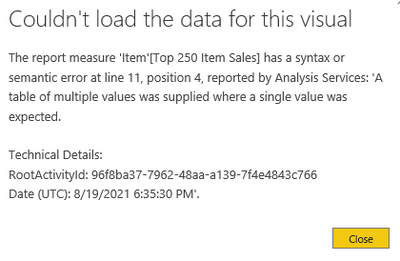
I moved the +IF to the end but i get the same error. The issue seems to be that it's expecting a single value where VALUES() is in the formula, but a table is supplied. I'm not sure of any alternative way to make it work though.
- Mark as New
- Bookmark
- Subscribe
- Mute
- Subscribe to RSS Feed
- Permalink
- Report Inappropriate Content
If you change both steps to look at the same measure does the error go away?
- Mark as New
- Bookmark
- Subscribe
- Mute
- Subscribe to RSS Feed
- Permalink
- Report Inappropriate Content
No i get the same error either way. The measure works without the IF portion. I get the error when I add it in, but the functionality of seeing the total number of top products is important to the report.
- Mark as New
- Bookmark
- Subscribe
- Mute
- Subscribe to RSS Feed
- Permalink
- Report Inappropriate Content
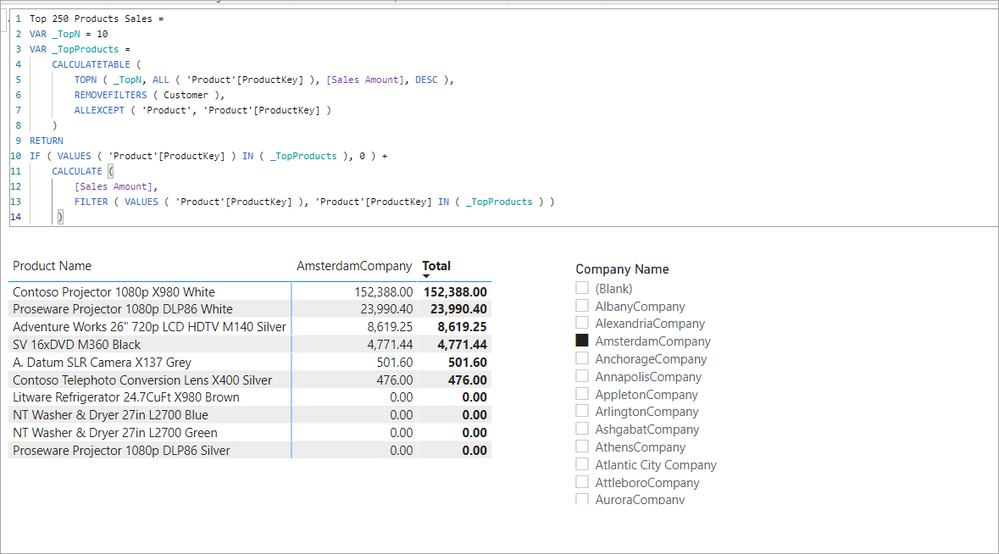
Right, forcing the 0 on the blanks but keeping the top 250, try this.
Top 250 Products Sales =
VAR _TopN = 250
VAR _TopProducts =
    CALCULATETABLE (
        TOPN ( _TopN, ALL ( 'Product'[ProductKey] ), [Sales Amount], DESC ),
        REMOVEFILTERS ( Customer ),
        ALLEXCEPT ( 'Product', 'Product'[ProductKey] )
    )
RETURN
IF ( VALUES ( 'Product'[ProductKey] ) IN ( _TopProducts ), 0 ) +
    CALCULATE (
        [Sales Amount],
        FILTER ( VALUES ( 'Product'[ProductKey] ), 'Product'[ProductKey] IN ( _TopProducts ) )
     )
It works on my sample to put the 0 on the rows that are in the topn (I am looking at 10 here) even when I filter to a single customer that only bought a portion of the list.
- Mark as New
- Bookmark
- Subscribe
- Mute
- Subscribe to RSS Feed
- Permalink
- Report Inappropriate Content
This is exactly what i need. I'm not sure why i'm getting an error when adding in the if statement and you're not.
I get this error using this updated formula. Note that the format is identical, just with the proper names.

- Mark as New
- Bookmark
- Subscribe
- Mute
- Subscribe to RSS Feed
- Permalink
- Report Inappropriate Content
Copy your measure and share it here.
- Mark as New
- Bookmark
- Subscribe
- Mute
- Subscribe to RSS Feed
- Permalink
- Report Inappropriate Content
Top 250 Item Sales =
VAR _TopN = 10
VAR _TopProducts =
    CALCULATETABLE (
        TOPN ( _TopN, ALL ('Item'[Item Number External]), [Net Sales Product LY], DESC ),
        'Market Channel'[Market Channel]="ED",
        REMOVEFILTERS ( Customer ),
        ALLEXCEPT ( 'Item', 'Item'[Item Number External] )
    )
RETURN
if(VALUES('Item'[Item Number External]) IN (_TopProducts),0)+
    CALCULATE (
        [Net Sales Product YTD],
        FILTER ( VALUES ( 'Item'[Item Number External] ), 'Item'[Item Number External] IN ( _TopProducts ) )
     )
Note: i changed the 250 to 10 for now and the Top Products variable uses Last Year sales, while the calculate function in the return looks at YTD
- Mark as New
- Bookmark
- Subscribe
- Mute
- Subscribe to RSS Feed
- Permalink
- Report Inappropriate Content
Try something like this.
Top 250 Products Sales =
VAR _TopN = 250
VAR _TopProducts =
    CALCULATETABLE (
        TOPN ( _TopN, ALL ( 'Product'[ProductKey] ), [Sales Amount], DESC ),
        REMOVEFILTERS ( Customer ),
        ALLEXCEPT ( 'Product', 'Product'[ProductKey] )
    )
RETURN
    CALCULATE (
        [Sales Amount],
        FILTER ( VALUES ( 'Product'[ProductKey] ), 'Product'[ProductKey] IN ( _TopProducts ) )
    )
Without knowing the structure of your model it is difficult to give a more precise example. This measure works against the Contoso sample database.
- Mark as New
- Bookmark
- Subscribe
- Mute
- Subscribe to RSS Feed
- Permalink
- Report Inappropriate Content
This works much closer. The problem is that it still shows all products, just with blanks for those outside the top 250. I cant just filter out the blanks becasue when i look at customers, I still want to see all the 250 products, even if there are no sales.

- Mark as New
- Bookmark
- Subscribe
- Mute
- Subscribe to RSS Feed
- Permalink
- Report Inappropriate Content
@astano05 , Try measure like
Measure =
Var _tab = TOPN(250,all(Table[Item]),[Sales],DESC)
return
calculate([sales], filter(Table, Table[item] in _tab))
- Mark as New
- Bookmark
- Subscribe
- Mute
- Subscribe to RSS Feed
- Permalink
- Report Inappropriate Content
Thanks for the response. I get an error with that measure that the visual can't be displayed.
I used this measure which is getting me close:

Helpful resources

Power BI Dataviz World Championships
The Power BI Data Visualization World Championships is back! Get ahead of the game and start preparing now!

Power BI Monthly Update - December 2025
Check out the December 2025 Power BI Holiday Recap!

FabCon Atlanta 2026
Join us at FabCon Atlanta, March 16-20, for the ultimate Fabric, Power BI, AI and SQL community-led event. Save $200 with code FABCOMM.

| User | Count |
|---|---|
| 39 | |
| 38 | |
| 38 | |
| 28 | |
| 27 |


| User | Count |
|---|---|
| 124 | |
| 89 | |
| 73 | |
| 66 | |
| 65 |


