cancel
Showing results for 
Search instead for 
Did you mean: 

A new Data Days event is coming soon! This time we’re going bigger than ever. Fabric, Power BI, SQL, AI and more. Don't miss out.

Reply
questionaskr
Frequent Visitor

Measure that creates an arithmetic progression of a value for as many rows as selected

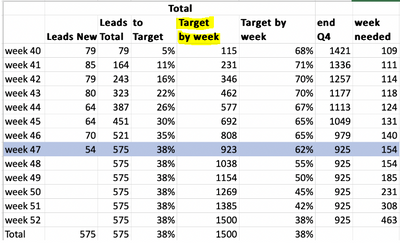
Good afternoon, I am trying to recreate this table:

questionaskr_1-1643640696911.png

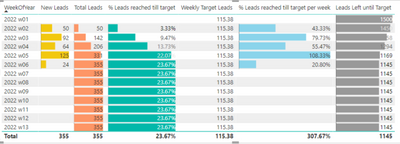
This is what I have so far 

questionaskr_4-1643641464141.png

The Target on % to target is a value derived from a slider. I have calculated the first three columns, the one I am having a hard time calculating the highlighted one, the target by week. I have managed to get the value needed per week dividing the Target value by the number of rows shown which is the number of weeks like this: 

Weekly Target Leads = [Quarterly Lead Goal Value]/COUNTROWS(ALLSELECTED(Dates[Weeks]))
 
But if I do it like this I would now need to sum the value of the previous row each time, or multply the number I got, in this case 115 by an incresing index for each week. I have tried many things and none have worked. Hopefully you guys can give me some ideas, thank you in advance.


2 REPLIES 2
amitchandak
Super User
Super User

@questionaskr , I think you need last wek values. For that in date or week table have week Rank column


new columns
Week Start date = 'Date'[Date]+-1*WEEKDAY('Date'[Date],2)+1
Week End date = 'Date'[Date]+ 7-1*WEEKDAY('Date'[Date],2)
Week Rank = RANKX(all('Date'),'Date'[Week Start date],,ASC,Dense)
OR
Week Rank = RANKX(all('Date'),'Date'[Year Week],,ASC,Dense) //YYYYWW format


Then you can measures like
This Week = CALCULATE(sum('Table'[Qty]), FILTER(ALL('Date'),'Date'[Week Rank]=max('Date'[Week Rank])))
Last Week = CALCULATE(sum('Table'[Qty]), FILTER(ALL('Date'),'Date'[Week Rank]=max('Date'[Week Rank])-1))


Power BI — Week on Week and WTD
https://medium.com/@amitchandak.1978/power-bi-wtd-questions-time-intelligence-4-5-98c30fab69d3
https://community.powerbi.com/t5/Community-Blog/Week-Is-Not-So-Weak-WTD-Last-WTD-and-This-Week-vs-La...
https://www.youtube.com/watch?v=pnAesWxYgJ8

Share with Power BI Enthusiasts: Full Power BI Video (20 Hours) YouTube
Microsoft Fabric Series 60+ Videos YouTube
Microsoft Fabric Hindi End to End YouTube

Thank you for your anwser, but I dont think it solves the problem, I am not looking for the weekly change, rather I am trying to create a column in that table to know how far off are we each week or reaching the target. This column should increase each week by the same amount, this amount is the quarterly goal divided by the number of weeks in the quarter and this goal is set by a slider so that it can be dynamically changed. So as stated, this new column is an arithmetic progression of Weekly Target Leads

Helpful resources

Announcements
May Power BI Update Carousel

Power BI Monthly Update - May 2026

Check out the May 2026 Power BI update to learn about new features.

Fabric SQL PBI Data Days

Data Days 2026 coming soon!

Sign up to receive a private message when registration opens and key events begin.

New to Fabric survey Carousel

New to Fabric Survey

If you have recently started exploring Fabric, we'd love to hear how it's going. Your feedback can help with product improvements.

Power BI DataViz World Championships carousel

Power BI DataViz World Championships - June 2026

A new Power BI DataViz World Championship is coming this June! Don't miss out on submitting your entry.