FabCon is coming to Atlanta
Join us at FabCon Atlanta from March 16 - 20, 2026, for the ultimate Fabric, Power BI, AI and SQL community-led event. Save $200 with code FABCOMM.
Register now!- Power BI forums
- Get Help with Power BI
- Desktop
- Service
- Report Server
- Power Query
- Mobile Apps
- Developer
- DAX Commands and Tips
- Custom Visuals Development Discussion
- Health and Life Sciences
- Power BI Spanish forums
- Translated Spanish Desktop
- Training and Consulting
- Instructor Led Training
- Dashboard in a Day for Women, by Women
- Galleries
- Data Stories Gallery
- Themes Gallery
- Contests Gallery
- QuickViz Gallery
- Quick Measures Gallery
- Visual Calculations Gallery
- Notebook Gallery
- Translytical Task Flow Gallery
- TMDL Gallery
- R Script Showcase
- Webinars and Video Gallery
- Ideas
- Custom Visuals Ideas (read-only)
- Issues
- Issues
- Events
- Upcoming Events
The Power BI Data Visualization World Championships is back! Get ahead of the game and start preparing now! Learn more
- Power BI forums
- Forums
- Get Help with Power BI
- Desktop
- Re: Measure shows only total
- Subscribe to RSS Feed
- Mark Topic as New
- Mark Topic as Read
- Float this Topic for Current User
- Bookmark
- Subscribe
- Printer Friendly Page

- Mark as New
- Bookmark
- Subscribe
- Mute
- Subscribe to RSS Feed
- Permalink
- Report Inappropriate Content
Measure shows only total
Hello,
I am making a dashboard where I want to calculate the average sales per day per product.
I have one table ('EAN') that contains the article number [EAN13] and the title [Title short], and one table ('Sales/Day') that is structured as follows:
- [EAN] - Article number.
- [Date] - Day (starting when the first sale of the first product occured, ending at the last day of the last month.
- [First Day Stock] - Day when the product was for the first time in stock.
- [Sellable] - True/false whether the [First Day Stock] is equal to or smaller than [Date].
- [Voorraad] - Ending stock of that day.
- [Verkopen] - Sales of that day ("Verkopen").
- [Sellable 2] - Which indicates whether or not the product was in stock, and could potentially be sold.
- The other columns can be ignored for now.
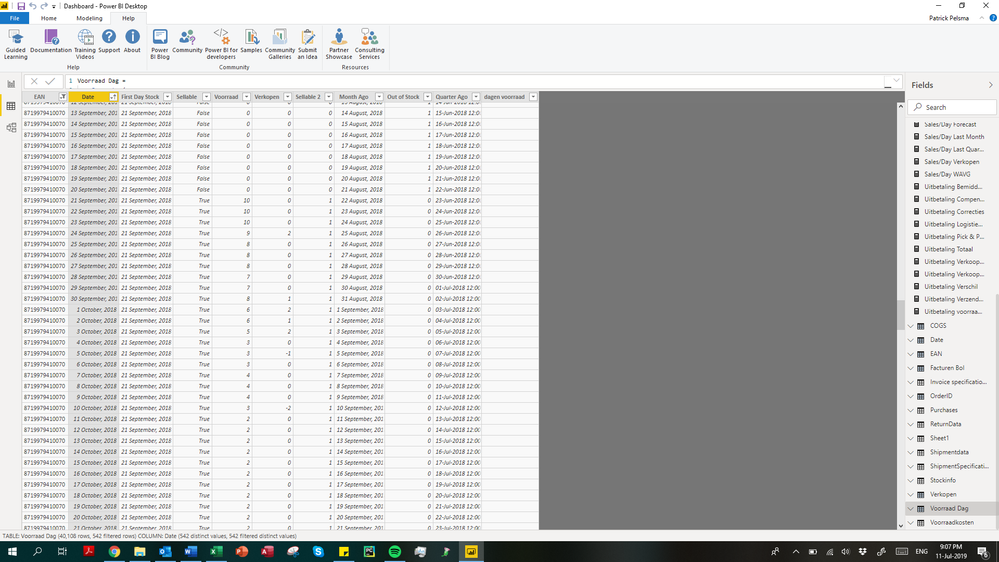
I made a single-way relationship between the table of the article number/title, and the table as shown above.
With this format I want to achieve the following: calculate a rolling average of the sales per day.
I made a measure for the all time sales per day:
Sales/Day All Time =
        CALCULATE (
            SUM ( 'Sales/Day'[Verkopen] ) |
            FILTER (
                ALLEXCEPT( 'Sales/Day' | 'Sales/Day'[EAN]) |
                'Sales/Day'[Date] <= MAX ( 'Sales/Day'[Date] )
            )  |
            FILTER (
                ALLSELECTED ( EAN ) |
                EAN[EAN13] <> BLANK()
            )
        )
        /
        CALCULATE (
            SUM ( 'Sales/Day'[Sellable 2] ) |
            FILTER (
                ALLEXCEPT( 'Sales/Day' | 'Sales/Day'[EAN]) |
                'Sales/Day'[Date] <= MAX ( 'Sales/Day'[Date] )
            ) |
            FILTER (
                ALLSELECTED ( EAN ) |
                EAN[EAN13] <> BLANK()
            )
        )
However, when I make a table with the article numbers, and the sales/day measure, it only shows the average sales/day and this is the same for all articles.

If I would replace 'EAN'[EAN13] by 'Sales/Day'[EAN] in the row of the Matrix table, the result is correct; however, since I need other measures in the matrix table, I cannot use this way of working.
I hope somebody is able to help me out with this challange. If you need more information, please let me know.

Best regards,
Patrick
Solved! Go to Solution.


- Mark as New
- Bookmark
- Subscribe
- Mute
- Subscribe to RSS Feed
- Permalink
- Report Inappropriate Content
Hi @Anonymous ,
This as to do with the context of your measure, when you are making the visual based on the EAN table you cannot make the calculation based on the Sales[EAN] code because the row context is different, what happens is that you are making the filter context for the visual based on one value from one table but then calculating the measure on the Sales side.
This is even more pressing since you have a one to many relationship going from EAN to Sales so when you calculate a value from the Sales to the EAN since the relationship is going the other way is like you don't have any relation in place so it returns a single value for all the rows.
In your measure the allexcept part is redundant since the filter context comes from the EAN redo the measure to:
Sales/Day All Time =
        CALCULATE (
            SUM ( 'Sales/Day'[Sales] ) ;
            FILTER (
                 'Sales/Day'  ;
                'Sales/Day'[Date] <= MAX ( 'Sales/Day'[Date] )
            )  ;
            FILTER (
                ALLSELECTED ( EAN[EAN13] ) ;
                EAN[EAN13] <> BLANK()
            )
        )
        /
        CALCULATE (
            SUM ( 'Sales/Day'[Sellable_1] ) ;
            FILTER (
                 'Sales/Day' ;
                'Sales/Day'[Date] <= MAX ( 'Sales/Day'[Date] )
            ) ;
            FILTER (
                ALLSELECTED ( EAN[EAN13] ) ;
                EAN[EAN13] <> BLANK()
            )
        )
As you can see below the measure Sales/Day All Time 2 (adjusted gives the correct value).

See attach PBIX file.
Regards,
MFelix
Regards
Miguel Félix
Did I answer your question? Mark my post as a solution!
Proud to be a Super User!
Check out my blog: Power BI em Português- Mark as New
- Bookmark
- Subscribe
- Mute
- Subscribe to RSS Feed
- Permalink
- Report Inappropriate Content
Hi @Anonymous ,
Measures are based on context and depending on the way you setup you measure you have different results, your model is not easy to replicate by hand but if you can share a mockup that would be great.
Even without making any mockup try to change the reference to EAN table on your allselected to the EAN13 column replace your measure by:
Sales/Day All Time =
        CALCULATE (
            SUM ( 'Sales/Day'[Verkopen] ) |
            FILTER (
                ALLEXCEPT( 'Sales/Day' | 'Sales/Day'[EAN]) |
                'Sales/Day'[Date] <= MAX ( 'Sales/Day'[Date] )
            )  |
            FILTER (
                ALLSELECTED ( EAN[EAN13] ) |
                EAN[EAN13] <> BLANK()
            )
        )
        /
        CALCULATE (
            SUM ( 'Sales/Day'[Sellable 2] ) |
            FILTER (
                ALLEXCEPT( 'Sales/Day' | 'Sales/Day'[EAN]) |
                'Sales/Day'[Date] <= MAX ( 'Sales/Day'[Date] )
            ) |
            FILTER (
                ALLSELECTED ( EAN[EAN13] ) |
                EAN[EAN13] <> BLANK()
            )
        )
I have highlithed in bold the changes if this doesn't work please as I say before share some mockup file.
Regards,
MFelix
Regards
Miguel Félix
Did I answer your question? Mark my post as a solution!
Proud to be a Super User!
Check out my blog: Power BI em Português- Mark as New
- Bookmark
- Subscribe
- Mute
- Subscribe to RSS Feed
- Permalink
- Report Inappropriate Content
Hi @MFelix
Thanks for your quick reply. Changing the measure formula does not seem to work unfortunately.
I attached a mockup model for you.
Looking forward to hearing from you/
Thanks again for your help.
Patrick
- Mark as New
- Bookmark
- Subscribe
- Mute
- Subscribe to RSS Feed
- Permalink
- Report Inappropriate Content
Hi @Anonymous ,
This as to do with the context of your measure, when you are making the visual based on the EAN table you cannot make the calculation based on the Sales[EAN] code because the row context is different, what happens is that you are making the filter context for the visual based on one value from one table but then calculating the measure on the Sales side.
This is even more pressing since you have a one to many relationship going from EAN to Sales so when you calculate a value from the Sales to the EAN since the relationship is going the other way is like you don't have any relation in place so it returns a single value for all the rows.
In your measure the allexcept part is redundant since the filter context comes from the EAN redo the measure to:
Sales/Day All Time =
        CALCULATE (
            SUM ( 'Sales/Day'[Sales] ) ;
            FILTER (
                 'Sales/Day'  ;
                'Sales/Day'[Date] <= MAX ( 'Sales/Day'[Date] )
            )  ;
            FILTER (
                ALLSELECTED ( EAN[EAN13] ) ;
                EAN[EAN13] <> BLANK()
            )
        )
        /
        CALCULATE (
            SUM ( 'Sales/Day'[Sellable_1] ) ;
            FILTER (
                 'Sales/Day' ;
                'Sales/Day'[Date] <= MAX ( 'Sales/Day'[Date] )
            ) ;
            FILTER (
                ALLSELECTED ( EAN[EAN13] ) ;
                EAN[EAN13] <> BLANK()
            )
        )
As you can see below the measure Sales/Day All Time 2 (adjusted gives the correct value).
See attach PBIX file.
Regards,
MFelix
Regards
Miguel Félix
Did I answer your question? Mark my post as a solution!
Proud to be a Super User!
Check out my blog: Power BI em Português- Mark as New
- Bookmark
- Subscribe
- Mute
- Subscribe to RSS Feed
- Permalink
- Report Inappropriate Content
Hi @MFelix,
You are a hero, it works perfectly! I marked your post as a solution!
Have a great weekend.
Patrick
Helpful resources

Power BI Dataviz World Championships
The Power BI Data Visualization World Championships is back! Get ahead of the game and start preparing now!

Power BI Monthly Update - December 2025
Check out the December 2025 Power BI Holiday Recap!

FabCon Atlanta 2026
Join us at FabCon Atlanta, March 16-20, for the ultimate Fabric, Power BI, AI and SQL community-led event. Save $200 with code FABCOMM.

| User | Count |
|---|---|
| 38 | |
| 37 | |
| 33 | |
| 32 | |
| 29 |


| User | Count |
|---|---|
| 132 | |
| 88 | |
| 82 | |
| 68 | |
| 64 |


