Forum Discussion
Anonymous
6 years agoNot applicable
Measure ignore applied filter
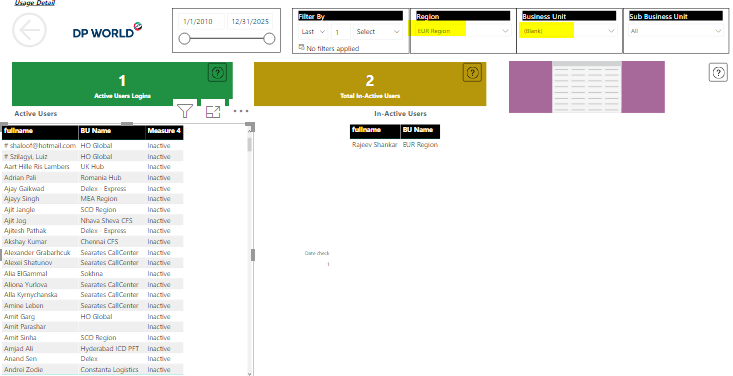
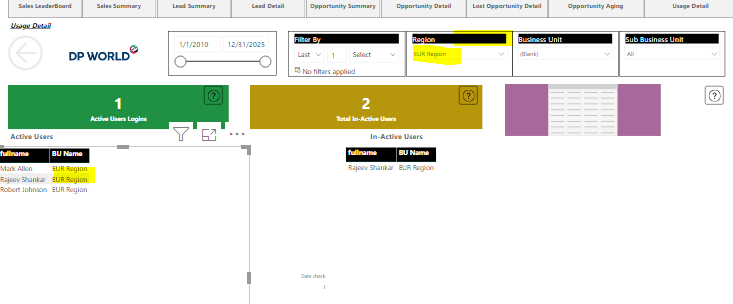
hey expert i created a measure and dropped in table .From slicer i selected a specific region but still it shows data for all regions. As in below image its showing for all regions.. I want f...
Greg_Deckler
Community Champion
6 years agoCould be numerous things. You might have an ALL in your measure formula or there could be a missing relationship.
- Anonymous6 years agoNot applicable
yeah actually this measure is capturing date from a slicer which is using ALLSelected function
- Anonymous6 years agoNot applicable
Greg_Deckler so is there any possibility actually i am fetching dates from slicer and then creating a measure..so can i create a dynamic column or above mentioned measure which does work wth slicers.
measure 1:Date Min =CALCULATE(MIN( DimDate[Date2] ),ALLSELECTED( DimDate[Date2] ))Measure 2:Date Max =CALCULATE(MAX( DimDate[Date2] ),ALLSELECTED( DimDate[Date2] ))
Measure 3:Final Measure= IF([Latest Activity]>=[Date Min] && [Latest Activity]<=[Date Max],"active","inactive")- Greg_Deckler6 years ago
Community Champion
OK, that sounds more like a missing relationship or that somebody has inactivate interactions between visuals. Can you post an image of your data model? Is your region in the same table as your other data that you are displaying in the visual you are having issues with?