FabCon is coming to Atlanta
Join us at FabCon Atlanta from March 16 - 20, 2026, for the ultimate Fabric, Power BI, AI and SQL community-led event. Save $200 with code FABCOMM.
Register now!- Power BI forums
- Get Help with Power BI
- Desktop
- Service
- Report Server
- Power Query
- Mobile Apps
- Developer
- DAX Commands and Tips
- Custom Visuals Development Discussion
- Health and Life Sciences
- Power BI Spanish forums
- Translated Spanish Desktop
- Training and Consulting
- Instructor Led Training
- Dashboard in a Day for Women, by Women
- Galleries
- Data Stories Gallery
- Themes Gallery
- Contests Gallery
- QuickViz Gallery
- Quick Measures Gallery
- Visual Calculations Gallery
- Notebook Gallery
- Translytical Task Flow Gallery
- TMDL Gallery
- R Script Showcase
- Webinars and Video Gallery
- Ideas
- Custom Visuals Ideas (read-only)
- Issues
- Issues
- Events
- Upcoming Events
The Power BI Data Visualization World Championships is back! Get ahead of the game and start preparing now! Learn more
- Power BI forums
- Forums
- Get Help with Power BI
- Desktop
- Re: Measure based on dividing on types
- Subscribe to RSS Feed
- Mark Topic as New
- Mark Topic as Read
- Float this Topic for Current User
- Bookmark
- Subscribe
- Printer Friendly Page


- Mark as New
- Bookmark
- Subscribe
- Mute
- Subscribe to RSS Feed
- Permalink
- Report Inappropriate Content
Measure based on dividing on types
Hi all,
I have a PBIX file with a fact table with numbers in it. These are linked to dimensions like costcenter.
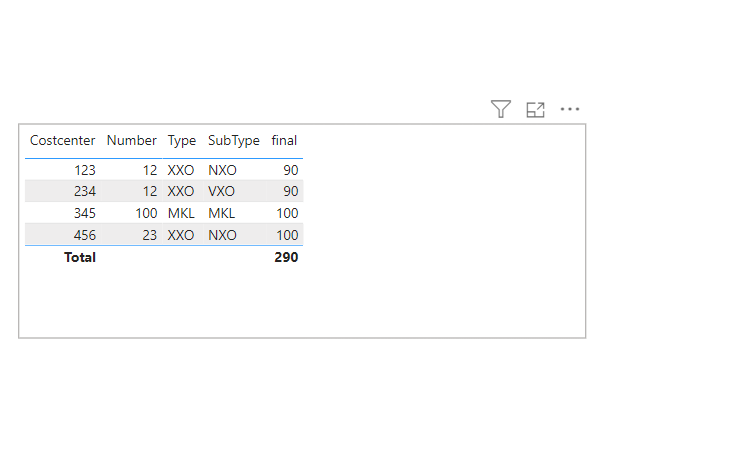
But now I have an issue with my measure on total level because I have a special wish. This is my output:
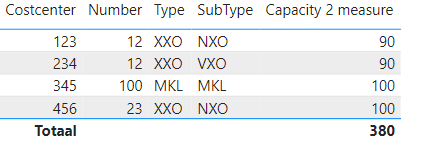
This looks ok, but I have 1 special thing; the columns Number and Subtype are coming from Costcenter. And when I have Subtypes NXO ánd VXO (like on number 12) I don't want the total to sum up these, but just use it only once. So total in this example must be 290, because number 12 = 90, number 100 = 100 and 23 = 100.
My current Capacity 2 measure is:
I've tried many things like SUMMARIZING costcenter on Number and subtype and so on, but every time I get stuck.
Is there a DAX crack here that can help me with the solution?
PBIX example can be found here: https://file.io/nfbQbg5K6Dgx
Solved! Go to Solution.


- Mark as New
- Bookmark
- Subscribe
- Mute
- Subscribe to RSS Feed
- Permalink
- Report Inappropriate Content
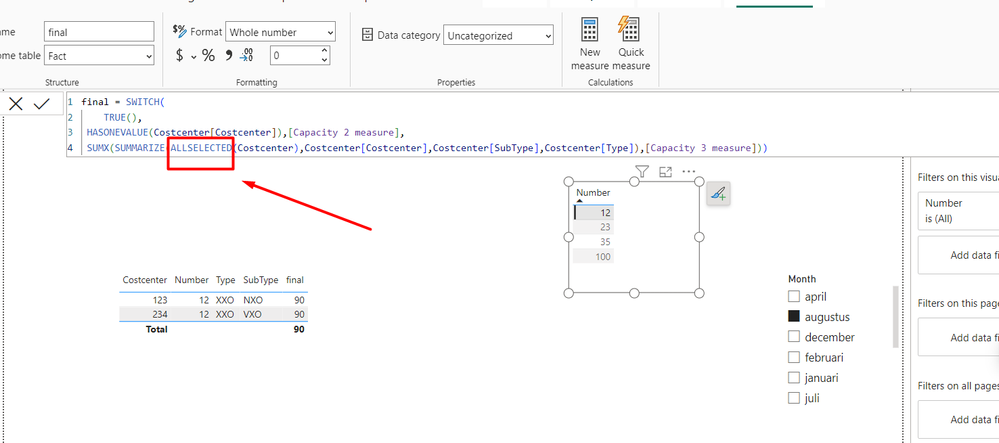
- Mark as New
- Bookmark
- Subscribe
- Mute
- Subscribe to RSS Feed
- Permalink
- Report Inappropriate Content
Hi @Ahmedx,
Thank you for your quick response! This seems to work for the data that is in the example, but I saw on your code that it's not working for cases where only VXO is present (and NXO is not). I've added that case to https://easyupload.io/1j4mpj with costcenter 567.
Is there an option which is working not with an approach where VXO is not calculated, but just 1 value for VXO and NXO when both are present. They will by the way always be equal.
- Mark as New
- Bookmark
- Subscribe
- Mute
- Subscribe to RSS Feed
- Permalink
- Report Inappropriate Content
I can’t help you, you better get a new version on your personal computer and see my solution
- Mark as New
- Bookmark
- Subscribe
- Mute
- Subscribe to RSS Feed
- Permalink
- Report Inappropriate Content
I have downloaded your file @Ahmedx. It works I think, but
- Mark as New
- Bookmark
- Subscribe
- Mute
- Subscribe to RSS Feed
- Permalink
- Report Inappropriate Content
in such a case what should we do?
- Mark as New
- Bookmark
- Subscribe
- Mute
- Subscribe to RSS Feed
- Permalink
- Report Inappropriate Content
If VXO = 80 and NXO is not present -> 80
If VXO is not present and NXO = 80 -> 80
If VXO = 80 and NXO = 80 -> 80
- Mark as New
- Bookmark
- Subscribe
- Mute
- Subscribe to RSS Feed
- Permalink
- Report Inappropriate Content
- Mark as New
- Bookmark
- Subscribe
- Mute
- Subscribe to RSS Feed
- Permalink
- Report Inappropriate Content
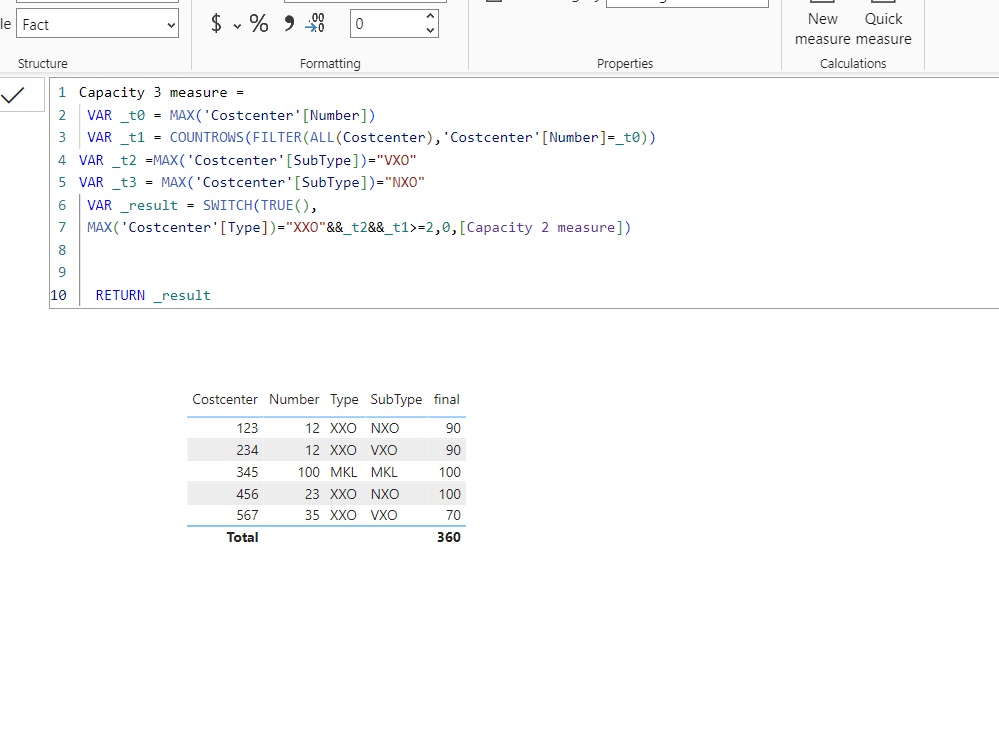
Unfortunately @Ahmedx, this is not working. With my new added 'VXO only' example you get this:
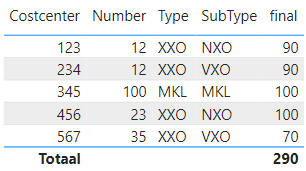
While I was expecting that 70 to be added here, so 360 in total.
In my perspective this measure is wrong while it has 80 hardcoded:
Capacity 3 measure =
 VAR _t1 = MAX('Costcenter'[Number])
VAR _t2 =FILTER(ALL(Costcenter),'Costcenter'[Number]=_t1&&'Costcenter'[SubType]="VXO")
VAR _t3 = FILTER(ALL(Costcenter),'Costcenter'[Number]=_t1&&'Costcenter'[SubType]="NXO")
VAR _t4 =CALCULATE([Capacity 2 measure],_t2)
VAR _t5 =CALCULATE([Capacity 2 measure],_t3)
 VAR _result =
  SWITCH(TRUE(),
   ISBLANK(COUNTROWS(_t2)) && _t5=80,80,
   ISBLANK(COUNTROWS(_t3)) && _t4=80,80,
   _t4=80&&_t5=80,80,
        MAX('Costcenter'[Type])="XXO"&&MAX('Costcenter'[SubType])="VXO",0,[Capacity 2 measure])
RETURN _result
File download with all examples in it: click
- Mark as New
- Bookmark
- Subscribe
- Mute
- Subscribe to RSS Feed
- Permalink
- Report Inappropriate Content
- Mark as New
- Bookmark
- Subscribe
- Mute
- Subscribe to RSS Feed
- Permalink
- Report Inappropriate Content
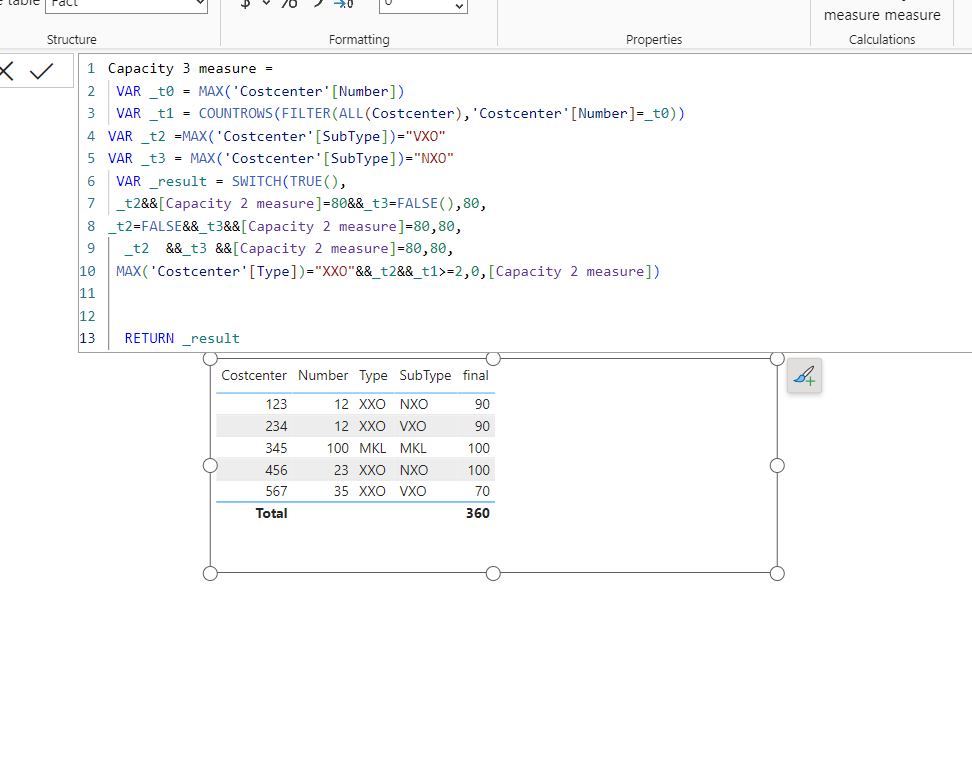
Looks awesome @Ahmedx . But can you explain what's going here? What are those magic '80' numbers doing there?
- Mark as New
- Bookmark
- Subscribe
- Mute
- Subscribe to RSS Feed
- Permalink
- Report Inappropriate Content
you wrote the condition, If VXO = 80 and NXO is not present -> 80
I understand that if the conditions are met, the result should be 80
- Mark as New
- Bookmark
- Subscribe
- Mute
- Subscribe to RSS Feed
- Permalink
- Report Inappropriate Content
You are 100% right @Ahmedx, but you can also say:
If VXO = 70 and NXO is not present -> 70
If VXO is not present and NXO = 70 -> 70
If VXO = 70 and NXO = 70 -> 70
or
If VXO = 10000 and NXO is not present -> 10000
If VXO is not present and NXO = 10000 -> 10000
If VXO = 10000 and NXO = 10000 -> 10000
So in general I just wanted to state that if on ONE 'Costcenter'[Number] you have ánd NXO ánd VXO the amount must be divided by 2. And if only NXO ór VXO is present then you need that number.
But the outcome of your query looks ok, but I can't imagine that that 80 is necessary.
I hope I'm more clear now!?
- Mark as New
- Bookmark
- Subscribe
- Mute
- Subscribe to RSS Feed
- Permalink
- Report Inappropriate Content
- Mark as New
- Bookmark
- Subscribe
- Mute
- Subscribe to RSS Feed
- Permalink
- Report Inappropriate Content
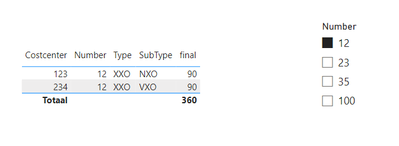
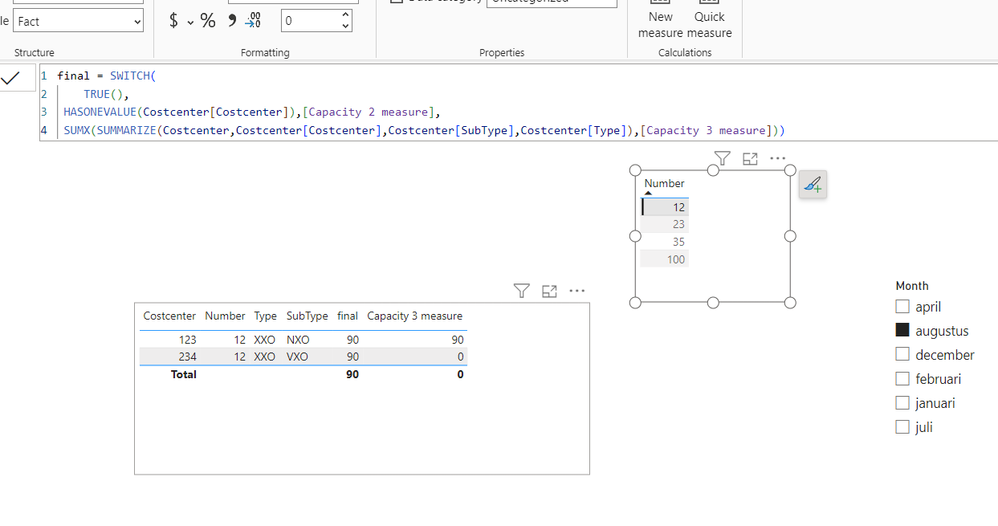
So close @Ahmedx.... I really appreciate your help!
But filtering on 'number' gives issues. Do you have an idea for this as well:
- Mark as New
- Bookmark
- Subscribe
- Mute
- Subscribe to RSS Feed
- Permalink
- Report Inappropriate Content
- Mark as New
- Bookmark
- Subscribe
- Mute
- Subscribe to RSS Feed
- Permalink
- Report Inappropriate Content
- Mark as New
- Bookmark
- Subscribe
- Mute
- Subscribe to RSS Feed
- Permalink
- Report Inappropriate Content
- Mark as New
- Bookmark
- Subscribe
- Mute
- Subscribe to RSS Feed
- Permalink
- Report Inappropriate Content
- Mark as New
- Bookmark
- Subscribe
- Mute
- Subscribe to RSS Feed
- Permalink
- Report Inappropriate Content
Sadly I can't change the URL. But it seems to be removed after a download. This URL keeps alive: https://easyupload.io/u2jijx
- Mark as New
- Bookmark
- Subscribe
- Mute
- Subscribe to RSS Feed
- Permalink
- Report Inappropriate Content
no file


Helpful resources

Power BI Dataviz World Championships
The Power BI Data Visualization World Championships is back! Get ahead of the game and start preparing now!

Power BI Monthly Update - November 2025
Check out the November 2025 Power BI update to learn about new features.

FabCon Atlanta 2026
Join us at FabCon Atlanta, March 16-20, for the ultimate Fabric, Power BI, AI and SQL community-led event. Save $200 with code FABCOMM.

| User | Count |
|---|---|
| 59 | |
| 46 | |
| 42 | |
| 23 | |
| 18 |


| User | Count |
|---|---|
| 192 | |
| 125 | |
| 99 | |
| 67 | |
| 48 |


