cancel
Showing results for 
Search instead for 
Did you mean: 

The Power BI Data Visualization World Championships is back! Get ahead of the game and start preparing now! Learn more

Reply
Niels_T
Post Patron
Post Patron

Measure: Accumulate value of previous month

Hello,


I've been trying to figure out this measure for the past couple days and I can't seem to find the solution:


Stock Niveau (Full) = 
IF( EOMONTH(MAX('Calendar'[Date]),0) = EOMONTH(TODAY(),0) ,


CALCULATE([Total Orders],DATESINPERIOD('Calendar'[Date], MAX('Calendar'[Date]),-3,MONTH)) + CALCULATE(SUM('Stock Value'[Cost Amount (Actual)]), ALL('Stock Value')) + SUM('Sales Forecast (GS)'[Sales FC aan COGS]),


IF( EOMONTH(MAX('Calendar'[Date]),0) > EOMONTH(TODAY(),0),

[Total Orders] + SUM('Sales Forecast (GS)'[Sales FC aan COGS])))


This measure works and gives me the following result (in sample data):
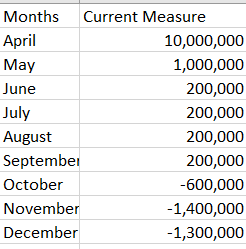
Niels_T_0-1649149141117.png


The last piece that is missing however, is the following:

Starting from the month after the current month, take the value of the month + the value of the previous month.


This is the expected result:
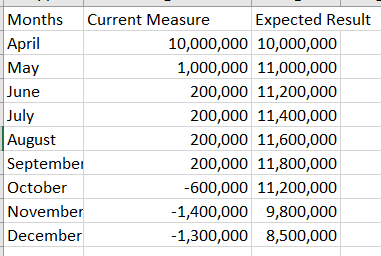
Niels_T_1-1649149219805.png

All months before current month have to be blank.


Someone knows how to figure this out?

1 ACCEPTED SOLUTION
Anonymous
Not applicable

Hi @Niels_T ,


There should be a [MonthNum] column in whole number format in Calendar table. You can try this code to create a virtul table and then sumx the result to get running total.

Running Total =
VAR _SUMMARIZE =
    SUMMARIZE (
        ALL ( 'Calendar' ),
        'Calendar'[Months],
        'Calendar'[MonthNum],
        "Stock Niveau (Full)",
            IF (
                EOMONTH ( MAX ( 'Calendar'[Date] ), 0 ) = EOMONTH ( TODAY (), 0 ),
                CALCULATE (
                    [Total Orders],
                    DATESINPERIOD ( 'Calendar'[Date], MAX ( 'Calendar'[Date] ), -3, MONTH )
                )
                    + CALCULATE ( SUM ( 'Stock Value'[Cost Amount (Actual)] ), ALL ( 'Stock Value' ) )
                    + SUM ( 'Sales Forecast (GS)'[Sales FC aan COGS] ),
                IF (
                    EOMONTH ( MAX ( 'Calendar'[Date] ), 0 ) > EOMONTH ( TODAY (), 0 ),
                    [Total Orders] + SUM ( 'Sales Forecast (GS)'[Sales FC aan COGS] )
                )
            )
    )
RETURN
    SUMX (
        FILTER ( _SUMMARIZE, [MonthNum] <= MAX ( 'Calendar'[MonthNum] ) ),
        [Stock Niveau (Full)]
    )


Best Regards,
Rico Zhou


If this post helps, then please consider Accept it as the solution to help the other members find it more quickly.


View solution in original post

2 REPLIES 2
Anonymous
Not applicable

Hi @Niels_T ,


There should be a [MonthNum] column in whole number format in Calendar table. You can try this code to create a virtul table and then sumx the result to get running total.

Running Total =
VAR _SUMMARIZE =
    SUMMARIZE (
        ALL ( 'Calendar' ),
        'Calendar'[Months],
        'Calendar'[MonthNum],
        "Stock Niveau (Full)",
            IF (
                EOMONTH ( MAX ( 'Calendar'[Date] ), 0 ) = EOMONTH ( TODAY (), 0 ),
                CALCULATE (
                    [Total Orders],
                    DATESINPERIOD ( 'Calendar'[Date], MAX ( 'Calendar'[Date] ), -3, MONTH )
                )
                    + CALCULATE ( SUM ( 'Stock Value'[Cost Amount (Actual)] ), ALL ( 'Stock Value' ) )
                    + SUM ( 'Sales Forecast (GS)'[Sales FC aan COGS] ),
                IF (
                    EOMONTH ( MAX ( 'Calendar'[Date] ), 0 ) > EOMONTH ( TODAY (), 0 ),
                    [Total Orders] + SUM ( 'Sales Forecast (GS)'[Sales FC aan COGS] )
                )
            )
    )
RETURN
    SUMX (
        FILTER ( _SUMMARIZE, [MonthNum] <= MAX ( 'Calendar'[MonthNum] ) ),
        [Stock Niveau (Full)]
    )


Best Regards,
Rico Zhou


If this post helps, then please consider Accept it as the solution to help the other members find it more quickly.


This was EXACTLY what I was looking for. 


Thank you!

Helpful resources

Announcements
November Power BI Update Carousel

Power BI Monthly Update - November 2025

Check out the November 2025 Power BI update to learn about new features.

Fabric Data Days Carousel

Fabric Data Days

Advance your Data & AI career with 50 days of live learning, contests, hands-on challenges, study groups & certifications and more!

FabCon Atlanta 2026 carousel

FabCon Atlanta 2026

Join us at FabCon Atlanta, March 16-20, for the ultimate Fabric, Power BI, AI and SQL community-led event. Save $200 with code FABCOMM.

Top Kudoed Authors