Join us at FabCon Atlanta from March 16 - 20, 2026, for the ultimate Fabric, Power BI, AI and SQL community-led event. Save $200 with code FABCOMM.
Register now!View all the Fabric Data Days sessions on demand. View schedule
Hi. I have a number of datasets which I am using in my Power BI model which can be simplified to the below for the purposes of this question:
| Staff Member | Staff Manager | Hours | Productive Hours |
| Staff Member A | Manager 1 | 10 | 8 |
| Staff Member B | Manager 2 | 15 | 13 |
| Staff Member C | Manager 3 | 10 | 10 |
| Staff Member D | Manager 2 | 20 | 18 |
| Staff Member E | Manager 1 | 15 | 13 |
the only thing to note about the above is that the staff manager name comes from a parent table which contains various types of information about individual staff members which can be propogated to my main dataset via a 1 to many relationship using a unique staff member identifier that exists in the parent table and my main dataset.
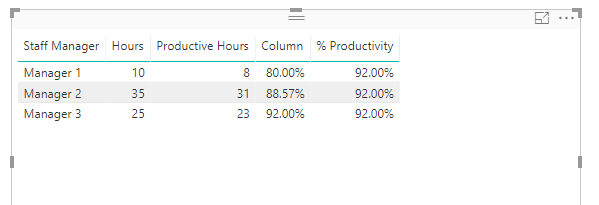
I have created a simple measure (% Productivity) which divides productive hours by total hours. Obviously this creates different results in different filter contexts. However, what I want to do is find the max of % productivity when my data is aggregated at staff manager level. In the above example the table I want to calculate the MAX on is this:
| Manger | Hours | Productive Hours | % Productivity |
| Manager 1 | 10 | 8 | 80.00% |
| Manager 2 | 35 | 31 | 88.57% |
| Manager 3 | 25 | 23 | 92.00% |
Therefore I want a measure that, whatever the filter context, will always return the max productivity at manager level (in this case 92%.
Any help would be much appreciated.
Thanks!
Solved! Go to Solution.
@M_J_Farrow,
Please check my PBIX file.
https://1drv.ms/u/s!AhsotbnGu1Nok0x6nUs3Pv_bM-aU
Regards,
Lydia
@M_J_Farrow,
Create the following column and % Productivity measure in your table.
Column = CALCULATE( SUM(Table[Productive Hours]),FILTER(Table,Table[Staff Manager]=EARLIER(Table[Staff Manager])))/CALCULATE( SUM(Table[Hours]),FILTER(Table,Table[Staff Manager]=EARLIER(Table[Staff Manager])))
% Productivity = CALCULATE(MAX(Table[Column]),ALL(Table))
Regards,
Lydia
Thanks for this Lydia. My data isn't arranged as you have shown in your graphic. When I showed the data in this format it was a visual I create from my data. Where would I therefore add the calculated column- to the data by staff member? In this data set you can have more than one hours booking per staff member.
@M_J_Farrow,
Please check my PBIX file.
https://1drv.ms/u/s!AhsotbnGu1Nok0x6nUs3Pv_bM-aU
Regards,
Lydia
Thanks Lydia. Sorry I took so long to reply to this. Must have missed your reply first time around.
There is a minor error in the above. In the first gtable staff member E should show as managerr 3. Doesn't impact the question which I'm asking.
Check out the November 2025 Power BI update to learn about new features.
Advance your Data & AI career with 50 days of live learning, contests, hands-on challenges, study groups & certifications and more!