cancel
Showing results for 
Search instead for 
Did you mean: 

Get Fabric Certified for FREE during Fabric Data Days. Don't miss your chance! Request now

Reply
rhcentennialh
Helper II
Helper II

Max of Year - Visual Level Filter Selection

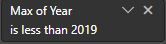
I am trying to find out how i can get the "Max of" selection back in my Visual Level Filters for a data referencing Years. I was able to accomplish this earlier in the year but cant remember how i did this.


Visual Level Filter Example.JPG


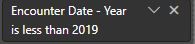
Currently i am looking at this (Below) and am unable to recreate what i did at the beginning of the year. 


Visual Level Filter Example 2.0.JPG


I need to make it be "Max of Encounter Date - Year" so my filter and visuals will work properly


Any help would be greatly appreciated

1 ACCEPTED SOLUTION
v-xicai
Community Support
Community Support

Hi @rhcentennialh ,


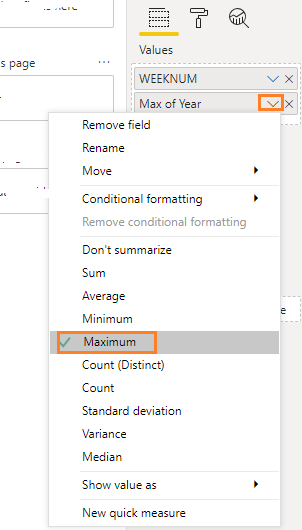
You may get this "Max of " setting like below in Format pane.


59.png


Best Regards,

Amy


If this post helps, then please consider Accept it as the solution to help the other members find it more quickly.

View solution in original post

2 REPLIES 2
v-xicai
Community Support
Community Support

Hi @rhcentennialh ,


You may get this "Max of " setting like below in Format pane.


59.png


Best Regards,

Amy


If this post helps, then please consider Accept it as the solution to help the other members find it more quickly.

AnthonyTilley
Solution Sage
Solution Sage

Given the images you have posted the Max of year is a calculated colunm or measure that is then being filtered the MAX included in the name can only be because you have a colunm called max of year.or a measure called max of year 


i would guess that in one of your tables yeah have someting along the lines of Max of year = MAX([YEAR])

would need to no exactly what your trying to achive and some sample data along with a model in order to help any further


Did I answer your question? Mark my post as a solution!

Proud to be a Super User!


Helpful resources

Announcements
November Power BI Update Carousel

Power BI Monthly Update - November 2025

Check out the November 2025 Power BI update to learn about new features.

Fabric Data Days Carousel

Fabric Data Days

Advance your Data & AI career with 50 days of live learning, contests, hands-on challenges, study groups & certifications and more!

FabCon Atlanta 2026 carousel

FabCon Atlanta 2026

Join us at FabCon Atlanta, March 16-20, for the ultimate Fabric, Power BI, AI and SQL community-led event. Save $200 with code FABCOMM.

Top Solution Authors
Top Kudoed Authors