cancel
Showing results for 
Search instead for 
Did you mean: 

We've captured the moments from FabCon & SQLCon that everyone is talking about, and we are bringing them to the community, live and on-demand. Starts on April 14th. Register now

Reply
sarjensystems1
Helper III
Helper III

Matrix visual

Hii

I have the requirement like to show the forecast dynamically for 12 months i.e from AUG 2019 to sep 2018

I have taken the matrix visual and used month-year in the columns field and countries in the rows and forecast values in the values field.

Now i need to show  the month year in  descending order like AUG2019 JULY2019 JUNE2019....... but there is no option to sort column headers in the matrix visual.

I have tried the DAX formulae =12-[month number] but it didn't worked..

Is there any way to achieve it??

Thank you

1 ACCEPTED SOLUTION
PattemManohar
Community Champion
Community Champion

@sarjensystems1  Please create a new SortKey column for your MonthYear column 


SortKey_MonthYear = FORMAT([date],"YYYYMM")

So the values will be 201908,201907,201906 etc... Use this sortkey column as Sort By Column for the MonthYear column. Then the ascending or descending on your Sort By option in Matrix visual will work as expected.


Did I answer your question? Mark my post as a solution!

Proud to be a PBI Community Champion


View solution in original post

4 REPLIES 4
PattemManohar
Community Champion
Community Champion

@sarjensystems1  Please create a new SortKey column for your MonthYear column 


SortKey_MonthYear = FORMAT([date],"YYYYMM")

So the values will be 201908,201907,201906 etc... Use this sortkey column as Sort By Column for the MonthYear column. Then the ascending or descending on your Sort By option in Matrix visual will work as expected.


Did I answer your question? Mark my post as a solution!

Proud to be a PBI Community Champion


HII @PattemManohar 

After creating the sort colmn it is sorting in the ascending order(SEPT2018,OCT2018,NOV2018...........JULY2019,AUG2019)

.but i need descending order(AUG2019,JUL2019......NOV2018,OCT2018,SEP2018)


Thank you

@sarjensystems1 Please select “Sort descending” option when you click on the ellipse (three little dots on top right of the visual)


Did I answer your question? Mark my post as a solution!

Proud to be a PBI Community Champion


Anonymous
Not applicable

Hi @sarjensystems1 ,


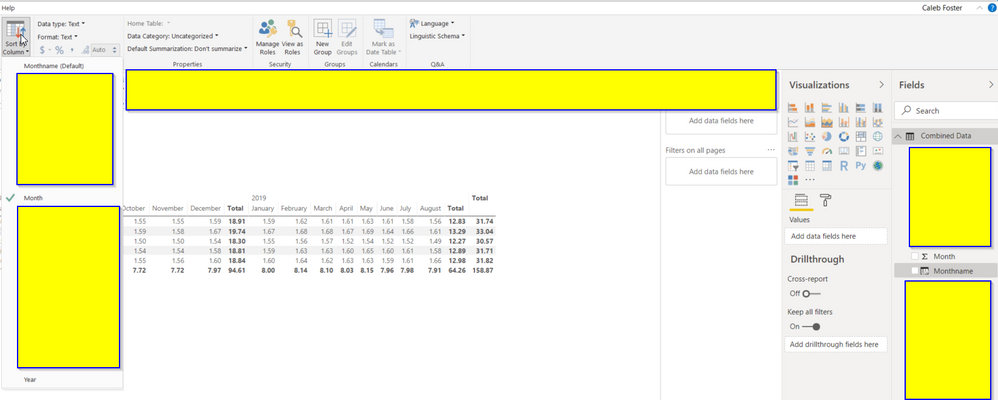
If you select the modeling tab and then your month-year field from the fields pane, you should see the option to sort by a column. You should then be able to sort by your primary date field, which will make sure it stays in order when being put into the matrix visual.Power bi example 1.png

Helpful resources

Announcements
New to Fabric survey Carousel

New to Fabric Survey

If you have recently started exploring Fabric, we'd love to hear how it's going. Your feedback can help with product improvements.

Power BI DataViz World Championships carousel

Power BI DataViz World Championships - June 2026

A new Power BI DataViz World Championship is coming this June! Don't miss out on submitting your entry.

Join our Fabric User Panel

Join our Fabric User Panel

Share feedback directly with Fabric product managers, participate in targeted research studies and influence the Fabric roadmap.

March Power BI Update Carousel

Power BI Community Update - March 2026

Check out the March 2026 Power BI update to learn about new features.