Join us at FabCon Vienna from September 15-18, 2025
The ultimate Fabric, Power BI, SQL, and AI community-led learning event. Save €200 with code FABCOMM.
Get registered- Power BI forums
- Get Help with Power BI
- Desktop
- Service
- Report Server
- Power Query
- Mobile Apps
- Developer
- DAX Commands and Tips
- Custom Visuals Development Discussion
- Health and Life Sciences
- Power BI Spanish forums
- Translated Spanish Desktop
- Training and Consulting
- Instructor Led Training
- Dashboard in a Day for Women, by Women
- Galleries
- Data Stories Gallery
- Themes Gallery
- Contests Gallery
- Quick Measures Gallery
- Notebook Gallery
- Translytical Task Flow Gallery
- TMDL Gallery
- R Script Showcase
- Webinars and Video Gallery
- Ideas
- Custom Visuals Ideas (read-only)
- Issues
- Issues
- Events
- Upcoming Events
Enhance your career with this limited time 50% discount on Fabric and Power BI exams. Ends September 15. Request your voucher.
- Power BI forums
- Forums
- Get Help with Power BI
- Desktop
- Re: Matrix visual: Show values of one column (valu...
- Subscribe to RSS Feed
- Mark Topic as New
- Mark Topic as Read
- Float this Topic for Current User
- Bookmark
- Subscribe
- Printer Friendly Page


- Mark as New
- Bookmark
- Subscribe
- Mute
- Subscribe to RSS Feed
- Permalink
- Report Inappropriate Content
Matrix visual: Show values of one column (value) only for specific rows
Dear Forum,
I have defined in a Matrix visual
Rows:
- "Continent"
- "Country"
- "Shop"
Values:
- "Count_Subsidiaries"
- "URL_Shop"
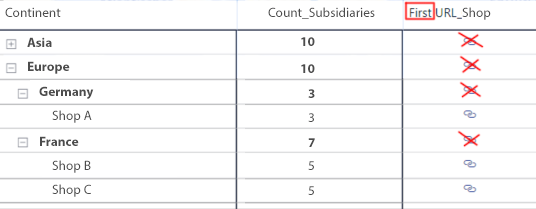
Now, I want to connect each Shop to its corresponding Web URL. But unfortunately at the Matrix visual, there is the first URL for each categroy presented at the subtotals, too (the name is changed to 'First_URL_Shop').
Is there an elegant way, to have the Web URLs only shown for the rows "Shop" and not as 'First_URL' also for the other categories?
Thank you very much for your help!
Mister_T
Solved! Go to Solution.

- Mark as New
- Bookmark
- Subscribe
- Mute
- Subscribe to RSS Feed
- Permalink
- Report Inappropriate Content
Hi @Mister_T ,
Based on your description, you can create a measure as follows.
Measure = IF(HASONEVALUE('Sheet4'[Continent]),MAX('Sheet4'[URL_Shop]))Result:
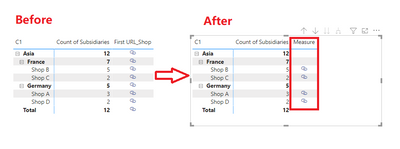
Hope that's what you were looking for.
Best Regards,
Yuna
If this post helps, then please consider Accept it as the solution to help the other members find it more quickly.
- Mark as New
- Bookmark
- Subscribe
- Mute
- Subscribe to RSS Feed
- Permalink
- Report Inappropriate Content
Hi @Mister_T ,
Thanks for your reply. I modified the measure as follows.
modified_Measure = IF(ISINSCOPE('test for url'[Continent]),MAX('test for url'[URL_Shop]))
Result:

Hope that's what you were looking for.
Best Regards,
Yuna
If this post helps, then please consider Accept it as the solution to help the other members find it more quickly.
- Mark as New
- Bookmark
- Subscribe
- Mute
- Subscribe to RSS Feed
- Permalink
- Report Inappropriate Content
Hi @Mister_T ,
Based on your description, you can create a measure as follows.
Measure = IF(HASONEVALUE('Sheet4'[Continent]),MAX('Sheet4'[URL_Shop]))Result:
Hope that's what you were looking for.
Best Regards,
Yuna
If this post helps, then please consider Accept it as the solution to help the other members find it more quickly.
- Mark as New
- Bookmark
- Subscribe
- Mute
- Subscribe to RSS Feed
- Permalink
- Report Inappropriate Content
Hi @Anonymous,
thank you very much for your support! Sorry for my late reaction. I unfortunately was not available for some time.
I have tested your solution, but unfortunately it only works in case there is more than one shop per country. In case there is only one shop listed in a specific country, then I still have an URL on country level. I would like to have the URL at the store level only, regardless of the number of stores per country. Any idea how to fix this?
Thanks a lot!
Best regards,
Mister_T
- Mark as New
- Bookmark
- Subscribe
- Mute
- Subscribe to RSS Feed
- Permalink
- Report Inappropriate Content
Hi @Mister_T ,
Thanks for your reply. I modified the measure as follows.
modified_Measure = IF(ISINSCOPE('test for url'[Continent]),MAX('test for url'[URL_Shop]))
Result:
Hope that's what you were looking for.
Best Regards,
Yuna
If this post helps, then please consider Accept it as the solution to help the other members find it more quickly.
- Mark as New
- Bookmark
- Subscribe
- Mute
- Subscribe to RSS Feed
- Permalink
- Report Inappropriate Content
Hi @Anonymous,
It works like a charm! Exactly, what I was looking for. Thank you very much!
Have a great day!
Mister_T


- Mark as New
- Bookmark
- Subscribe
- Mute
- Subscribe to RSS Feed
- Permalink
- Report Inappropriate Content
Helpful resources

Power BI Monthly Update - August 2025
Check out the August 2025 Power BI update to learn about new features.

Fabric Community Update - August 2025
Find out what's new and trending in the Fabric community.

| User | Count |
|---|---|
| 65 | |
| 62 | |
| 59 | |
| 54 | |
| 28 |


| User | Count |
|---|---|
| 181 | |
| 82 | |
| 66 | |
| 47 | |
| 44 |


