

This time we’re going bigger than ever. Fabric, Power BI, SQL, AI and more. We're covering it all. You won't want to miss it.
Learn moreDid you hear? There's a new SQL AI Developer certification (DP-800). Start preparing now and be one of the first to get certified. Register now
Hello All,
i have an issue chancing the view in my matrix :
This is what the matrix is giving me:
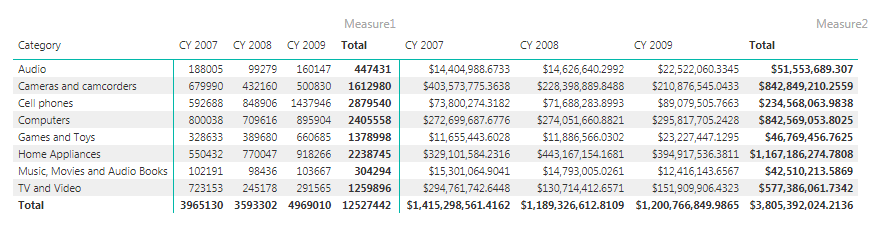
and this is what i would like:
basically pieces to the left for each month and than invoicing to the right for each month .
Is it possible ?
many Thanks
Solved! Go to Solution.
Hi Alex,
The workaround consists of two identical tables, in which only changes the measure. You have to bring to the front the left table, put it overlapping the row headers of the right table and make sure they are aligned horizontally.
Best,
Jorge.
Dears ,
Did someone figure out a better way for this topic ... onfurtunatly the overlap does not fit my need anysmore too many row heathers.
Thanks
Hi Alex,
The workaround consists of two identical tables, in which only changes the measure. You have to bring to the front the left table, put it overlapping the row headers of the right table and make sure they are aligned horizontally.
Best,
Jorge.
I tried this overlapping procedure ... but also showing the "catogory" in second table ... is there a way to hide ?
Hi Alex, Could you show us a screenshot? Thanks
Hi Alex,
I don't know a solution in the matrix options. However, I can give you a workaround with two tables overlapped.
What do you think? It is useful for you?
Check out the April 2026 Power BI update to learn about new features.
Sign up to receive a private message when registration opens and key events begin.
If you have recently started exploring Fabric, we'd love to hear how it's going. Your feedback can help with product improvements.
| User | Count |
|---|---|
| 34 | |
| 32 | |
| 25 | |
| 21 | |
| 16 |
| User | Count |
|---|---|
| 61 | |
| 49 | |
| 28 | |
| 23 | |
| 23 |