cancel
Showing results for 
Search instead for 
Did you mean: 

We've captured the moments from FabCon & SQLCon that everyone is talking about, and we are bringing them to the community, live and on-demand. Starts on April 14th. Register now

Reply
memons
Frequent Visitor

Matrix table

I have data in this table exactly like this


SerialMonthTarget (Total)Coverage% CoverageAdmin Coverage% Admin Coverage
1Jan25510224965797.8%261679102.5%
2Mar28776625819989.7%291686101.3%


I want this data in the table as shown below, Is this possible in PowerBI to do it without changing my dataset.


SerialMonthTarget (Total)

Admin Coverage 

(considered as Jan Coverage, not admin coverage)

% Admin Coverage
1Jan25510224965797.8%
2Mar287766291686101.3%
2 ACCEPTED SOLUTIONS
Anonymous
Not applicable

Hi  ,

I created a sample pbix file(see attachment) for you, please check whether that is what you want. 

1. Create a measure to get the sum of Coverage base on different conditions

NAdmin Coverage = 
VAR _tab =
    SUMMARIZE (
        'Table',
        'Table'[Serial],
        'Table'[Month],
        "coverage",
            IF (
                SELECTEDVALUE ( 'Table'[Month] ) = "Jan",
                SUM ( 'Table'[Coverage] ),
                SUM ( 'Table'[Admin Coverage] )
            )
    )
RETURN
    SUMX ( _tab, [coverage] )

2. Create a measure to get the sum of %Coverage base on different conditions

N%Admin Coverage = 
VAR _tab =
    SUMMARIZE (
        'Table',
        'Table'[Serial],
        'Table'[Month],
        "%coverage",
            IF (
                SELECTEDVALUE ( 'Table'[Month] ) = "Jan",
                SUM ( 'Table'[% Coverage] ),
                SUM ( 'Table'[% Admin Coverage] )
            )
    )
RETURN
    SUMX ( _tab, [%coverage] )
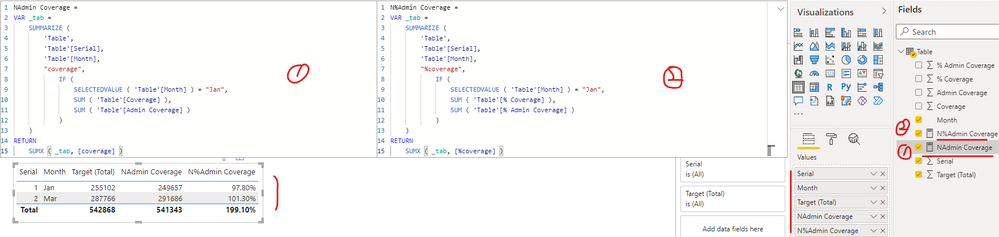
yingyinr_0-1652666739252.png

If the above one can't help you get the desired result, please provide some sample data in your tables (exclude sensitive data) with Text format and your expected result with backend logic and special examples. It is better if you can share a simplified pbix file. You can refer the following link to upload the file to the community. Thank you.

How to upload PBI in Community

Best Regards

View solution in original post

Thanks, You have made my day. Great Work. The solution worked perfectly.

View solution in original post

2 REPLIES 2
Anonymous
Not applicable

Hi  ,

I created a sample pbix file(see attachment) for you, please check whether that is what you want. 

1. Create a measure to get the sum of Coverage base on different conditions

NAdmin Coverage = 
VAR _tab =
    SUMMARIZE (
        'Table',
        'Table'[Serial],
        'Table'[Month],
        "coverage",
            IF (
                SELECTEDVALUE ( 'Table'[Month] ) = "Jan",
                SUM ( 'Table'[Coverage] ),
                SUM ( 'Table'[Admin Coverage] )
            )
    )
RETURN
    SUMX ( _tab, [coverage] )

2. Create a measure to get the sum of %Coverage base on different conditions

N%Admin Coverage = 
VAR _tab =
    SUMMARIZE (
        'Table',
        'Table'[Serial],
        'Table'[Month],
        "%coverage",
            IF (
                SELECTEDVALUE ( 'Table'[Month] ) = "Jan",
                SUM ( 'Table'[% Coverage] ),
                SUM ( 'Table'[% Admin Coverage] )
            )
    )
RETURN
    SUMX ( _tab, [%coverage] )

yingyinr_0-1652666739252.png

If the above one can't help you get the desired result, please provide some sample data in your tables (exclude sensitive data) with Text format and your expected result with backend logic and special examples. It is better if you can share a simplified pbix file. You can refer the following link to upload the file to the community. Thank you.

How to upload PBI in Community

Best Regards

Thanks, You have made my day. Great Work. The solution worked perfectly.

Helpful resources

Announcements
New to Fabric survey Carousel

New to Fabric Survey

If you have recently started exploring Fabric, we'd love to hear how it's going. Your feedback can help with product improvements.

Power BI DataViz World Championships carousel

Power BI DataViz World Championships - June 2026

A new Power BI DataViz World Championship is coming this June! Don't miss out on submitting your entry.

Join our Fabric User Panel

Join our Fabric User Panel

Share feedback directly with Fabric product managers, participate in targeted research studies and influence the Fabric roadmap.