Join us at FabCon Atlanta from March 16 - 20, 2026, for the ultimate Fabric, Power BI, AI and SQL community-led event. Save $200 with code FABCOMM.
Register now!The Power BI Data Visualization World Championships is back! Get ahead of the game and start preparing now! Learn more
Hello,
I have in one of my reports a Matrix VIsual.
This Visual decides to not show the total column anymore depending on how it is filtered.
For example if I filter 50 weeks it shows the total.
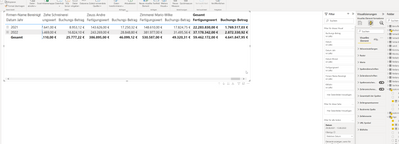
If I filter 100 weks it doesnt anymore.
I can't explain this behaviour. Because if I filter 10 calendaric years it shows it.
If I filter 10 years, it doesnt.
So it can't be the amount of columns. Cause the 100 weeks that doent show the total cant be lmore columns then 10 calendaric years.
I can even say 100 calendaric years and it shows it, but switched to years nothing.
Filtered as years it only shows it as long it is just 1 year.
And I change nothing else beside this one filter.
I really don't know what is happening there and how I can solve it.
Of course I could make a separate Table just for total. But this is not rly user friendly. Cause you have to expand a year in two tables and so on.
Greetings Benedikt
@amitchandak @davehus
I think I know what sign you mean, because in the graph visual it is when I show too much data.
But no there isn't in the matrix.
And yes it is fully expanded. It should show all data.
Hi @BeneL ,
Is the visual fully exapanded to show all the data?
Did I help you today? Please accept my solution and hit the Kudos button.
@BeneL , Just is there some sign (!) near to visual or in sub total column? That means data points limit has exceeded and not all data is shown
The Power BI Data Visualization World Championships is back! Get ahead of the game and start preparing now!
| User | Count |
|---|---|
| 59 | |
| 46 | |
| 39 | |
| 38 | |
| 21 |
| User | Count |
|---|---|
| 176 | |
| 131 | |
| 118 | |
| 82 | |
| 54 |