Join us at FabCon Atlanta from March 16 - 20, 2026, for the ultimate Fabric, Power BI, AI and SQL community-led event. Save $200 with code FABCOMM.
Register now!Get Fabric Certified for FREE during Fabric Data Days. Don't miss your chance! Request now
Hello,
I have a matrix where i have a list of dates as columns and it does not show all the colums in the dataset.
There are no filters on the visual and "Show items with no data" is checked.
To make it stranger, when the dates are on the rows it shows the whole dataset.
Any help would be great.
Thanks,
Solved! Go to Solution.
Hi @Anonymous ,
Yes, This problem does exist.
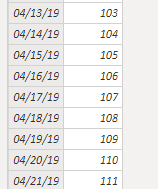
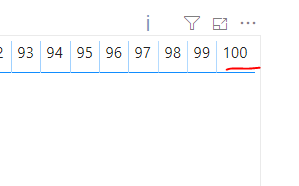
As tested, matrix can only display up to 100 columns.
This case also mentioned this problem:
Limit on the number of columns in Table and Matrix visuals
Best regards,
Lionel Chen
If this post helps, then please consider Accept it as the solution to help the other members find it more quickly.
Hi @Anonymous ,
Could you show us a sample data model?
Best regards,
Lionel Chen
If this post helps, then please consider Accept it as the solution to help the other members find it more quickly.
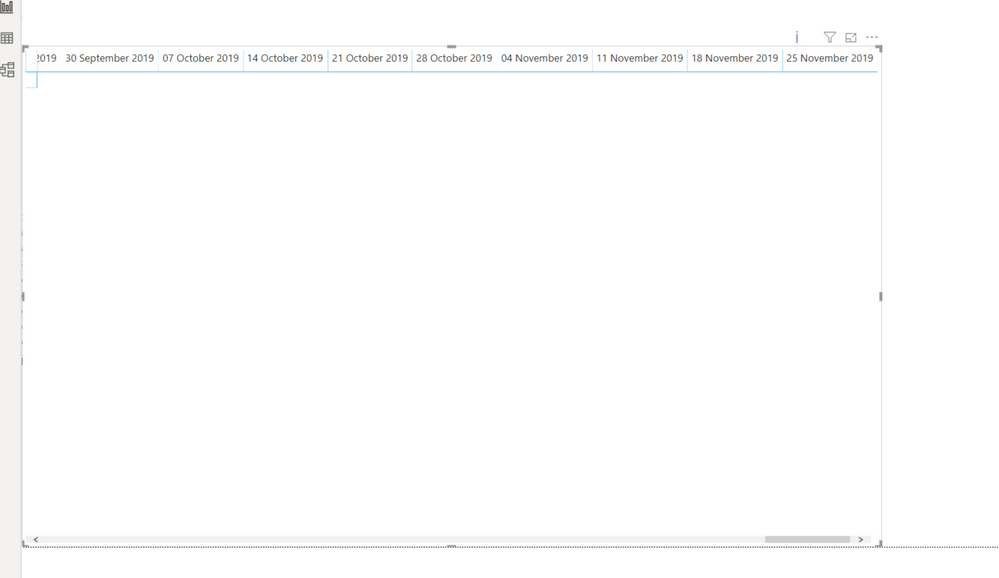
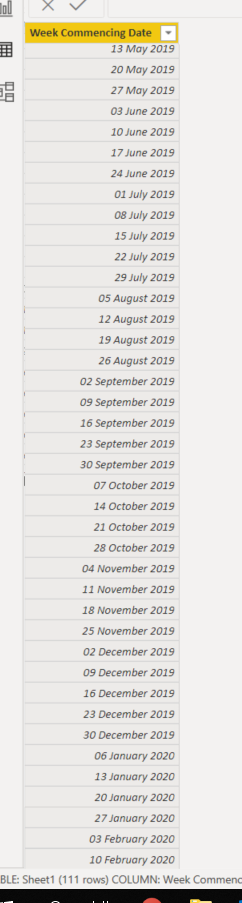
Please see the below screenshots, you can see the matrix visual i have created with "Week Commencing Date" on the columns and the dataset is only one column down to 10 February 2020.
As you can see the matrix visual only goes to 25th of November.
Thanks,
Hi @Anonymous ,
Yes, This problem does exist.
As tested, matrix can only display up to 100 columns.
This case also mentioned this problem:
Limit on the number of columns in Table and Matrix visuals
Best regards,
Lionel Chen
If this post helps, then please consider Accept it as the solution to help the other members find it more quickly.
Check out the November 2025 Power BI update to learn about new features.
Advance your Data & AI career with 50 days of live learning, contests, hands-on challenges, study groups & certifications and more!