Get certified for free when you join Fabric Data Days 2026 and dive into Fabric, Power BI, SQL, AI, and other essential data skills.
Join nowData Days is here! Join us now for 60+ days of learning, challenges, and connection. Learn more
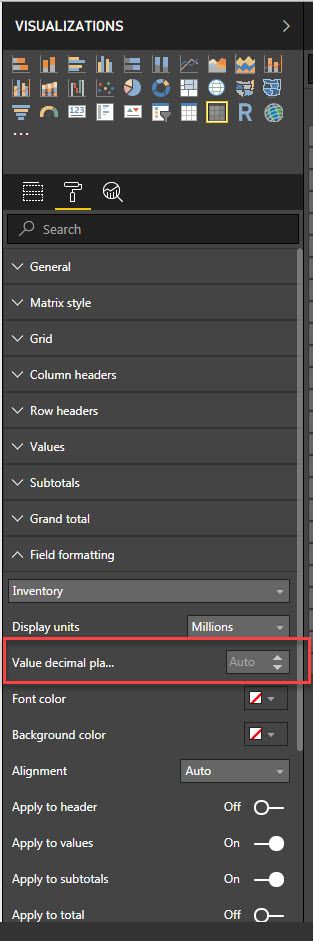
Anyone know why under Field Formatting in the Table Matrix the Value Decimal Places would be greyed out and not be available to select? I can not set decimal places for any of the fields in this table, even if the Display Units is set to Auto.
I'm also having this trouble.
I've created a 'percentage' behavior in my total column by virtue of ISFILTERED, but I need the main data body to show as units, while the percentage has to be at least decimals. It seems like this field should control the behavior I need but it's grayed out! Arg!
Hi bhorvati,
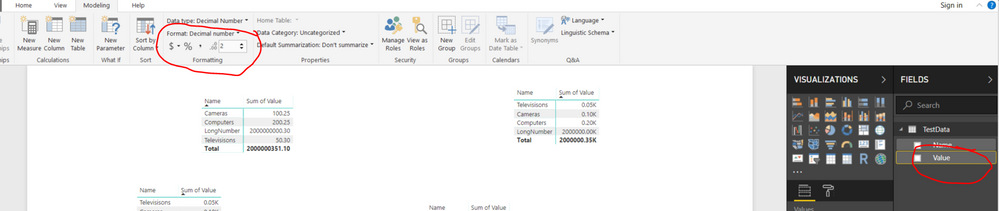
I cannot answer why this is happening but an alternative is to use the 'Modelling' tab and format your number and Decimal places in there as shown.
I have same issue on this, and I really don't want to format at data model level, any idea why it is grayed out
I have the same issue..Do you know what's causing it?
Don't miss out on Data Days, June 15 through August 7. Learn Fabric, Power BI, SQL, AI and more.
Check out the May 2026 Power BI update to learn about new features.
| User | Count |
|---|---|
| 22 | |
| 21 | |
| 20 | |
| 17 | |
| 13 |
| User | Count |
|---|---|
| 58 | |
| 50 | |
| 36 | |
| 30 | |
| 26 |