Join us at FabCon Atlanta from March 16 - 20, 2026, for the ultimate Fabric, Power BI, AI and SQL community-led event. Save $200 with code FABCOMM.
Register now!Get Fabric Certified for FREE during Fabric Data Days. Don't miss your chance! Request now
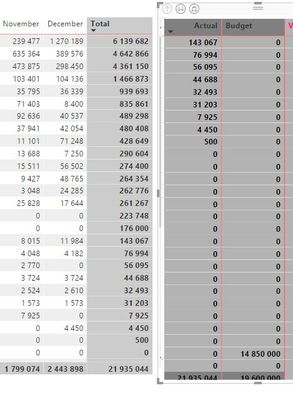
Hi, I have to matrixes with partly same values. In one of the matrixes (left) the column total row is "floating", aka always visible, in the other (right) the column total disappears if I scroll up and there are more lines than can fit in the box
How do I get the column total to always be floating / visibleI? I am not able to find this for some reason 😞
I had this issue and it has to do with the "stepped layout" under row headers. Stepped Layout on has floating total, stepped layout off it stays all the way at the bottom.
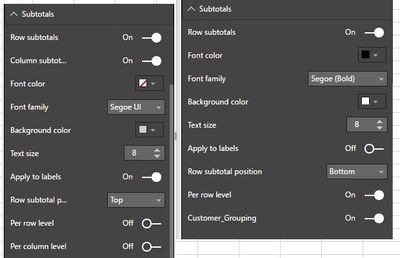
I dont know if this is related, but even though both matrixes are same style I have under "subtotals" different options in the two matrixs...?
(PS: "Customer_Groping" is the rows
Check out the November 2025 Power BI update to learn about new features.
Advance your Data & AI career with 50 days of live learning, contests, hands-on challenges, study groups & certifications and more!