Forum Discussion

Maps Issue Australia
Hi,
I just created a map with sales data of different post codes in Australia. The made the post code column as "Country, State Postcode". The post code "Australia, NSW 2052" is showing in Florida USA in the bubble map. All other data is fine. I previously used post code as "Australia 2052". The problem was same as now. Is there any way to resolve this?
Regards,
Abrar
- Anonymous7 years ago
@saad_mce,
What version of Power BI Desktop do you use? And what data category fo you set for the column?
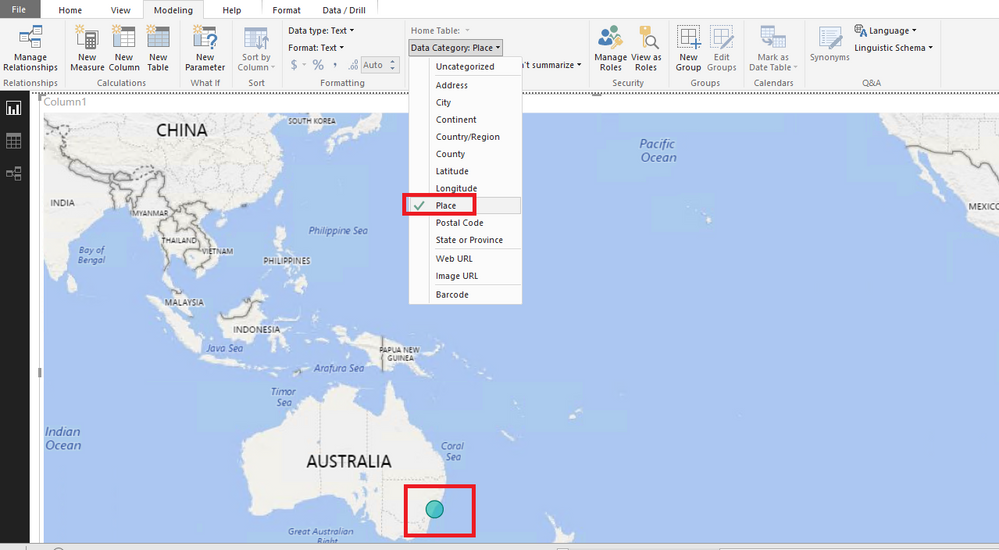
I make a test in Power BI Desktop december release(2.65.5313.1381), and set data category to Place, everything works well.
Regards,
Lydia

3 Replies
- AnonymousNot applicable
@saad_mce,
What version of Power BI Desktop do you use? And what data category fo you set for the column?
I make a test in Power BI Desktop december release(2.65.5313.1381), and set data category to Place, everything works well.
Regards,
Lydia - AnonymousNot applicable
- AnonymousNot applicable
Hi Lydia,
Problem solved. Thank you.
I was using the previous version.
Regards,
Abrar