cancel
Showing results for 
Search instead for 
Did you mean: 

The Power BI Data Visualization World Championships is back! Get ahead of the game and start preparing now! Learn more

Reply
AshDil
Helper V
Helper V

Manage Relationship between Fact table not having Date column and Calendar table

Hi,


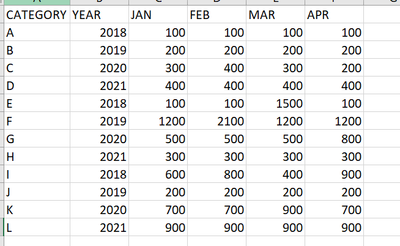
I have data as follows:

AshDil_0-1626150106023.png 

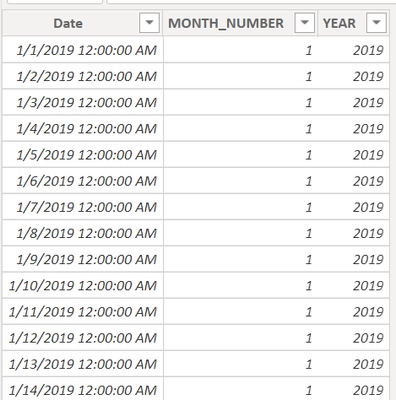
Calendar table:

AshDil_1-1626150220217.png


want to establish connection between the above fact table and calendar table which I created in Power BI.

Please help me to do.


Thanks,

AshDil.

1 ACCEPTED SOLUTION
TomMartens
Super User
Super User

Hey @AshDil ,


first you have to transform the months columns in your fact table into two attribute (month)/value combination using the Unpivot operation in Power Query. Here you will find one of the many articles describing what Unpivoting means: Unpivot Columns in Power BI - New Tech Dojo


Then create another column that will finally hold a date column, this date column then is allowing to relate the fact table with your calendar table.


If you need more help, please create a Power BI file that contains some sample data but still reflects your data model, upload the pbix to onedrive or dropbox and share the link. If you are using Excel to create the sample data, share the xlsx as well.


Regards,

Tom 


Did I answer your question? Mark my post as a solution, this will help others!

Proud to be a Super User!
I accept Kudos 😉
Hamburg, Germany

View solution in original post

2 REPLIES 2
TomMartens
Super User
Super User

Hey @AshDil ,


first you have to transform the months columns in your fact table into two attribute (month)/value combination using the Unpivot operation in Power Query. Here you will find one of the many articles describing what Unpivoting means: Unpivot Columns in Power BI - New Tech Dojo


Then create another column that will finally hold a date column, this date column then is allowing to relate the fact table with your calendar table.


If you need more help, please create a Power BI file that contains some sample data but still reflects your data model, upload the pbix to onedrive or dropbox and share the link. If you are using Excel to create the sample data, share the xlsx as well.


Regards,

Tom 


Did I answer your question? Mark my post as a solution, this will help others!

Proud to be a Super User!
I accept Kudos 😉
Hamburg, Germany

Hi @TomMartens ,
Thanks for your help.

Helpful resources

Announcements
Power BI DataViz World Championships

Power BI Dataviz World Championships

The Power BI Data Visualization World Championships is back! Get ahead of the game and start preparing now!

December 2025 Power BI Update Carousel

Power BI Monthly Update - December 2025

Check out the December 2025 Power BI Holiday Recap!

FabCon Atlanta 2026 carousel

FabCon Atlanta 2026

Join us at FabCon Atlanta, March 16-20, for the ultimate Fabric, Power BI, AI and SQL community-led event. Save $200 with code FABCOMM.