Forum Discussion

Make it so do not summarize works
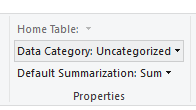
I have population defaulted to Don't summarize. Using it in a bar chart, it defaults to aggregating by COUNT. I cannot get it too drop the aggregation. I select Average as a workaround but then that is in the axis description, which I don't want.
Make it so Don't summarize, and Show Value as No Calculation works.https://app.powerbi.com/groups/me/reports/f0a23657-424e-4459-a46b-bf5a937295ce
5 Replies
 v-yuta-msft
Community Support
Anonymous ,
Click column you need to aggregate, then click modeling-> select default summarization as sum/average.
Community Support Team _ Jimmy Tao
If this post helps, then please consider Accept it as the solution to help the other members find it more quickly.
- AnonymousNot applicable
Thanks for the reply. But I do not want it to aggregate so why would I select SUM?
- v-yuta-msft
Anonymous ,
Could you please share a sample file so that I can make test on it?
Regards,
Jimmy Tao
 MarkDataScienceRegular Visitor
This is a consistenly UNSOLVED problem in PBI -- I have attemped a dozen suggested solutions in order to make "Do Not Summarize" available as an option --- NONE OF THEM WORK>
MS SUCKS!
- d_gosbell
Super User
It is not clear what your issue is. If you could provide an example file as requested by v-yuta-msft that illustrates this issue and if you can also provide details of the output your would expect from that sample data we might be able to help come up with a solution.