cancel
Showing results for 
Search instead for 
Did you mean: 

Data Days is here! Join us now for 60+ days of learning, challenges, and connection. Learn more

Reply
qmartiny
Helper III
Helper III

MAXX of Measure not giving expected result

Hello,


Here's the short on the issue

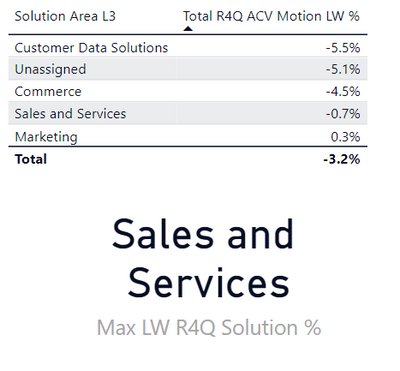
I want to return the top category and value for this measure. However writing the dax for it gives me the wrong result.
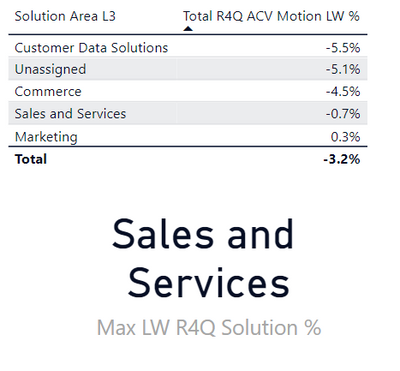
 

qmartiny_0-1667303808274.png


I have the following measure calculating the difference between two snapshot values in a table as follows 


Total R4Q ACV Motion LW % = 
VAR CurrentPipe = CALCULATE (
    SUM ( 'CX Pipe Motion'[ACV EUR] ),
    REMOVEFILTERS( 'CX Pipe Motion'[Snapshot Short Desc]),'CX Pipe Motion'[Snapshot Short Desc] = "Today" && 'CX Pipe Motion'[DRM cont] in {"Active", "Booked/Won"} && 'CX Pipe Motion'[Closing Quarter] in {"2022-Q4", "2023-Q1", "2023-Q2", "2023-Q3"})

VAR LWPipe = CALCULATE (
SUM ( 'CX Pipe Motion'[ACV EUR] ),
REMOVEFILTERS( 'CX Pipe Motion'[Snapshot Short Desc]),'CX Pipe Motion'[Snapshot Short Desc] = "Today -7" && 'CX Pipe Motion'[DRM cont] in {"Active", "Booked/Won"} && 'CX Pipe Motion'[Closing Quarter] in {"2022-Q4", "2023-Q1", "2023-Q2", "2023-Q3"})
    
RETURN

((CurrentPipe - LWPipe) / LWPipe )


Now trying to get the MAX of this measure 

I've used this to get the max category but i'm getting the above result instead.


Max LW R4Q Solution % = 
MAXX(
    TOPN(1, 'CX Pipe Motion', [Total R4Q ACV Motion LW %], DESC),
    'CX Pipe Motion'[Solution Area L3]
)


Any ideas would be helpful.

Thanks a lot


Quentin


1 ACCEPTED SOLUTION


Can you please try below.


Max LW R4Q Solution % = 
MAXX(
    TOPN(1, VALUES('CX Pipe Motion'[Solution Area L3]), [Total R4Q ACV Motion LW %], DESC),
    'CX Pipe Motion'[Solution Area L3]
)


Did I answer your question? Mark my post as a solution! Appreciate your Kudos!!

Proud to be a Super User!


View solution in original post

4 REPLIES 4
FarhanAhmed
Community Champion
Community Champion

Hi,


Can you please share a clear screenshot and have some sample data . It is very hard to read and understand.


Did I answer your question? Mark my post as a solution! Appreciate your Kudos!!

Proud to be a Super User!


Hi Farhan,


Here is the table. I expect the result to display the top solution by % change.


It's showing me a different solution than expected

qmartiny_0-1667303738347.png


Can you please try below.


Max LW R4Q Solution % = 
MAXX(
    TOPN(1, VALUES('CX Pipe Motion'[Solution Area L3]), [Total R4Q ACV Motion LW %], DESC),
    'CX Pipe Motion'[Solution Area L3]
)


Did I answer your question? Mark my post as a solution! Appreciate your Kudos!!

Proud to be a Super User!


Hi Farhan,


It's working if I change to ASC. Thank you!


Max LW R4Q Solution % = 
MAXX(
    TOPN(1, VALUES('CX Pipe Motion'[Solution Area L3]), [Total R4Q ACV Motion LW %], ASC),
    'CX Pipe Motion'[Solution Area L3]
)


Helpful resources

Announcements
Fabric Data Days is here Carousel

Fabric Data Days 2026

Don't miss out on Data Days, June 15 through August 7. Learn Fabric, Power BI, SQL, AI and more.

May Power BI Update Carousel

Power BI Monthly Update - May 2026

Check out the May 2026 Power BI update to learn about new features.

Power BI DataViz World Championships carousel

Power BI DataViz World Championships - June 2026

A new Power BI DataViz World Championship is coming this June! Don't miss out on submitting your entry.