FabCon is coming to Atlanta
Join us at FabCon Atlanta from March 16 - 20, 2026, for the ultimate Fabric, Power BI, AI and SQL community-led event. Save $200 with code FABCOMM.
Register now!- Power BI forums
- Get Help with Power BI
- Desktop
- Service
- Report Server
- Power Query
- Mobile Apps
- Developer
- DAX Commands and Tips
- Custom Visuals Development Discussion
- Health and Life Sciences
- Power BI Spanish forums
- Translated Spanish Desktop
- Training and Consulting
- Instructor Led Training
- Dashboard in a Day for Women, by Women
- Galleries
- Data Stories Gallery
- Themes Gallery
- Contests Gallery
- Quick Measures Gallery
- Notebook Gallery
- Translytical Task Flow Gallery
- TMDL Gallery
- R Script Showcase
- Webinars and Video Gallery
- Ideas
- Custom Visuals Ideas (read-only)
- Issues
- Issues
- Events
- Upcoming Events
Calling all Data Engineers! Fabric Data Engineer (Exam DP-700) live sessions are back! Starting October 16th. Sign up.
- Power BI forums
- Forums
- Get Help with Power BI
- Desktop
- Re: Lost columns on expanding JSON
- Subscribe to RSS Feed
- Mark Topic as New
- Mark Topic as Read
- Float this Topic for Current User
- Bookmark
- Subscribe
- Printer Friendly Page


- Mark as New
- Bookmark
- Subscribe
- Mute
- Subscribe to RSS Feed
- Permalink
- Report Inappropriate Content
Lost columns on expanding JSON
Hi
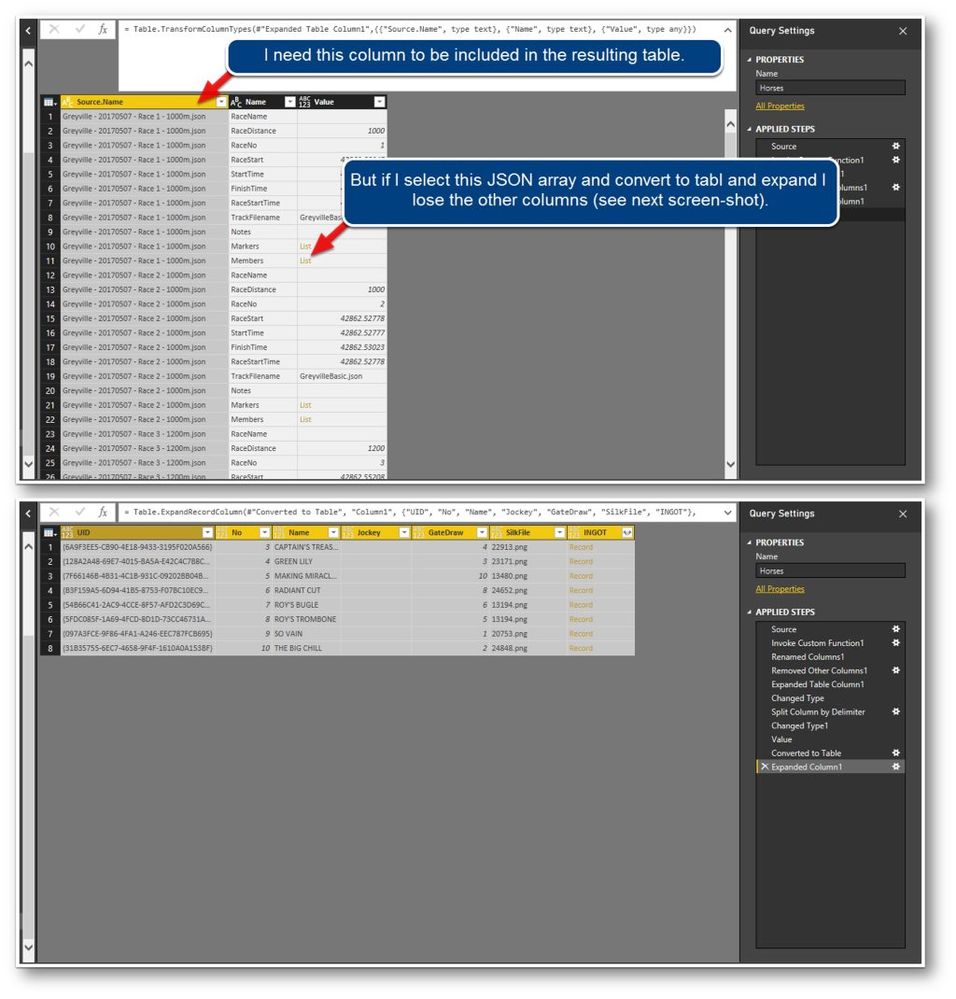
Please view the two screen-shots below.
I am trying to keep the column shown in the top screen but lose it when I convert to table.
Any assistance will be appreciated.
Thanks, Mark.
Solved! Go to Solution.


- Mark as New
- Bookmark
- Subscribe
- Mute
- Subscribe to RSS Feed
- Permalink
- Report Inappropriate Content
Please check out this file: https://www.dropbox.com/s/bram6131s01nv1t/PBI_ExpandJson.pbix?dl=0
You need to edit the query "Download" with a reference to your local drive
You just have to decide whether to join the tables in the query-editor, which would create one big monster-table, or create a data model, which would be the more professional approach.
Imke Feldmann (The BIccountant)
If you liked my solution, please give it a thumbs up. And if I did answer your question, please mark this post as a solution. Thanks!
How to integrate M-code into your solution -- How to get your questions answered quickly -- How to provide sample data -- Check out more PBI- learning resources here -- Performance Tipps for M-queries
- Mark as New
- Bookmark
- Subscribe
- Mute
- Subscribe to RSS Feed
- Permalink
- Report Inappropriate Content
Hi @sunildatalytyx ,
if the fields are not included in the first 1000 items of the expanded content, then they will not show up.
In that case you have to add them to the M-code manually.
Imagine the automatic expansion had just found "PRN", then you'd add SNR like shown below:
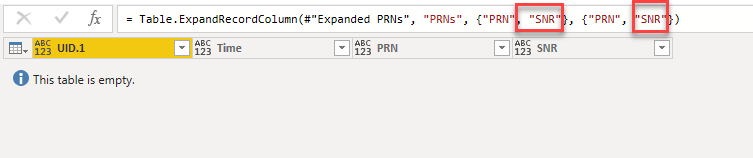
Simply add them to the list with commas as separators.
Imke Feldmann (The BIccountant)
If you liked my solution, please give it a thumbs up. And if I did answer your question, please mark this post as a solution. Thanks!
How to integrate M-code into your solution -- How to get your questions answered quickly -- How to provide sample data -- Check out more PBI- learning resources here -- Performance Tipps for M-queries

- Mark as New
- Bookmark
- Subscribe
- Mute
- Subscribe to RSS Feed
- Permalink
- Report Inappropriate Content
Can you post your JSON or a sample of it?
Follow on LinkedIn
@ me in replies or I'll lose your thread!!!
Instead of a Kudo, please vote for this idea
Become an expert!: Enterprise DNA
External Tools: MSHGQM
YouTube Channel!: Microsoft Hates Greg
Latest book!: DAX For Humans
DAX is easy, CALCULATE makes DAX hard...
- Mark as New
- Bookmark
- Subscribe
- Mute
- Subscribe to RSS Feed
- Permalink
- Report Inappropriate Content
Hi smoupre
Many thanks for picking up on my issue.
Below is a Dropbox link to the zipped files.
The folder contains 9 JSON files representing 9 horse races.
I used "Combine and Edit" to get the data into Power BI.
The rest of the scenario is described in my screen-shots in my original post.
If you need any additional information please let me know.
Thank you, Mark.
https://www.dropbox.com/s/xthmfddgiy1s1dl/Greyville%207.5.2017%20Json%20race%20files.zip?dl=0
- Mark as New
- Bookmark
- Subscribe
- Mute
- Subscribe to RSS Feed
- Permalink
- Report Inappropriate Content
Hi again smoupre
I found the tutorial below that seems to provide a solution.
Rather than wasting your time, I'll try the solution and if it works I'll post any comments.
Either way, I'll update this topic with my outcome.
Thanks for assisting, Mark.
- Mark as New
- Bookmark
- Subscribe
- Mute
- Subscribe to RSS Feed
- Permalink
- Report Inappropriate Content
Hi
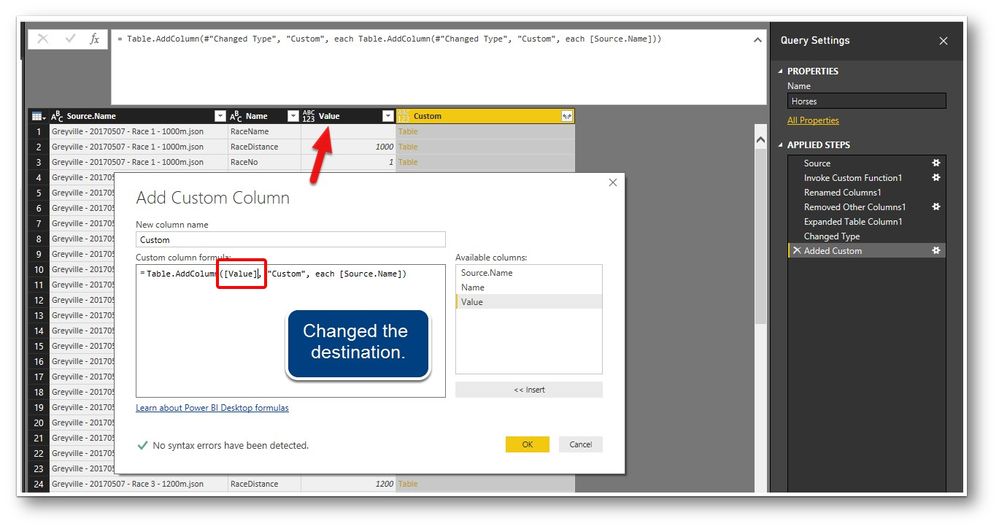
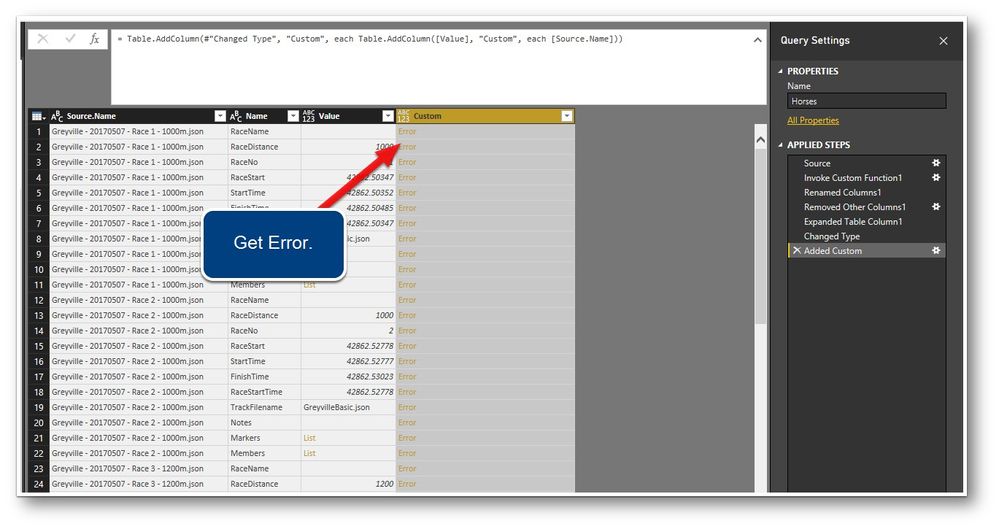
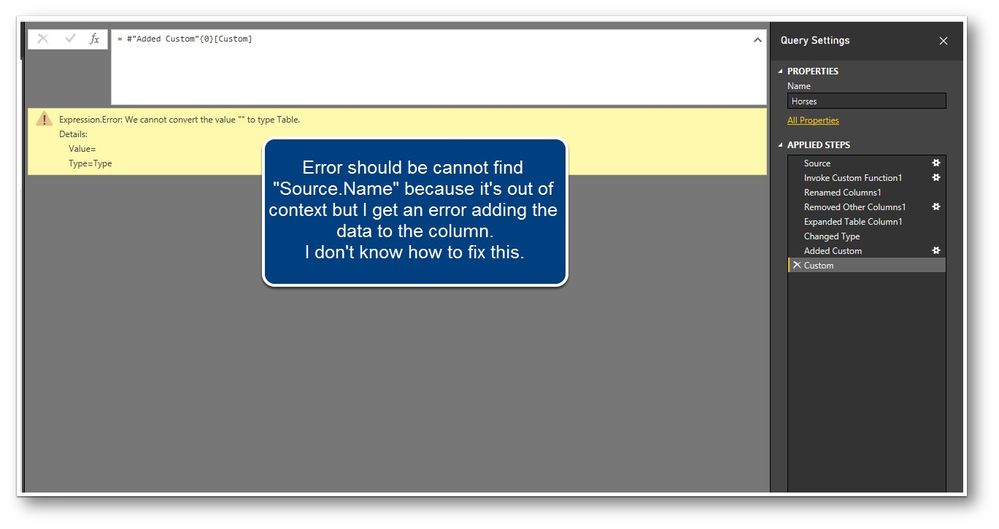
I tried to fllow the video but I suspect that adding columns to a column that hasn't been expanded is problematic.
Not sure?
I get a different error to the one expected accordng to the video.
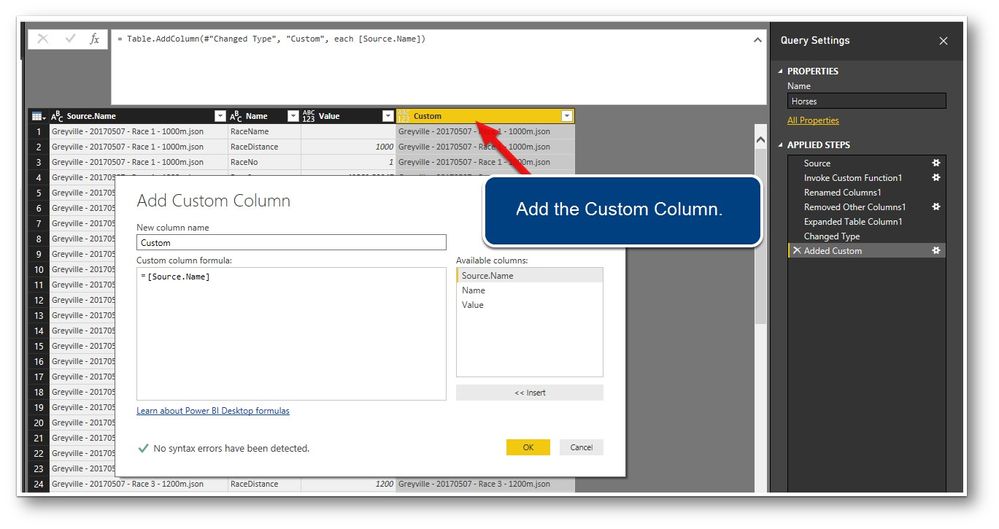
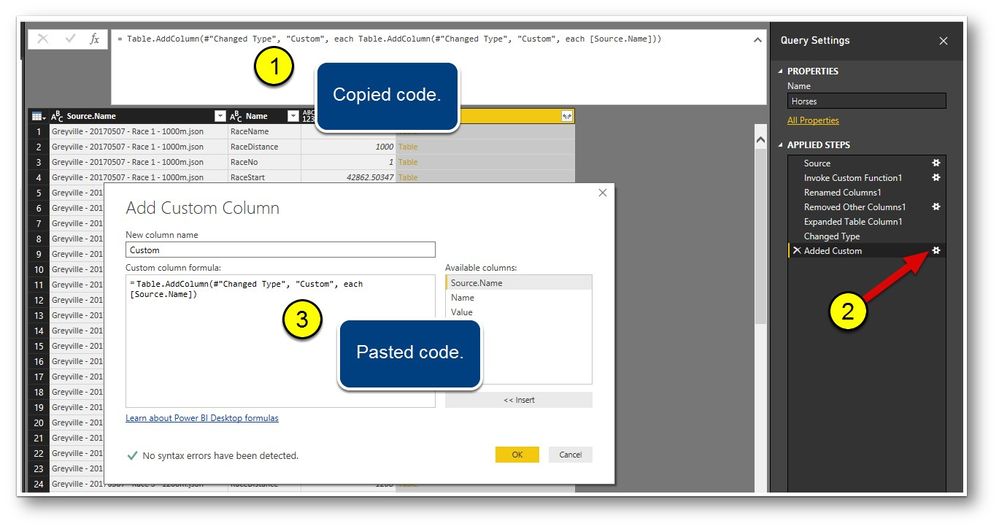
Please see screen-shots of my attempt below.
Your assistance will be greatly appreciated.
Thanks, Mark.

- Mark as New
- Bookmark
- Subscribe
- Mute
- Subscribe to RSS Feed
- Permalink
- Report Inappropriate Content
Hi
The images posted individually below (seem a bit tiny posted as a single combined image).
Thanks, Mark.
- Mark as New
- Bookmark
- Subscribe
- Mute
- Subscribe to RSS Feed
- Permalink
- Report Inappropriate Content
There's a fairly easy way to fix this: http://www.thebiccountant.com/2017/07/25/how-to-expand-a-column-that-cannot-be-expanded-in-power-bi-...
Imke Feldmann (The BIccountant)
If you liked my solution, please give it a thumbs up. And if I did answer your question, please mark this post as a solution. Thanks!
How to integrate M-code into your solution -- How to get your questions answered quickly -- How to provide sample data -- Check out more PBI- learning resources here -- Performance Tipps for M-queries
- Mark as New
- Bookmark
- Subscribe
- Mute
- Subscribe to RSS Feed
- Permalink
- Report Inappropriate Content
Hi ImkeF
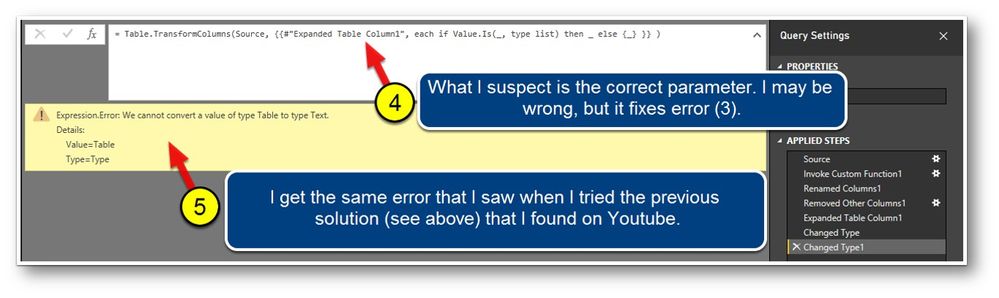
Thank you very much for your assistance, however I'm still stuck with an almost identical error as when I tried the Youtube video solution ... "Expression error: We cannot covert a value of type Table to type Text."
If you'd like any additonal information please let em know.
Below are some screen-shots of what I see.
Thanks, Mark.


- Mark as New
- Bookmark
- Subscribe
- Mute
- Subscribe to RSS Feed
- Permalink
- Report Inappropriate Content
Yes, you have to edit the code to adjust it to your query:
"Source" needs to be replaced by the name of the step that contains the table you want to operate this on (which is usually the name of the previous step) and "Column1" needs to be replaced by the name of your column "Value".
You might find these links helpful:
How to integrate M-code into your solution -- Check out more PBI- learning resources here
Imke Feldmann (The BIccountant)
If you liked my solution, please give it a thumbs up. And if I did answer your question, please mark this post as a solution. Thanks!
How to integrate M-code into your solution -- How to get your questions answered quickly -- How to provide sample data -- Check out more PBI- learning resources here -- Performance Tipps for M-queries
- Mark as New
- Bookmark
- Subscribe
- Mute
- Subscribe to RSS Feed
- Permalink
- Report Inappropriate Content
Hi ImkeF
Thanks again for your prompt reply and sorry for dragging this out.
So I changed the line to:
= Table.TransformColumns(Source, {{“Value”, each if Value.Is(_, type list) then _ else {_} }} )
where "Value" is the actual name of the colum but I still get "invalid identifier".
So "Source" is likely not the step name.
I see the following steps and I assume those are also the step names. Am I correct?
If so, how do I discover which step it is and if (say) the step is "Invoke Custom Function1", do I write the statement like this?
= Table.TransformColumns("Invoke Custom Function1", {{“Value”, each if Value.Is(_, type list) then _ else {_} }} )
I actually tried all of the names including the previous step as:
= Table.TransformColumns("Changed Type", {{“Value”, each if Value.Is(_, type list) then _ else {_} }} )
All of them throw and error "invalid idetifier" for {{"Value"
I am most grateful for your assistance.
Thanks, Mark.
- Mark as New
- Bookmark
- Subscribe
- Mute
- Subscribe to RSS Feed
- Permalink
- Report Inappropriate Content
Hi Mark,
please make sure that the quote signs are straight: "
Best to re-type them in the query-editor.
Imke Feldmann (The BIccountant)
If you liked my solution, please give it a thumbs up. And if I did answer your question, please mark this post as a solution. Thanks!
How to integrate M-code into your solution -- How to get your questions answered quickly -- How to provide sample data -- Check out more PBI- learning resources here -- Performance Tipps for M-queries
- Mark as New
- Bookmark
- Subscribe
- Mute
- Subscribe to RSS Feed
- Permalink
- Report Inappropriate Content
Hi ImkeF
I'm pretty sure I've now set the quotes correctly (see screen-shot) but even trying all step names, it still fails.
Your support is greatly appreciated.
Thanks again, Mark.

- Mark as New
- Bookmark
- Subscribe
- Mute
- Subscribe to RSS Feed
- Permalink
- Report Inappropriate Content
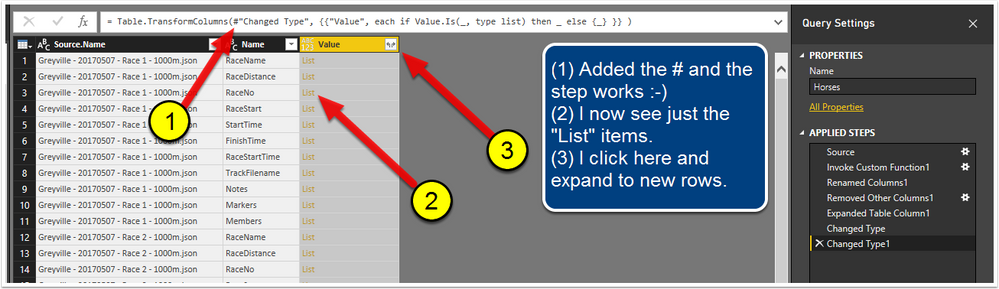
It needs to be "#Changed Type", so the hashtag is missing 😉
Imke Feldmann (The BIccountant)
If you liked my solution, please give it a thumbs up. And if I did answer your question, please mark this post as a solution. Thanks!
How to integrate M-code into your solution -- How to get your questions answered quickly -- How to provide sample data -- Check out more PBI- learning resources here -- Performance Tipps for M-queries
- Mark as New
- Bookmark
- Subscribe
- Mute
- Subscribe to RSS Feed
- Permalink
- Report Inappropriate Content
Sorry, that's a typo: Must be #"Changed Type" !!!
Imke Feldmann (The BIccountant)
If you liked my solution, please give it a thumbs up. And if I did answer your question, please mark this post as a solution. Thanks!
How to integrate M-code into your solution -- How to get your questions answered quickly -- How to provide sample data -- Check out more PBI- learning resources here -- Performance Tipps for M-queries
- Mark as New
- Bookmark
- Subscribe
- Mute
- Subscribe to RSS Feed
- Permalink
- Report Inappropriate Content
Hi ImkeF
Again, many thanks for your patience with my topic. Your support is greatly appreciated.
Although your step now works (thanks), I'm still struggling to get all the way to the point I need to get to.
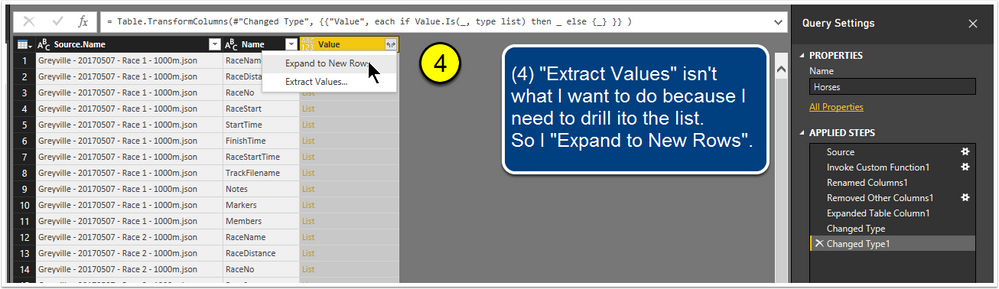
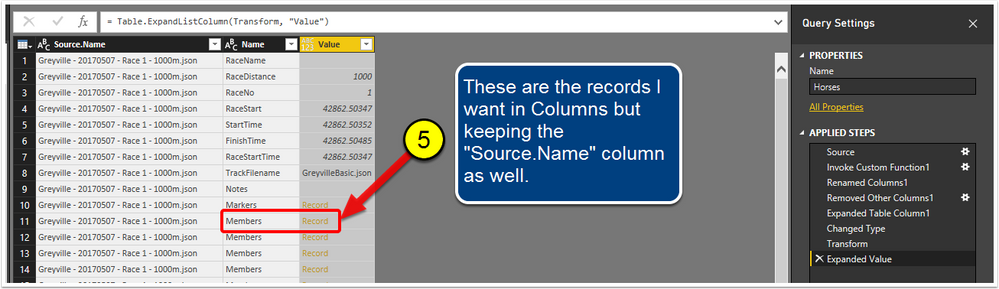
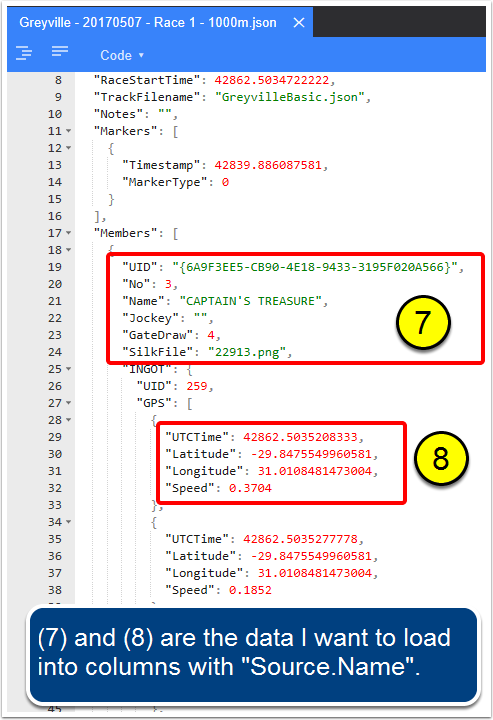
The screen-shots below should illustrate where I want to get to.
For the life of me I cannot get my head around writing the M code to get there.
Please guide me to the next steps.
(5) below is where I am stuck.
(6), (7) & (8) below is my explanation of the data I need in columns - but including column "Source.Name" - because I need to use it as a key in the table.
Many many thanks, Mark.

- Mark as New
- Bookmark
- Subscribe
- Mute
- Subscribe to RSS Feed
- Permalink
- Report Inappropriate Content
You could continue with a variant of my list-suggestion, now applied to a record, like you also find in my blogpost.
But I would do it differently: Instead of expanding the JSON in one query, I would expand it in multiple queries and then merge them back together after their parts have been expanded.
It would be easiest for me to explain, if you could share some sample data.
Imke Feldmann (The BIccountant)
If you liked my solution, please give it a thumbs up. And if I did answer your question, please mark this post as a solution. Thanks!
How to integrate M-code into your solution -- How to get your questions answered quickly -- How to provide sample data -- Check out more PBI- learning resources here -- Performance Tipps for M-queries
- Mark as New
- Bookmark
- Subscribe
- Mute
- Subscribe to RSS Feed
- Permalink
- Report Inappropriate Content
Hi ImkeF
Creating multiple queries then merging sounds like a great idea !
Below are links to two of the JSON files that I have.
As mentioned above, I combine the files by "Getting" a folder.
The idea is that as new JSON files arrive we'll copy them into the folder and refresh to update the reports.
Again, many thanks for your time and patience.
Best regards, Mark.
- Mark as New
- Bookmark
- Subscribe
- Mute
- Subscribe to RSS Feed
- Permalink
- Report Inappropriate Content
For (8): Do you only want the 1st element like you highlighted or all of them?
Imke Feldmann (The BIccountant)
If you liked my solution, please give it a thumbs up. And if I did answer your question, please mark this post as a solution. Thanks!
How to integrate M-code into your solution -- How to get your questions answered quickly -- How to provide sample data -- Check out more PBI- learning resources here -- Performance Tipps for M-queries
- Mark as New
- Bookmark
- Subscribe
- Mute
- Subscribe to RSS Feed
- Permalink
- Report Inappropriate Content
Please check out this file: https://www.dropbox.com/s/bram6131s01nv1t/PBI_ExpandJson.pbix?dl=0
You need to edit the query "Download" with a reference to your local drive
You just have to decide whether to join the tables in the query-editor, which would create one big monster-table, or create a data model, which would be the more professional approach.
Imke Feldmann (The BIccountant)
If you liked my solution, please give it a thumbs up. And if I did answer your question, please mark this post as a solution. Thanks!
How to integrate M-code into your solution -- How to get your questions answered quickly -- How to provide sample data -- Check out more PBI- learning resources here -- Performance Tipps for M-queries
- Mark as New
- Bookmark
- Subscribe
- Mute
- Subscribe to RSS Feed
- Permalink
- Report Inappropriate Content
Hi ImkeF
Thank you so very much 🙂
Before you came along I was pretty much clueless on how to figure this out.
Here's a "High-Five" to you !!!
I have learned a valuable lesson from your excellent instructions and cannot THANK YOU enough.
I can't imagine a way to reciprocate right now but if I ever can I certainly will.
Many many thanks and all the best, Mark.

- Mark as New
- Bookmark
- Subscribe
- Mute
- Subscribe to RSS Feed
- Permalink
- Report Inappropriate Content
Hi,
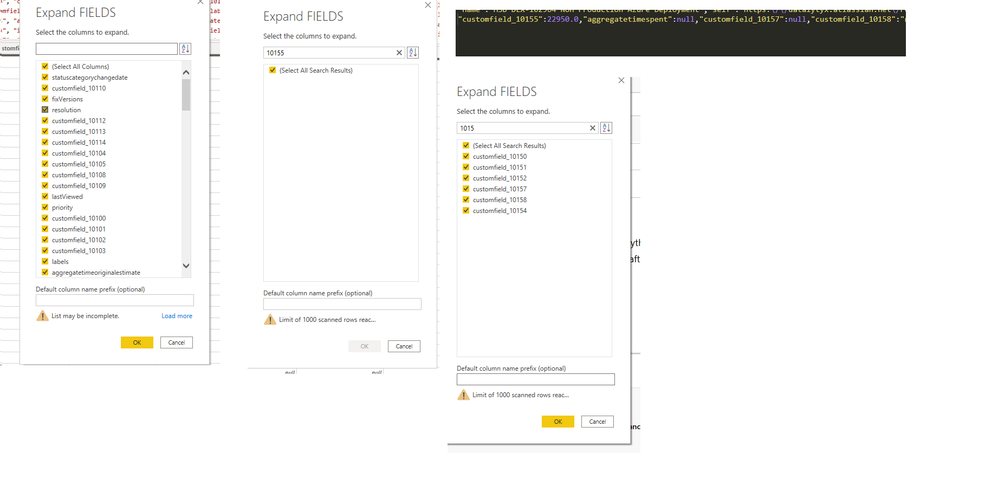
I am facing similar issue, however my JSON file is only a record and when i transform it using the JSON option, everything is expanded as expected except for 1 column. I can see this value being in the JSON but this not flowing as expected after the expand. I have gone through your conversation and also few other blogs but not able to resolve it.
Below is a screeshot of the problem:
List of all the columns, 10155 not seen in the expand tables options and customfield 10155 available when i copy paste the fields onto sublime text.
Thanks in advance!

Helpful resources

FabCon Global Hackathon
Join the Fabric FabCon Global Hackathon—running virtually through Nov 3. Open to all skill levels. $10,000 in prizes!

Power BI Monthly Update - September 2025
Check out the September 2025 Power BI update to learn about new features.

FabCon Atlanta 2026
Join us at FabCon Atlanta, March 16-20, for the ultimate Fabric, Power BI, AI and SQL community-led event. Save $200 with code FABCOMM.


