Fabric Data Days starts November 4th!
Advance your Data & AI career with 50 days of live learning, dataviz contests, hands-on challenges, study groups & certifications and more!
Get registered- Power BI forums
- Get Help with Power BI
- Desktop
- Service
- Report Server
- Power Query
- Mobile Apps
- Developer
- DAX Commands and Tips
- Custom Visuals Development Discussion
- Health and Life Sciences
- Power BI Spanish forums
- Translated Spanish Desktop
- Training and Consulting
- Instructor Led Training
- Dashboard in a Day for Women, by Women
- Galleries
- Data Stories Gallery
- Themes Gallery
- Contests Gallery
- Quick Measures Gallery
- Visual Calculations Gallery
- Notebook Gallery
- Translytical Task Flow Gallery
- TMDL Gallery
- R Script Showcase
- Webinars and Video Gallery
- Ideas
- Custom Visuals Ideas (read-only)
- Issues
- Issues
- Events
- Upcoming Events
Get Fabric Certified for FREE during Fabric Data Days. Don't miss your chance! Learn more
- Power BI forums
- Forums
- Get Help with Power BI
- Desktop
- Re: Lookup value with multiple filters
- Subscribe to RSS Feed
- Mark Topic as New
- Mark Topic as Read
- Float this Topic for Current User
- Bookmark
- Subscribe
- Printer Friendly Page


- Mark as New
- Bookmark
- Subscribe
- Mute
- Subscribe to RSS Feed
- Permalink
- Report Inappropriate Content
Lookup value with multiple filters
Hi Team,
I have two tables, Sales and Currency. See below:
I would like to populate Sales.Exchange Rate GBP and Sales.Exchange Rate USD with the exchange rates from the currency table (values above are my expected results)
The logic I need to use looks something like this (For GBP):

select earliest exchange rate from Currency where Sales.Currency = Currency.Source and Currency.Target = 'GBP' and Sales.Date > Currency.Date
How can I accomplish this?
Solved! Go to Solution.


- Mark as New
- Bookmark
- Subscribe
- Mute
- Subscribe to RSS Feed
- Permalink
- Report Inappropriate Content
https://www.dropbox.com/s/o04lz90nbzttotv/reporting%20model.pbix?dl=0
Exchange rate GBP CC=
VAR sourcecurrency = Requests[Currency]
VAR targetcurrency = "GBP"
VAR currentdate = Requests[Date Requested]
VAR maxcurrencydate =
CALCULATE (
MAX ( 'Currency'[date] ),
FILTER (
'Currency',
'Currency'[date] <= currentdate
&& 'Currency'[sourcecurrency] = sourcecurrency
&& 'Currency'[targetcurrency] = targetcurrency
)
)
RETURN
CALCULATE (
CALCULATE ( SUM ( 'Currency'[exchangerate] ) ),
FILTER (
'Currency',
'Currency'[date] = maxcurrencydate
&& 'Currency'[sourcecurrency] = sourcecurrency
&& 'Currency'[targetcurrency] = targetcurrency
)
)
If this post helps, then please consider accepting it as the solution to help other members find it faster, and give a big thumbs up.
Click here to visit my LinkedIn page
Click here to schedule a short Teams meeting to discuss your question.
- Mark as New
- Bookmark
- Subscribe
- Mute
- Subscribe to RSS Feed
- Permalink
- Report Inappropriate Content
Thank you @Jihwan_Kim ,
I appreciate the time you spent doing this, I will try and make it work
- Mark as New
- Bookmark
- Subscribe
- Mute
- Subscribe to RSS Feed
- Permalink
- Report Inappropriate Content
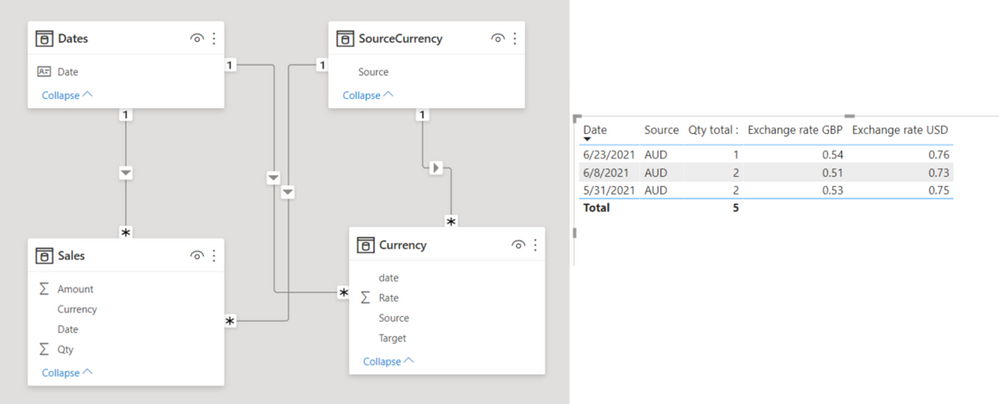
If this post helps, then please consider accepting it as the solution to help other members find it faster, and give a big thumbs up.
Click here to visit my LinkedIn page
Click here to schedule a short Teams meeting to discuss your question.
- Mark as New
- Bookmark
- Subscribe
- Mute
- Subscribe to RSS Feed
- Permalink
- Report Inappropriate Content
I see you have created a SourceCurrency table, is this a necessary step in addition to my current currency table? My source currencies have more than just AUD so ideally I would rather not have to create this
J
- Mark as New
- Bookmark
- Subscribe
- Mute
- Subscribe to RSS Feed
- Permalink
- Report Inappropriate Content
You are right.
If you do not have other currencies, it is not mandatorily needed.
If this post helps, then please consider accepting it as the solution to help other members find it faster, and give a big thumbs up.
Click here to visit my LinkedIn page
Click here to schedule a short Teams meeting to discuss your question.
- Mark as New
- Bookmark
- Subscribe
- Mute
- Subscribe to RSS Feed
- Permalink
- Report Inappropriate Content
Hi @Jihwan_Kim
I have tried to implement your solution but it is not working, I have attached a link to a PowerBI model. As you can see I am trying to add a new column to my table 'Requests' but it is returning no results
- Mark as New
- Bookmark
- Subscribe
- Mute
- Subscribe to RSS Feed
- Permalink
- Report Inappropriate Content
https://www.dropbox.com/s/o04lz90nbzttotv/reporting%20model.pbix?dl=0
Exchange rate GBP CC=
VAR sourcecurrency = Requests[Currency]
VAR targetcurrency = "GBP"
VAR currentdate = Requests[Date Requested]
VAR maxcurrencydate =
CALCULATE (
MAX ( 'Currency'[date] ),
FILTER (
'Currency',
'Currency'[date] <= currentdate
&& 'Currency'[sourcecurrency] = sourcecurrency
&& 'Currency'[targetcurrency] = targetcurrency
)
)
RETURN
CALCULATE (
CALCULATE ( SUM ( 'Currency'[exchangerate] ) ),
FILTER (
'Currency',
'Currency'[date] = maxcurrencydate
&& 'Currency'[sourcecurrency] = sourcecurrency
&& 'Currency'[targetcurrency] = targetcurrency
)
)
If this post helps, then please consider accepting it as the solution to help other members find it faster, and give a big thumbs up.
Click here to visit my LinkedIn page
Click here to schedule a short Teams meeting to discuss your question.
- Mark as New
- Bookmark
- Subscribe
- Mute
- Subscribe to RSS Feed
- Permalink
- Report Inappropriate Content
Hi @Jihwan_Kim ,
Thank you, it works.
I had to add a DATEVALUE function to my currentdate variable as it was complaining about comparing date and strings.

Helpful resources

Fabric Data Days
Advance your Data & AI career with 50 days of live learning, contests, hands-on challenges, study groups & certifications and more!

Power BI Monthly Update - October 2025
Check out the October 2025 Power BI update to learn about new features.

FabCon Atlanta 2026
Join us at FabCon Atlanta, March 16-20, for the ultimate Fabric, Power BI, AI and SQL community-led event. Save $200 with code FABCOMM.


| User | Count |
|---|---|
| 80 | |
| 49 | |
| 35 | |
| 31 | |
| 30 |


