FabCon is coming to Atlanta
Join us at FabCon Atlanta from March 16 - 20, 2026, for the ultimate Fabric, Power BI, AI and SQL community-led event. Save $200 with code FABCOMM.
Register now!- Power BI forums
- Get Help with Power BI
- Desktop
- Service
- Report Server
- Power Query
- Mobile Apps
- Developer
- DAX Commands and Tips
- Custom Visuals Development Discussion
- Health and Life Sciences
- Power BI Spanish forums
- Translated Spanish Desktop
- Training and Consulting
- Instructor Led Training
- Dashboard in a Day for Women, by Women
- Galleries
- Data Stories Gallery
- Themes Gallery
- Contests Gallery
- QuickViz Gallery
- Quick Measures Gallery
- Visual Calculations Gallery
- Notebook Gallery
- Translytical Task Flow Gallery
- TMDL Gallery
- R Script Showcase
- Webinars and Video Gallery
- Ideas
- Custom Visuals Ideas (read-only)
- Issues
- Issues
- Events
- Upcoming Events
Get Fabric Certified for FREE during Fabric Data Days. Don't miss your chance! Request now
- Power BI forums
- Forums
- Get Help with Power BI
- Desktop
- Re: Lookup value from one table from another
- Subscribe to RSS Feed
- Mark Topic as New
- Mark Topic as Read
- Float this Topic for Current User
- Bookmark
- Subscribe
- Printer Friendly Page

- Mark as New
- Bookmark
- Subscribe
- Mute
- Subscribe to RSS Feed
- Permalink
- Report Inappropriate Content
Lookup value from one table from another
I have a large table with one of the columns as 'CID' and there are multiple rows in this table with the same CID value.
There is another table with distinct CID codes that I need to match the previous table against.
So, I need to add a column to the large table that says CIDmatchs with logic being, if there is a match with the lookup table value; set it to 1 else 0 so I can count all the 1s together.
Can someone please help me with the logic for DAX or M any any method I can use to resolve this??
Solved! Go to Solution.
- Mark as New
- Bookmark
- Subscribe
- Mute
- Subscribe to RSS Feed
- Permalink
- Report Inappropriate Content
Hi @Anonymous, sounds to me like you have selected "Add Measure" instead of "Add Column"?
Just check that you have used "Add Column" and done so in the table that will hold the CID Flag. In this case we are adding it to the CID Table.
- Mark as New
- Bookmark
- Subscribe
- Mute
- Subscribe to RSS Feed
- Permalink
- Report Inappropriate Content
CID Flag = IF(
	IFERROR(
		LOOKUPVALUE(
			'CID Table'[CID],
			'CID Table'[CID],
			'Large Table'[CID]
		),
		0
	) = 0,
	0,
	1
)
Make that a column in your large table. You might need to rename the tables names i've used, but hope you get the idea.
- Mark as New
- Bookmark
- Subscribe
- Mute
- Subscribe to RSS Feed
- Permalink
- Report Inappropriate Content
Thanks a lot for the solution. And, it has definitely solved part of my issue.
I forgot to add another problem to it.
So, the counts calculated by the 'CID Flag' is also counting the duplicates since there are rows with same CID values in the larger table. How should I make sure that the Flag only counts the distinct rows from the larger table?
Thanks in advance.


- Mark as New
- Bookmark
- Subscribe
- Mute
- Subscribe to RSS Feed
- Permalink
- Report Inappropriate Content
@Anonymous,
I asume the large table have the sample data
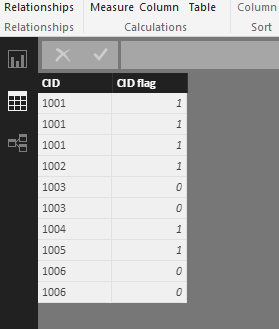
Now you need to count the distinct value for the CIDs that have CID Flag=1, right?
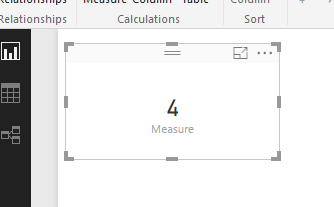
If that is the case, please try to create a measure using the DAX below.
Measure = CALCULATE(DISTINCTCOUNT(Table3[CID]),FILTER(Table3,Table3[CID flag]=1))
Regards,
Charlie Liao
- Mark as New
- Bookmark
- Subscribe
- Mute
- Subscribe to RSS Feed
- Permalink
- Report Inappropriate Content
Thanks Charlie. I could get the distinct counts using your logic.
- Mark as New
- Bookmark
- Subscribe
- Mute
- Subscribe to RSS Feed
- Permalink
- Report Inappropriate Content
Try the same formula, except do it from the 'CID Table' to the 'Large Table' instead (in reverse). Lookup works on multiple rows, as long as each row would return the same value.
- Mark as New
- Bookmark
- Subscribe
- Mute
- Subscribe to RSS Feed
- Permalink
- Report Inappropriate Content
I tried to replace the arguments and put it as :
CID Flag = IF( IFERROR( LOOKUPVALUE( 'Large Table'[CID], 'Large Table'[CID], 'CID Table'[CID]), 0 ) = 0, 0, 1 )
But, this is not working as the LOOKUPVALUE function is not allowing me to use 'CID Table'[CID] as the thrid argument at all. I can only see the columns of the Large Table for the third argument.
However, it is running when the previous query was used :
CID Flag = IF( IFERROR( LOOKUPVALUE( 'CID Table'[CID], 'CID Table'[CID], 'Large Table'[CID] ), 0 ) = 0, 0, 1 )
Could you please assist me here?
- Mark as New
- Bookmark
- Subscribe
- Mute
- Subscribe to RSS Feed
- Permalink
- Report Inappropriate Content
Also, it seem the third argument needs to be a single value so, when I try using a column of another table, its just showing me the option to choose another measure as the third argument.
- Mark as New
- Bookmark
- Subscribe
- Mute
- Subscribe to RSS Feed
- Permalink
- Report Inappropriate Content
Make the CID Flag a column in the other table, not the large table. Thats the only way to reverse it correctly. You will still be able to include it in your reports.
- Mark as New
- Bookmark
- Subscribe
- Mute
- Subscribe to RSS Feed
- Permalink
- Report Inappropriate Content
Thanks.. @Anonymous
However, it is not allowing me to keep the third arguement of lookuptable function to use a table column, but, only measures of either tables. And, I tried in both ways.. for the larger as well as the smaller table.
Is there something that I might be missing?
- Mark as New
- Bookmark
- Subscribe
- Mute
- Subscribe to RSS Feed
- Permalink
- Report Inappropriate Content
Hi @Anonymous, sounds to me like you have selected "Add Measure" instead of "Add Column"?
Just check that you have used "Add Column" and done so in the table that will hold the CID Flag. In this case we are adding it to the CID Table.
- Mark as New
- Bookmark
- Subscribe
- Mute
- Subscribe to RSS Feed
- Permalink
- Report Inappropriate Content
@Anonymous
Thanks a lot Ross... It worked this time.. I guess I was trying to create a measure instead of a column. 😛
Really appreciate your help!
Helpful resources

Power BI Monthly Update - November 2025
Check out the November 2025 Power BI update to learn about new features.

Fabric Data Days
Advance your Data & AI career with 50 days of live learning, contests, hands-on challenges, study groups & certifications and more!

FabCon Atlanta 2026
Join us at FabCon Atlanta, March 16-20, for the ultimate Fabric, Power BI, AI and SQL community-led event. Save $200 with code FABCOMM.


