cancel
Showing results for 
Search instead for 
Did you mean: 

The Power BI Data Visualization World Championships is back! Get ahead of the game and start preparing now! Learn more

Reply
JohannTTG
Helper I
Helper I

Line chart - connection of dots when data is missing

Hi,

I use a line chart for different series of values (legend-setting is used) When for some series a specific values is not available then the line is broken.

From a pure technical point of view this is clear. But the management does not like this.

JohannTTG_0-1686124738011.png


Please look at the last line - no value for "2023 Februar" so the line is interrupted.

How to draw a line between the first dot (2023 Jänner) and the dot for 2023 März?

I am not allowed to insert artifical data (either 0 or the average of the both values at each side). And there should not be a dot for the missing Februar-value. All my manager wants is a straight line!


Is this possible? (my feeling is, that is impossible but maybe someone has a brilliant idea)


Many thanks and regards


1 ACCEPTED SOLUTION
barritown
Super User
Super User

Hi,

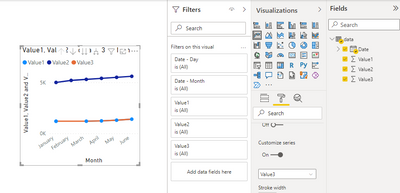
While I was checking your issue Power BI somehow made this line with the gap continuous, but I am not sure how it happened so just be aware of that.

There is a workaround however - you add one more sequence to your line chart, exactly like the one with the gap, but where the gap is filled with a value - ( Jan + Mar ) / 2, for example. You remove the markers for the continuous line and change its color to the same color that is assigned to the line with the gap.

barritown_0-1686147606057.png

Best Regards,

Alexander

My YouTube vlog in English

My YouTube vlog in Russian

View solution in original post

1 REPLY 1
barritown
Super User
Super User

Hi,

While I was checking your issue Power BI somehow made this line with the gap continuous, but I am not sure how it happened so just be aware of that.

There is a workaround however - you add one more sequence to your line chart, exactly like the one with the gap, but where the gap is filled with a value - ( Jan + Mar ) / 2, for example. You remove the markers for the continuous line and change its color to the same color that is assigned to the line with the gap.

barritown_0-1686147606057.png

Best Regards,

Alexander

My YouTube vlog in English

My YouTube vlog in Russian

Helpful resources

Announcements
Power BI DataViz World Championships

Power BI Dataviz World Championships

The Power BI Data Visualization World Championships is back! Get ahead of the game and start preparing now!

December 2025 Power BI Update Carousel

Power BI Monthly Update - December 2025

Check out the December 2025 Power BI Holiday Recap!

FabCon Atlanta 2026 carousel

FabCon Atlanta 2026

Join us at FabCon Atlanta, March 16-20, for the ultimate Fabric, Power BI, AI and SQL community-led event. Save $200 with code FABCOMM.