Join us at FabCon Atlanta from March 16 - 20, 2026, for the ultimate Fabric, Power BI, AI and SQL community-led event. Save $200 with code FABCOMM.
Register now!The Power BI Data Visualization World Championships is back! Get ahead of the game and start preparing now! Learn more
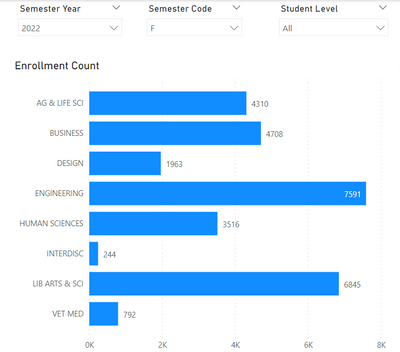
When I click on one of the bars on this page
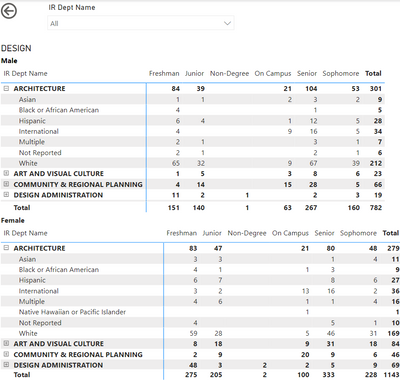
I can drill through to this page:
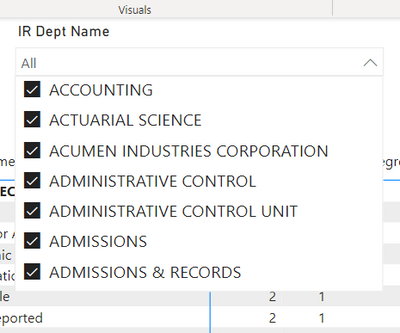
My problem is that the slicer shows all departments, not just those in the chosen college.
I feel I am missing something obvious, but how do I limit the slicer to the relevant options?
Solved! Go to Solution.
After additional exploration, I think my problem is that 'college' and 'department' are in different tables, so the slicers don't automatically interact.
That makes a lot of sense.
Subscribe to the @PowerBIHowTo YT channel for an upcoming video on List and Record functions in Power Query!!
Learn Power BI and Fabric - subscribe to our YT channel - Click here: @PowerBIHowTo
If my solution proved useful, I'd be delighted to receive Kudos. When you put effort into asking a question, it's equally thoughtful to acknowledge and give Kudos to the individual who helped you solve the problem. It's a small gesture that shows appreciation and encouragement! ❤
Did I answer your question? Mark my post as a solution. Proud to be a Super User! Appreciate your Kudos 🙂
Feel free to email me with any of your BI needs.
After additional exploration, I think my problem is that 'college' and 'department' are in different tables, so the slicers don't automatically interact.
@SusanRay can you try with unselecting all the values in the slicer on the drill thru page and see if it works.
👉 Learn Power BI and Fabric - subscribe to our YT channel - @PowerBIHowTo
Subscribe to the @PowerBIHowTo YT channel for an upcoming video on List and Record functions in Power Query!!
Learn Power BI and Fabric - subscribe to our YT channel - Click here: @PowerBIHowTo
If my solution proved useful, I'd be delighted to receive Kudos. When you put effort into asking a question, it's equally thoughtful to acknowledge and give Kudos to the individual who helped you solve the problem. It's a small gesture that shows appreciation and encouragement! ❤
Did I answer your question? Mark my post as a solution. Proud to be a Super User! Appreciate your Kudos 🙂
Feel free to email me with any of your BI needs.
I unselected everything on the detail page and then tried the drill-through again from the overview page. The slicer still includes all of the departments rather than just the relevant handful.
The Power BI Data Visualization World Championships is back! Get ahead of the game and start preparing now!
| User | Count |
|---|---|
| 41 | |
| 38 | |
| 36 | |
| 30 | |
| 28 |
| User | Count |
|---|---|
| 129 | |
| 88 | |
| 79 | |
| 68 | |
| 63 |