This time we’re going bigger than ever. Fabric, Power BI, SQL, AI and more. We're covering it all. You won't want to miss it.
Learn moreGet Fabric Certified for FREE during AI Skills Fest. This week only. Secure your voucher now.
I have scheduled a PySpark Notebook daily to update the tables I used for Power BI visualization. I thought the data pulled in Power BI would also be updated but it's not updating the latest records. Is it because I'm using a Free Trial Fabric? Or I maxed out the data request from Fabric?
On the Fabric side, the tables are updated but once I view the tables in Power BI, it doesn't show the latest records.
Update -
I manually ran my PySpark Notebook and created a duplicated table DIM_TABLE_2 and it shows the latest record.
We have the exact issue.
Pipeline running to update tables in the Lakehouse nightly. PBIX is connected to the Lakehouse through Direct Query so no refresh is needed outside of the occasional click in the desktop applicaiton.
Tables in Lakehouse show records dated up untill the latest succesfull pipeline run, but PBIX does not show latest records. It seems to have stopped at about a week ago.
Before this we did not have to refresh the PBIX at all since it was a Direct Query to the Lakehouse.
Are you also refreshing the Power BI dataset? Although the data are stored in OneLake, you still need to "reframe" the data through a refresh.
Pat
What does "reframe" mean in this context? I keep hitting refresh but it doesn't work since it has a live connection with Fabric.
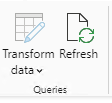
I refreshed these icons:
But no luck!
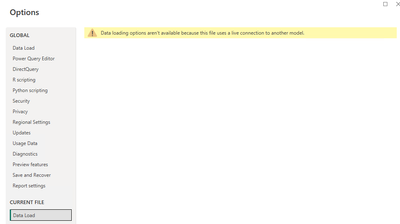
I get this warning message too if I access data load tab
Check out the May 2026 Power BI update to learn about new features.
Sign up to receive a private message when registration opens and key events begin.
| User | Count |
|---|---|
| 23 | |
| 21 | |
| 20 | |
| 20 | |
| 15 |
| User | Count |
|---|---|
| 58 | |
| 55 | |
| 42 | |
| 26 | |
| 24 |