Advance your Data & AI career with 50 days of live learning, dataviz contests, hands-on challenges, study groups & certifications and more!
Get registeredGet Fabric Certified for FREE during Fabric Data Days. Don't miss your chance! Request now
HI,
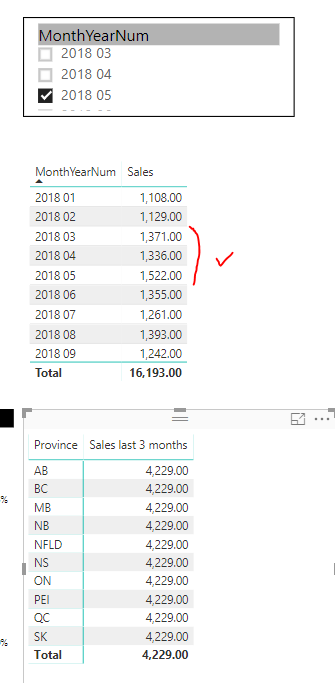
I want to show the last 3 months total by the slicer value. I got this part by using and got the correct answer:
last 3 months =
CALCULATE (
SUM ( salestable[sales]),
FILTER(ALL(salestable), salestable[PeriodEndDate] <= MAX(salestable[PeriodEndDate]) && DATEDIFF(salestable[PeriodEndDate],MAX(salestable[PeriodEndDate]),MONTH)<=2)
)
My problem is when I tried to break the total by province, It showed the total but not last 3 months total for such province. Can someone please help? Thanks.
Solved! Go to Solution.
@Anonymous can you update your DAX measure to following and then try. I assume you have date dimension in your model, if not, it will make sense to add one as best practice.
Total Due Last 3 Months =
CALCULATE(
SUM( salestable[sales] ),
DATESINPERIOD(
DimDate[FullDateAlternateKey],
MAX(DimDate[FullDateAlternateKey]),
-3,
MONTH
)
)
Subscribe to the @PowerBIHowTo YT channel for an upcoming video on List and Record functions in Power Query!!
Learn Power BI and Fabric - subscribe to our YT channel - Click here: @PowerBIHowTo
If my solution proved useful, I'd be delighted to receive Kudos. When you put effort into asking a question, it's equally thoughtful to acknowledge and give Kudos to the individual who helped you solve the problem. It's a small gesture that shows appreciation and encouragement! ❤
Did I answer your question? Mark my post as a solution. Proud to be a Super User! Appreciate your Kudos 🙂
Feel free to email me with any of your BI needs.
@Anonymous can you update your DAX measure to following and then try. I assume you have date dimension in your model, if not, it will make sense to add one as best practice.
Total Due Last 3 Months =
CALCULATE(
SUM( salestable[sales] ),
DATESINPERIOD(
DimDate[FullDateAlternateKey],
MAX(DimDate[FullDateAlternateKey]),
-3,
MONTH
)
)
Subscribe to the @PowerBIHowTo YT channel for an upcoming video on List and Record functions in Power Query!!
Learn Power BI and Fabric - subscribe to our YT channel - Click here: @PowerBIHowTo
If my solution proved useful, I'd be delighted to receive Kudos. When you put effort into asking a question, it's equally thoughtful to acknowledge and give Kudos to the individual who helped you solve the problem. It's a small gesture that shows appreciation and encouragement! ❤
Did I answer your question? Mark my post as a solution. Proud to be a Super User! Appreciate your Kudos 🙂
Feel free to email me with any of your BI needs.
Thanks for your input.
I think it works now.
Advance your Data & AI career with 50 days of live learning, contests, hands-on challenges, study groups & certifications and more!
Check out the October 2025 Power BI update to learn about new features.