Join us at FabCon Atlanta from March 16 - 20, 2026, for the ultimate Fabric, Power BI, AI and SQL community-led event. Save $200 with code FABCOMM.
Register now!The Power BI Data Visualization World Championships is back! Get ahead of the game and start preparing now! Learn more
Hi team,
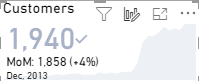
its my first time to use the KPI visual and im struggling to control decimal placing for the variance
I have rounded both my target and indicator so that they are 92.00% and 98.00% when allowing them to show 2dp
but somehow the variance till pick ups the -6.## % unwanted dps
any work around????
Solved! Go to Solution.
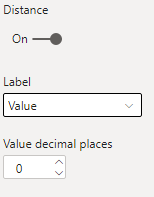
@Anonymous Yes! In the Goal section, change the Label from "Percent" to "Value" and the decimal places option will show. You can then set it to 0, and flip it back to "Percent".
Respectfully,
Zoe Douglas (DataZoe)
Follow me on LinkedIn at https://www.linkedin.com/in/zoedouglas-data
See my reports and blog at https://www.datazoepowerbi.com/
FWIW it would appear this has since changed.
I would also like to change the % distance to goal to a whole number %, yet using the solution above, when I switch back to %, the 2 d.p. remain.
Is there a different way of solving this now or am I stuck?
I am having the same issue. Has anyone figured it out?
@Anonymous Yes! In the Goal section, change the Label from "Percent" to "Value" and the decimal places option will show. You can then set it to 0, and flip it back to "Percent".
Respectfully,
Zoe Douglas (DataZoe)
Follow me on LinkedIn at https://www.linkedin.com/in/zoedouglas-data
See my reports and blog at https://www.datazoepowerbi.com/
ahhh hidden feature 🙂 many thanks
The Power BI Data Visualization World Championships is back! Get ahead of the game and start preparing now!
| User | Count |
|---|---|
| 39 | |
| 37 | |
| 33 | |
| 33 | |
| 29 |
| User | Count |
|---|---|
| 134 | |
| 96 | |
| 78 | |
| 67 | |
| 65 |