Forum Discussion

KPI Preview Feature - SSAS Tabular
 10 years ago
I managed to resolve this issue.
Issue was witrh compatability mode of SSAS Tabular Model. I set it to "SQL Server 2014 / SQL Server 2012 SP1 (1103):" and defgined KPI started showing in both Power BI Desktopp & Power view.
Hope it will hep others those may face similar problem.
Atul,

Thanks for the quick reply.
I did try. Attached is a screenshot. The PowerBI desktop was restarted after enabling the preview feature. The status shows just values -1, 0 and 1 for the 3 KPI states.
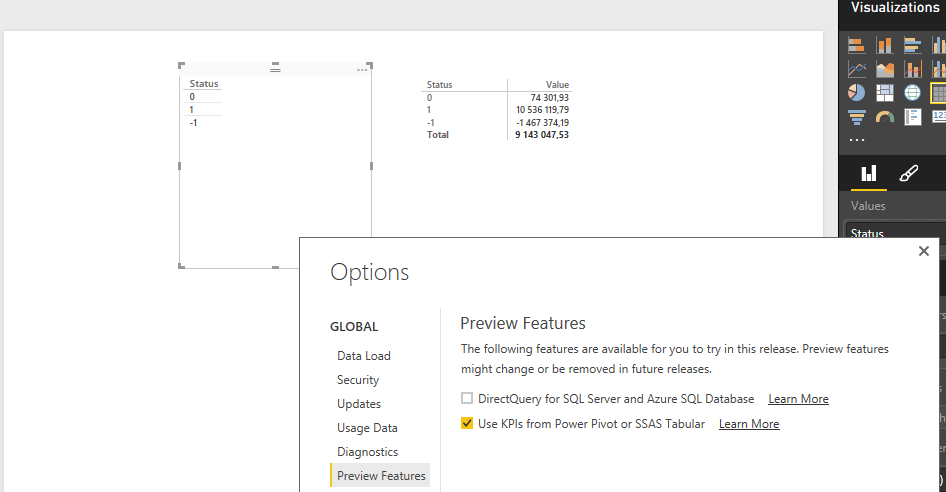
PS: Just adding the part of the script that adds the 3 measures. May be I have added them incorrectly?
#"Added Items" = Cube.Transform(MyCube, {{Cube.AddAndExpandDimensionColumn,
.....
{Cube.AddMeasureColumn, "Value", "[Measures].[MarginKPI]"},
{Cube.AddMeasureColumn, "Goal", "[Measures].[_MarginKPI Goal]"},
{Cube.AddMeasureColumn, "Status", "[Measures].[_MarginKPI Status]"}}
)

The upcoming November update should fix this. Once it's available ( very soon :), please give it a try and if the issue still repros, let us know.
- Tsanka10 years agoKudo Collector
That's really good news. Thanks for sharing it. Looking forward the November update :-)
- atul_kushwaha10 years agoFrequent Visitor
I think this issue still there even after Nov'15 Update. I have defined KPI in SSAS Tabular Model and connected it as LIVE SOURCE in PBI Desktop but only Measure is being shown, NO Status & Goal measures shown.
Whereas I can see KPI Measure Group in Excel when connect to same Tabular Model.
Regards,
Atul Kushwaha
- atul_kushwaha10 years agoFrequent Visitor
I managed to resolve this issue.
Issue was witrh compatability mode of SSAS Tabular Model. I set it to "SQL Server 2014 / SQL Server 2012 SP1 (1103):" and defgined KPI started showing in both Power BI Desktopp & Power view.
Hope it will hep others those may face similar problem.
Atul,
- Tsanka10 years agoKudo Collector
Hi atul_kushwaha,
Could you pease describe the steps that you have done to achive the goal? My cube has compatibility level 1103 (seen on database level and as a property in the VS) and still I am not able to see the KPIs. Obviously I am missing something.
If possible, could you pease also paste the defintion of one of your KPIs (the XML element as seen in the XMLA definition of the cube).
Thanks
Tsanka