Forum Discussion

KPI Preview Feature - SSAS Tabular
Hi
The blog information about the October update of PowerBI desktop states that KPI preview visualization is supported from PowerPivot or SSAS tabular.
I created a simple KPI in my tabular and added it into the PowerBI model. The results is having 3 new measure columns (value, status and goal). I cannot figure out how to visualize those 3 parts of the KPI (as a green-yellow-red indicator for instance). Tried to find information on the documentation site, watched the published videos and ... nothing. Have you managed to do this?
Any help will be much appreciated :-)
I really hope this to be possible as it is quite annoying when some end users open the powerbi site and point to me that KPI support is available
10x
I managed to resolve this issue.
Issue was witrh compatability mode of SSAS Tabular Model. I set it to "SQL Server 2014 / SQL Server 2012 SP1 (1103):" and defgined KPI started showing in both Power BI Desktopp & Power view.
Hope it will hep others those may face similar problem.
Atul,

12 Replies
 PowerBIGuyResponsive Resident
Tsanka After enabling the KPI preview freature. Have you tired taking the Status value and using it in a matix or card visual?
 TsankaKudo Collector
Thanks for the quick reply.
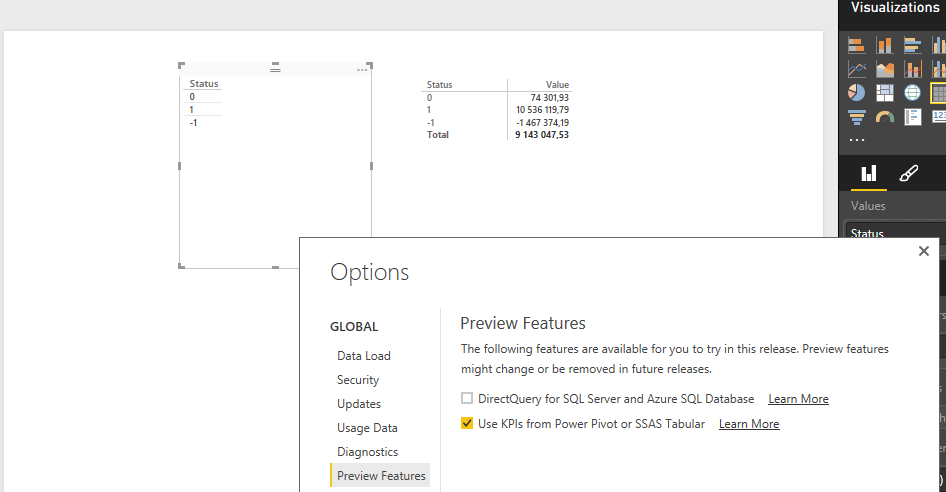
I did try. Attached is a screenshot. The PowerBI desktop was restarted after enabling the preview feature. The status shows just values -1, 0 and 1 for the 3 KPI states.
PS: Just adding the part of the script that adds the 3 measures. May be I have added them incorrectly?
#"Added Items" = Cube.Transform(MyCube, {{Cube.AddAndExpandDimensionColumn,
.....{Cube.AddMeasureColumn, "Value", "[Measures].[MarginKPI]"},
{Cube.AddMeasureColumn, "Goal", "[Measures].[_MarginKPI Goal]"},
{Cube.AddMeasureColumn, "Status", "[Measures].[_MarginKPI Status]"}}
)- PowerBIGuyResponsive Resident
I initially had issues getting a KPI to work via a power Pivot model. My issue was that PBI was not recognizing my field as a true KPI. I had to add a power view sheet to my excel file using the kpi value and that somehow fourced PBI desktop to recognize the KPI. The point i'm trying to make is if you are somehow using code or a qiuery to bring in these columns then they might not be recognized as a KPI column. Can you try using a direct connection to the cube and see if that works?