Join us at FabCon Atlanta from March 16 - 20, 2026, for the ultimate Fabric, Power BI, AI and SQL community-led event. Save $200 with code FABCOMM.
Register now!View all the Fabric Data Days sessions on demand. View schedule
Hello,
Regarding the binding of tables in Power BI, I would like to know how to make this connection, in the habitiude in SQL, we do the join or the connection between the tables with a primary key, but in Power BI I noted that There are linked tables with other fields.
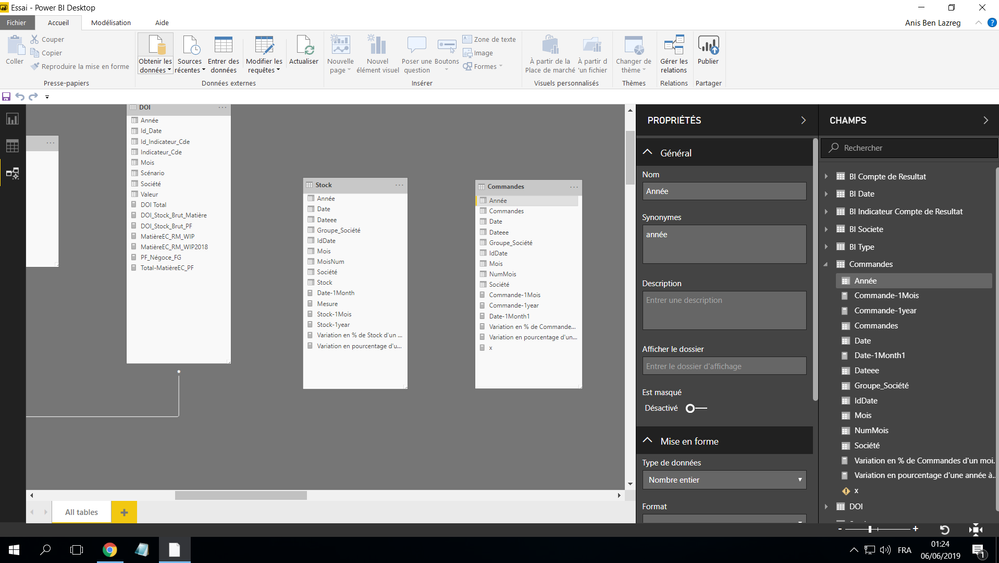
For example in this screenshot, I would like to join these two tables Stock and orders, Can we join them with the fields date or Year, or month or company since they exist in the two tables? And what is the difference between joining with a primary key and joining with a normal field?
I thank you in advance.
Solved! Go to Solution.
Hi @Anonymous ,
Yes, you could create the relationship for Date column and Year column to join the tables.
Normally, when we load two or more tables at the same time, Power BI desktop will looks at column names in the tables we are querying to determine if there are any potential relationships. If there are, those relationships are created automatically.
So for your scenario, if the relationships told by SQL DBA is the same as Power BI detect, then you needn't to modify them. While the logic is different, you can mange relationships follow this article based on your needs. See: Create and manage relationships in Power BI Desktop.
Best Regards,
Cherry
Hi @Anonymous ,
Have you solved your problem?
If you have solved, please always accept the replies making sense as solution to your question so that people who may have the same question can get the solution directly.
If you still need help, please feel free to ask.
Best Regards,
Cherry
Hi @Anonymous ,
Yes, you could create the relationship for Date column and Year column to join the tables.
Normally, when we load two or more tables at the same time, Power BI desktop will looks at column names in the tables we are querying to determine if there are any potential relationships. If there are, those relationships are created automatically.
So for your scenario, if the relationships told by SQL DBA is the same as Power BI detect, then you needn't to modify them. While the logic is different, you can mange relationships follow this article based on your needs. See: Create and manage relationships in Power BI Desktop.
Best Regards,
Cherry
Check out the November 2025 Power BI update to learn about new features.
Advance your Data & AI career with 50 days of live learning, contests, hands-on challenges, study groups & certifications and more!