Join us at FabCon Atlanta from March 16 - 20, 2026, for the ultimate Fabric, Power BI, AI and SQL community-led event. Save $200 with code FABCOMM.
Register now!Get Fabric Certified for FREE during Fabric Data Days. Don't miss your chance! Request now
Hi All,
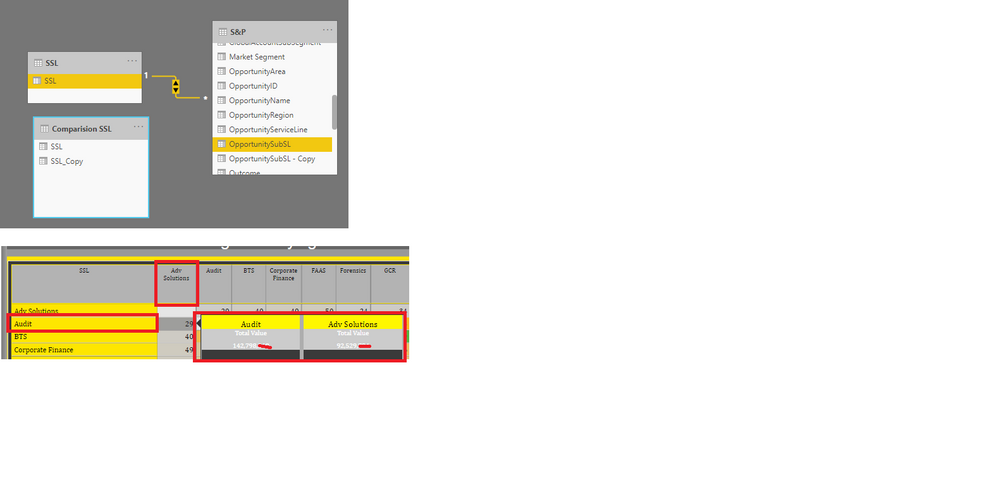
can someone help me to filter the data without having a table relationship?
I can create a relationship and get the numbers right whereas I am doing basket analysis where I shouldn't relate to that table to arrive the number.
In the below table I am unable to get the right number on the tooltip. where it should be the combination of 29 counts. but I am getting the total number of Audit and Adv solution. (Rows from SSL table and Columns from Comparison SSL)
Let me know if there any alternatives?
Regards,
Ranjan
@RanjanThammaiah , Yes you have force a filter in a Measure
calculate([Measure], filter('S&P','S&P'[SSL] in selectedvalues('SSL'[SSL])))
or
calculate([Measure], filter('S&P','S&P'[SSL] in values('SSL'[SSL])))
I have not used complete table names. Please use correct table and column name
Hi @amitchandak
i have used the DAX as below. but the values are blank now.
Here is the link for sample report Sample Report
access to your file is denied
anyway, try ALL()
Measure = CALCULATE([TVPS],
FILTER(ALL('S&P'),
'S&P'[SubServiceLineGroupingDesc]in VALUES('Comparision SSL'[SSL])))
thanks for the reply @az38 .
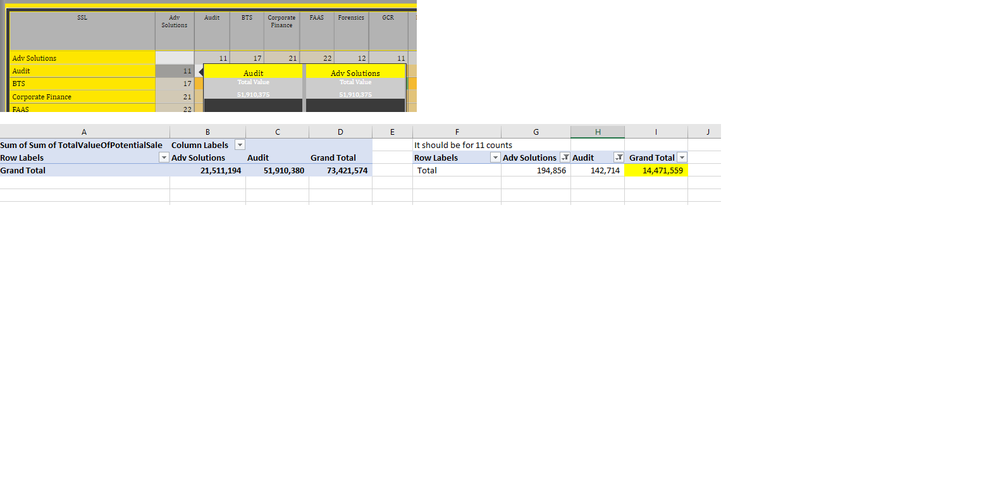
Unfortunately, it started giving one SSL total.
Here is the new link for the Sample Report.
Let me know still the link doesn't work for you(it's in the Dropbox)
The highlighted value I was looking for the 11 Counts.
Regards,
Ranjan
Sorry @RanjanThammaiah
I do not understand what exactly is going wrong.
I see another tooltip digits
sorry, even the other one is not working. there I have added the total value field instead of the Measure value.
Check out the November 2025 Power BI update to learn about new features.
Advance your Data & AI career with 50 days of live learning, contests, hands-on challenges, study groups & certifications and more!