Jumpstart your career with the Fabric Career Hub
Find everything you need to get certified on Fabric—skills challenges, live sessions, exam prep, role guidance, and a 50 percent discount on exams.
Get started- Power BI forums
- Updates
- News & Announcements
- Get Help with Power BI
- Desktop
- Service
- Report Server
- Power Query
- Mobile Apps
- Developer
- DAX Commands and Tips
- Custom Visuals Development Discussion
- Health and Life Sciences
- Power BI Spanish forums
- Translated Spanish Desktop
- Power Platform Integration - Better Together!
- Power Platform Integrations (Read-only)
- Power Platform and Dynamics 365 Integrations (Read-only)
- Training and Consulting
- Instructor Led Training
- Dashboard in a Day for Women, by Women
- Galleries
- Community Connections & How-To Videos
- COVID-19 Data Stories Gallery
- Themes Gallery
- Data Stories Gallery
- R Script Showcase
- Webinars and Video Gallery
- Quick Measures Gallery
- 2021 MSBizAppsSummit Gallery
- 2020 MSBizAppsSummit Gallery
- 2019 MSBizAppsSummit Gallery
- Events
- Ideas
- Custom Visuals Ideas
- Issues
- Issues
- Events
- Upcoming Events
- Community Blog
- Power BI Community Blog
- Custom Visuals Community Blog
- Community Support
- Community Accounts & Registration
- Using the Community
- Community Feedback
Earn a 50% discount on the DP-600 certification exam by completing the Fabric 30 Days to Learn It challenge.
- Power BI forums
- Forums
- Get Help with Power BI
- Desktop
- Re: Intellisense / Auto Complete Stopped Working
- Subscribe to RSS Feed
- Mark Topic as New
- Mark Topic as Read
- Float this Topic for Current User
- Bookmark
- Subscribe
- Printer Friendly Page


- Mark as New
- Bookmark
- Subscribe
- Mute
- Subscribe to RSS Feed
- Permalink
- Report Inappropriate Content
Intellisense / Auto Complete Stopped Working
I recently uninstalled the store version of PBI desktop to install the direct download version (because I wanted the drag-drop re-order which is not available in the store version). Latest version revision {553CCBE1-56C5-4CF7-BE8D-0AD37CA36E6F}
Intellisense was working fine for a few days, and then became sporadic. Now, it almost never gives the auto-complete for variable/line names. And it rarely shows the matches among built-in functions. e.g. here I would expect table.re to give Table.RemoveColumns among other entries, but it doesn't.
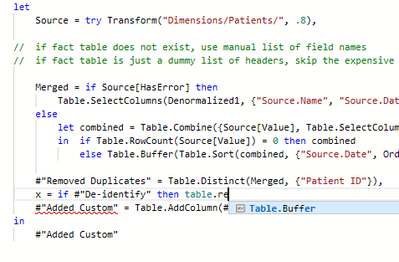
Reinstalled without any affect whatsoever. Turned off Intellisense, restarted, turned on, restarted, and no effect. Is there some cache or some trick someone has for this?
Solved! Go to Solution.
- Mark as New
- Bookmark
- Subscribe
- Mute
- Subscribe to RSS Feed
- Permalink
- Report Inappropriate Content
So, I've isolated the problem. Intellisense and auto-complete fail as soon as a 'try' is created without 'otherwise'.
e.g. if you add line 11 from this example anywhere in any query, the feature is broken in all queries.
textUnitPrice = try Number.ToText(Sales[UnitPrice])
- Mark as New
- Bookmark
- Subscribe
- Mute
- Subscribe to RSS Feed
- Permalink
- Report Inappropriate Content
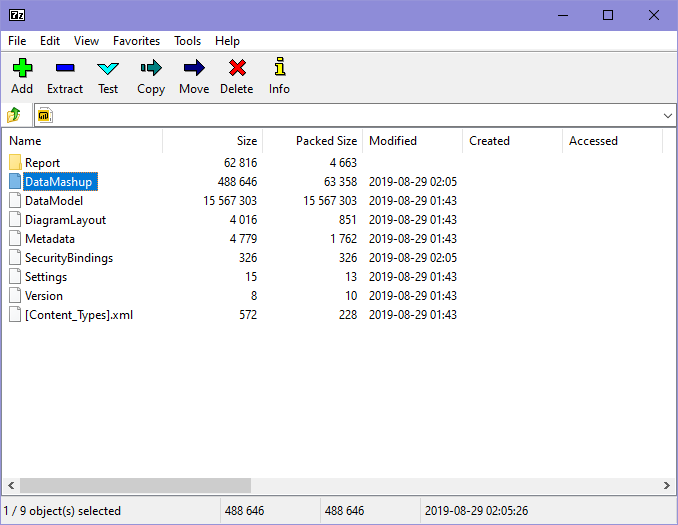
It seems that the problem is isolated to a single .pbix file. Others are working fine. Saving a copy (via PBI or Explorer) does not fix the issue. I tried to delete the internal Metadata file, but that made no difference either. Interestingly, Metadata was not even re-created after deletion. Any ideas other than recreating every query?
- Mark as New
- Bookmark
- Subscribe
- Mute
- Subscribe to RSS Feed
- Permalink
- Report Inappropriate Content
So, I've isolated the problem. Intellisense and auto-complete fail as soon as a 'try' is created without 'otherwise'.
e.g. if you add line 11 from this example anywhere in any query, the feature is broken in all queries.
textUnitPrice = try Number.ToText(Sales[UnitPrice])


- Mark as New
- Bookmark
- Subscribe
- Mute
- Subscribe to RSS Feed
- Permalink
- Report Inappropriate Content
Hi @hansei ,
Please kindly refer to below posts for advice:
https://stackoverflow.com/questions/12095102/intellisense-auto-complete-stops-working-on-vs2008
If this post helps, then please consider Accept it as the solution to help the other members find it more
quickly.
- Mark as New
- Bookmark
- Subscribe
- Mute
- Subscribe to RSS Feed
- Permalink
- Report Inappropriate Content
I fail to see the connection between my question about the latest Power BI Desktop and some suggestions for a 7 year old version of Visual Studio.
- Mark as New
- Bookmark
- Subscribe
- Mute
- Subscribe to RSS Feed
- Permalink
- Report Inappropriate Content
Hi @hansei ,
Based on my test, i cannot reproduce the same issue as you said. Above are some articles for your reference, hopefully give you some hits about the M code.
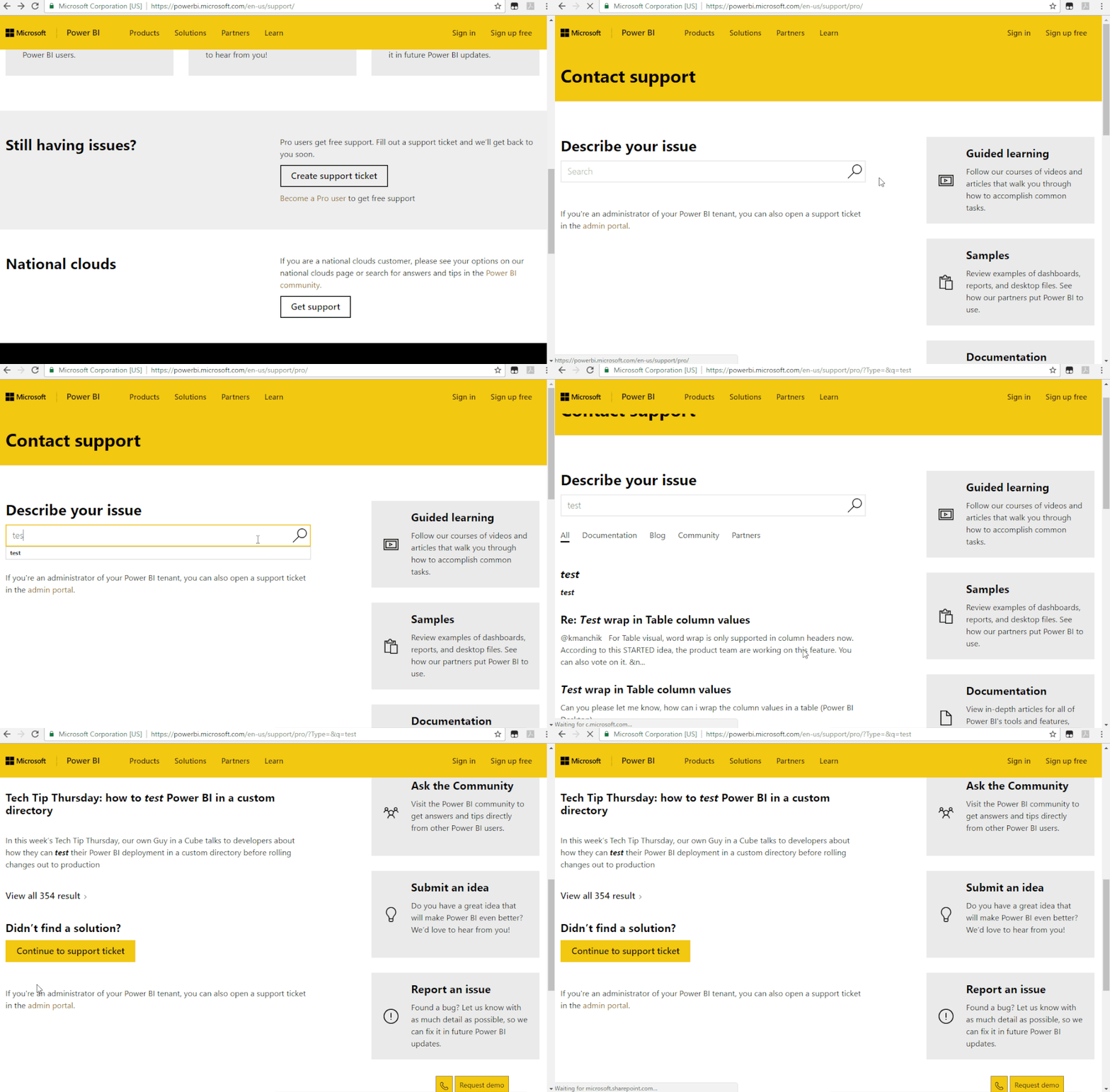
If does not help, you may submit a support ticket.https://powerbi.microsoft.com/en-us/support/
If this post helps, then please consider Accept it as the solution to help the other members find it more
quickly.

Helpful resources

New forum boards available in Real-Time Intelligence.
Ask questions in Eventhouse and KQL, Eventstream, and Reflex.


| User | Count |
|---|---|
| 93 | |
| 83 | |
| 75 | |
| 75 | |
| 66 |


| User | Count |
|---|---|
| 118 | |
| 105 | |
| 92 | |
| 64 | |
| 62 |


