Forum Discussion

Individual average divided by Team Average
I'm really new to Power BI and really need some help here.
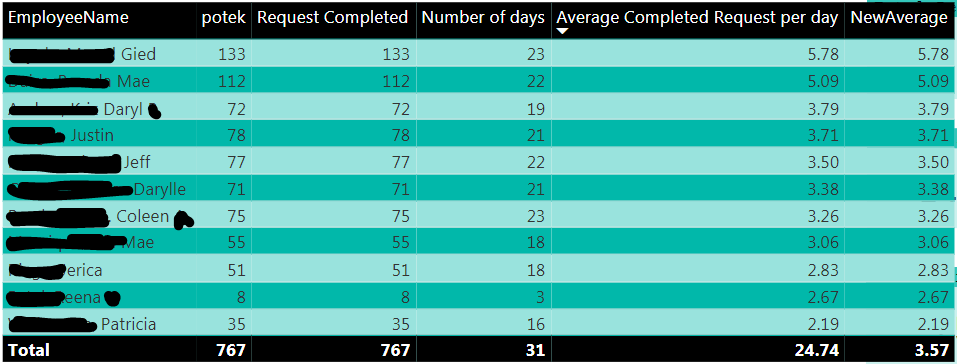
I'm just wondering if it is possible to create a calculation that gets the "Average Completed Request per day" for each employee divided by the total average as shown on the image below. For example on row 1 which Gied with 5.78 average should be divided to 3.57 (average of the whole lined in red), resulting to 162%.
If possible, below result is what I want to achieve. Really much easier computation in Excel.
Thank you so much in advance.
4 Replies
 AnonymousNot applicable
The formula you're looking for is technically "average of completed requests per day per team member", so you can take your existing formula as-is, and divide by a distinct count of team member names. That will count up the number of distinct names in each context, so for each row, you should get the same number (dividing by one), and you'll see the accurate number in the bottom.
 chesterraepinedHelper I
Anonymous
But the problem here is that the "Average Completed Request per day" is a measure and not a column. Also, I made a measure like you said
Productivity = [Average Completed Request per day] / DISTINCTCOUNT(TblNewSLATEST[EmployeeName] and it only takes the 24.74 average as the numerator divided by the DISTINCTCOUNT of the employees resulting to 2.24.
What I need is the average of the average inside the red rectangle on the first image above which must be 3.57.
I could actually get the result 3.57 something like this:
Productivity = SUM([Average Completed Request per day]) / DISTINCTCOUNT(TblNewSLATEST[EmployeeName])
But it won't work since "Average Completed Request per day" is a measure and not a column.
Thanks!
- chesterraepinedHelper I
But the problem here is that the "Average Completed Request per day" is a measure and not a column. Also, I made a measure like you said
Productivity = [Average Completed Request per day] / DISTINCTCOUNT(TblNewSLATEST[EmployeeName] and it only takes the 24.74 average as the numerator divided by the DISTINCTCOUNT of the employees resulting to 2.24.
What I need is the average of the average inside the red rectangle on the first image above which must be 3.57.
I could actually get the result 3.57 something like this:
Productivity = SUM([Average Completed Request per day]) / DISTINCTCOUNT(TblNewSLATEST[EmployeeName])
But it won't work since "Average Completed Request per day" is a measure and not a column.
Thanks!
- chesterraepinedHelper I
I am trying to create a measure that will give me an index average on each row.
Beside the "NewAverage" I need a measure named as "Productivity" that will divide each row to the column total value. By using the "NewAverage", the first row would essentially have an index average of 1.62 (5.78/3.57) the second row would have an index average of 1.42 (5.09/3.57).
Below are some reference:
Request Completed = COUNTROWS(TblNewSLATEST)
Number of days = DISTINCTCOUNT(TblNewSLATEST[Month&Day])
Average Completed Request per day = DIVIDE([Request Completed], [Number of days])
NewAverage = AVERAGEX(SUMMARIZE(TblNewSLATEST, TblNewSLATEST[EmployeeName], "toAverage", [Request Completed]), [Average Completed Request per day])